



What's new: Adobe Express Photos is now included with Acrobat Studio on Windows

TL;DR:
What: Adobe Express Photos is a screenshot-capture and image-editing tool included with Acrobat Studio at no extra cost.
Platform: Windows only.
How: Deploy a new Acrobat (26.1) Managed package via Admin Console Packager
What are the requirements to deploy Adobe Express Photos?
For organizations with an active Acrobat Studio or Acrobat Express for enterprise plan, Adobe Express Photos can be deployed in two ways:
-
Admin-managed deployment (available now): Adobe Express Photos is included in the Acrobat enterprise installer. Administrators can deploy it using the same packaging and distribution methods used for Acrobat through the Admin Console and enterprise management tools. Learn more.
Note: Administrators can deploy an Acrobat package that includes Adobe Express Photos to any Windows user in the organization, regardless of which Acrobat product each user is assigned (Studio, Express, Pro, or Standard).
-
Auto-install (coming early June): On Windows, Adobe Express Photos installs automatically as part of an Acrobat auto-update for users on Acrobat Studio and Acrobat Express, unless the administrator has opted out. Learn how you can opt out of Adobe Express Photos deployment.
How enabling Adobe Express Photos helps admins and their organization?
Most organizations have employees using free, unapproved screenshot and image editing tools, creating security exposure, fragmented workflows, and a steady stream of software requests to triage.
Adobe Express Photos consolidates those tasks into a single enterprise-grade Windows app already included with Acrobat Studio. Employees get a sanctioned tool out of the box, and you get a more secure, manageable environment.
What employees can do with Adobe Express Photos:
- Capture and annotate screenshots
- Open and view image files
- Crop, rotate, and resize images
- Apply basic edits and filters
- Remove backgrounds or objects
How do I deploy Adobe Express Photos via Admin Console?
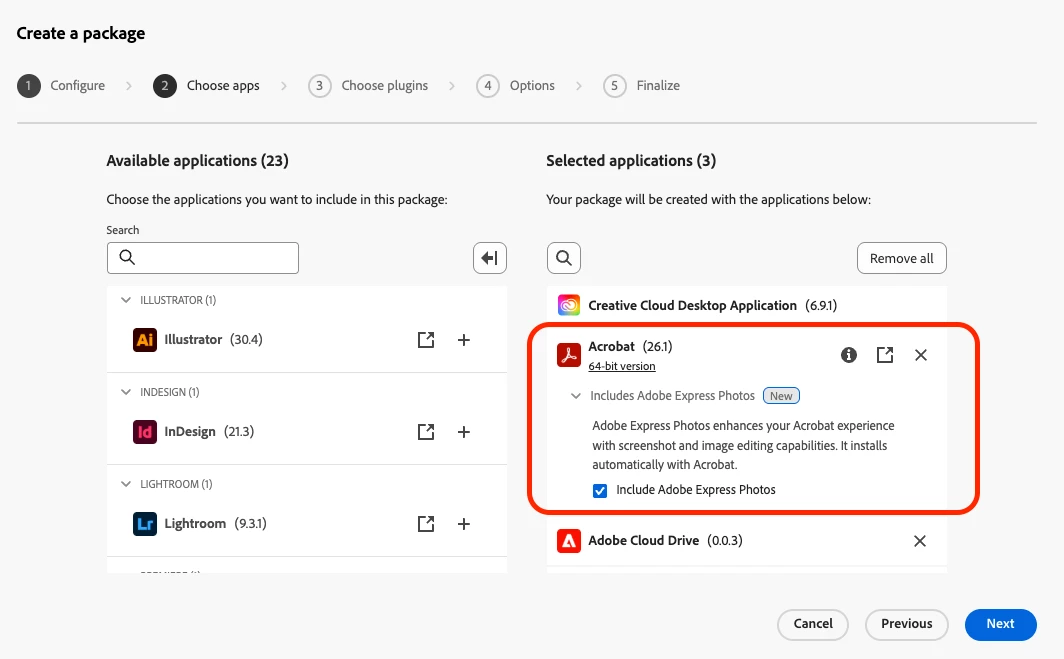
- Sign in to the Admin Console > Packages > Managed package (create a new Acrobat package).
Once the package is deployed to your Windows fleet, employees can launch the app immediately. Learn how to package apps via Admin Console
Quick tip: Adobe Express Photos installs alongside Acrobat automatically, no separate installation needed. It appears in the Start menu after deployment.
For deployment details, supported configurations, and troubleshooting, see the Adobe Express Photos FAQs for Administrators.
Deployed it already? Tell us how the rollout went. Running into issues or want to share how it’s helping? Drop it in the thread, the team is reading.
Quick Links
- Adobe Express Photos overview
- Questions? Adobe Express Photos FAQs for administrators
- Packaging Apps via Admin Console
Was this helpful? Click the Like icon below, it helps us know what's working.
More questions? Start a conversation | Catch up on all updates: ICYMI


 AdChoices