
What’s New: Shared Credits (formerly Generative Credit Pool) and Request Access for Firefly-powered Features

Shared credits (formerly Generative credit pool) provide access to organization-level Operations, enabling continued use of Firefly-powered features after users exhaust their individual monthly generative credits.
Users consume their individual credits first. Once those credits are exhausted, eligible Firefly-powered actions automatically draw from the organization’s Operations for users who are assigned access.
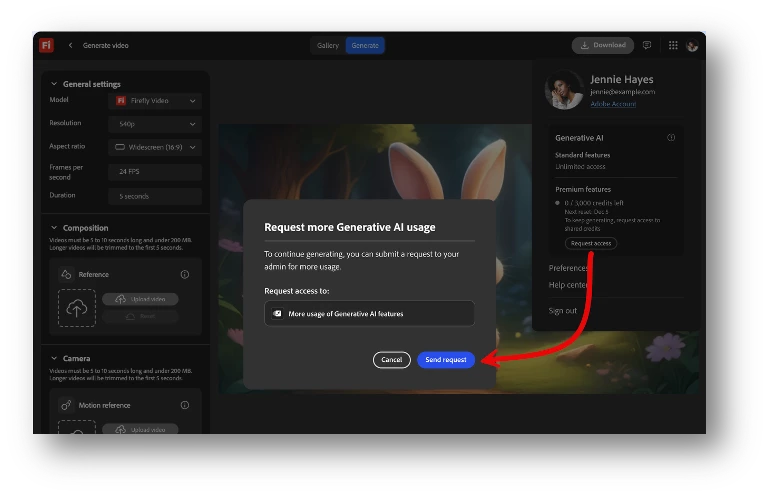
Users can now request access to shared credits once their individual credits run out. System administrators can review and approve these requests or automate access using assignment rules in the Admin Console.
Why this matters
This update helps organizations manage generative AI usage more efficiently while maintaining administrative control.
With Shared Credits, organizations can:
- Extend access to Firefly-powered features after individual credits run out
- Enable users to request additional generative credit access when needed
- Simplify management using automatic assignment rules and request workflows
- Support scalable usage of generative AI across enterprise teams
Prerequisites
This feature is available for organizations with an Enterprise Term License Agreement (ETLA) that includes Firefly Services or Firefly Creative Production and Creative Cloud for enterprise – Edition 4 or Edition 4 with Premium Stock.
Assign Users to Shared Credits
To enable Shared Credits:
-
Go to Admin Console > Products.
-
Select Firefly Services or Firefly Creative Production.
-
Create a new product profile or open an existing one.
-
Under Enable services, turn on the generative credits conversion option to enable Shared Credits.
-
Select Save.
-
Add users or user groups to this product profile so they can continue using Firefly-powered features after their individual monthly generative credits are exhausted.
-
Ensure the same set of users are also assigned to Creative Cloud for enterprise – Edition 4 or Creative Cloud for enterprise – Edition 4 with Premium Stock.
Important Notes
-
Shared Credits do not pool or redistribute individual monthly generative credits. They only provide fallback access once individual credits are exhausted.
-
Individual generative credits reset each month and are consumed before Shared Credits are used.
For a step-by-step guide, visit our documentation: Enable Shared Credits for your organization
Have feedback or encountering issues? Let us know by posting in the thread below, we’d love to hear from you!
Quick Links
- Generative credits overview
- Creative Cloud Generative AI features
- Assign users to Firefly Creative Production
If this was helpful, please click the ‘Like’ icon in the bottom left corner of this post. Your feedback helps us improve the experience. Thank you!
*For queries, feedback, and suggestions, please feel free to start a conversation.
*Please visit our ICYMI page for all the other updates & releases.


 AdChoices