mattchristensen
Community Manager
Community Manager
April 15, 2021
Question

Discuss: New Metadata & Timecode Burn-in effect

  • April 15, 2021
  • 23 replies
  • 19806 views

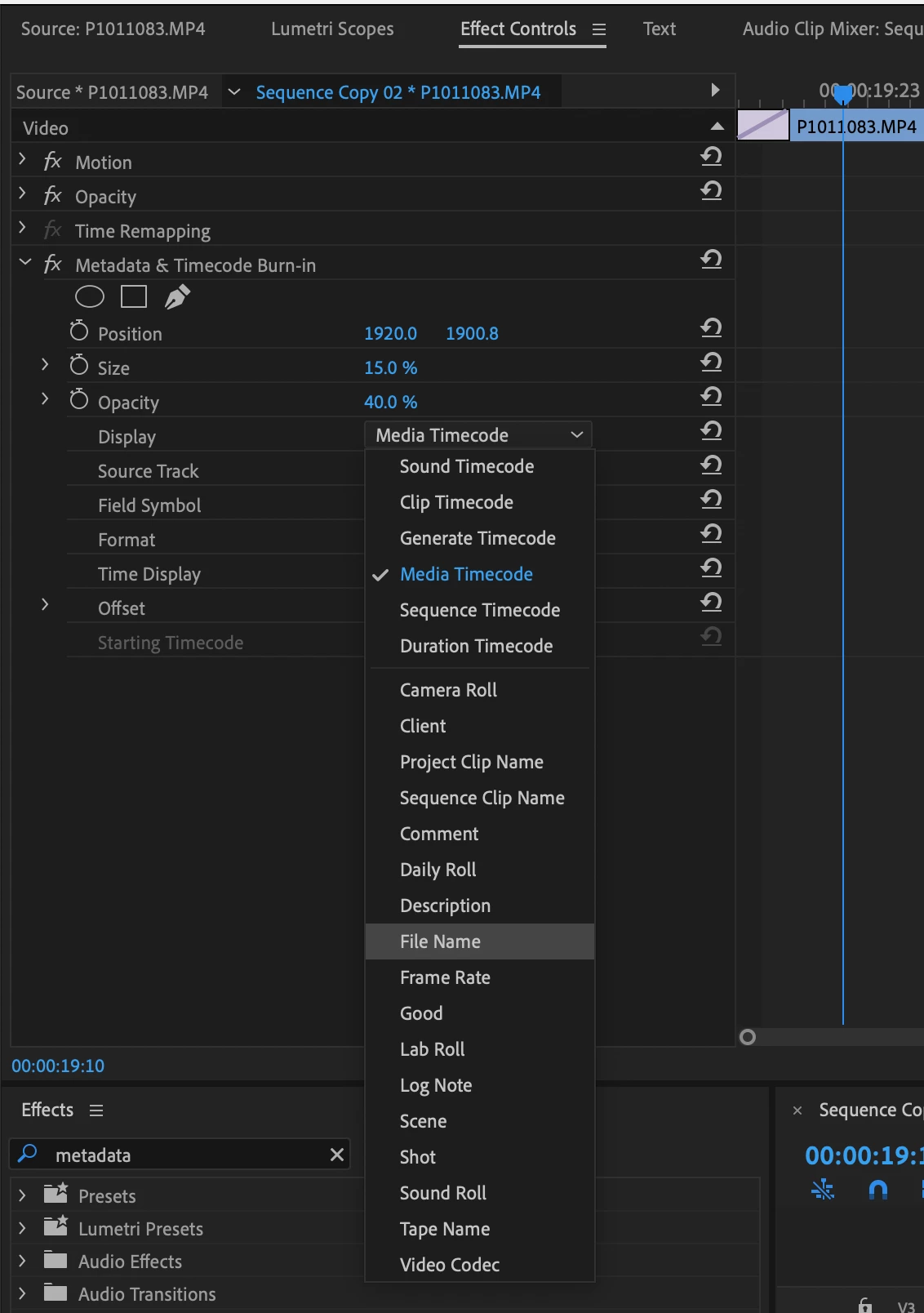
New in Premiere Pro Beta 15.2, the Metadata & Timecode Burn-in effect replaces the existing Clip Name and Timecode effects. This new effect takes advantage of our modern graphics engine and GPU acceleration for smooth playback while also offering an array of new types of metadata that you can burn into your video whether you need a simple watermark, timecode burn-in, or detailed attributes for high-end VFX workflows.


The Metadata & Timecode Burn-in effect can display 6 types of timecode and 20 types of project metadata. Apply the effect to a single clip or to an Adjustment Layer over your whole timeline. When applied to an Adjustment Layer you can set the Source Track the effect will read. Or, leave it set to Top Clip and the effect will use whichever clip is on the highest track. If you often need to display more than one type of metadata, you can apply another instance of the effect and then create an Effects Preset containing all your instances of the effect in one easy to re-use preset.


As we continue working to finish up this new effect we may make modifications that will cause existing versions of the effect to appear offline. If this happens you will need to re-apply the effect.


Note: Metadata & Timecode Burn-in effect is not yet available on Apple silicon Macs, but will be coming soon. If you use an M1 Mac and want to test this effect, you can run the Premiere Pro Beta in Rosetta mode by opening the Beta section in Creative Cloud, finding Premiere Pro, then choosing "Open (Intel)" from the ellipses (three dots) menu.


We look forward to your feedback on this new effect. Thank you!


23 replies

alphabetikal
Participating Frequently
April 22, 2022

Thanks for this effect, its professional and really needed for sound turn overs and so on.


Can the effect only function on clips and transparent video layers? It doesnt seem to work on adjustment layers - why is that? For example when you need to burn in the TC from an audio track for a sound turn over, you would need to use a transparent video layer to do this, correct? If you wanted to only have one instance of the effect over the whole sequence, and not have to past it on to multiple clips.


Ben | Helmut4
Participant
April 22, 2022

Hi,

a very intersting addition to Premiere Pro!


Would it be possible to open the metadata effect also for project metadata (via a drop down menu or freetype field)?

If one is using custom asset metadata those can't be shown for the time being.


Best,

Ben | Helmut4 engineer


alphabetikal
Participating Frequently
April 22, 2022

Thanks for this effect, its professional and really needed for sound turn overs and so on.


Can the effect only function on clips and transparent video layers? It doesnt seem to work on adjustment layers - why is that? For example when you need to burn in the TC from an audio track for a sound turn over, you would need to use a transparent video layer to do this, correct? If you wanted to only have one instance of the effect over the whole sequence, and not have to past it on to multiple clips.


Thanks

Participant
March 25, 2022

I can't tell if this is a bug or it's not intended to be used this way, but whenever I use sequence clip name I still only get the name of the video clip the effect is on. I thought that it would show you the name of the sequence.


If it's not intended to be used that way, could there be an option for this? It would be very handy so that when I update the version number of the sequence that burn in will automatically update with it. 

Inspiring
December 1, 2021

When will it be available on M1 macs? 

mattchristensen
Community Manager
Community Manager
December 1, 2021

@Hardi5CAE The new Metadata & Timecode Burn-in effect is working great on M1 Macs. You can try it on by downloading the latest Premiere Pro (Beta). 

Inspiring
December 1, 2021

Yes it works on intel Beta, but I'm not moving my whole project to a beta software just for one plugin.

I downloaded the beta and used it and it is great and all, but I would like to be abel to do everything in a full functioning app. 🙂

Inspiring
September 27, 2021

Great new feature!

I'd like an option in the list for Date and Time, showing when the clip was shot.

In nearly every video I make, I need to know what time it was when it the clip was shot. I believe some cameras record special metadata for this, while others like GoPro just have the creation date. Being able to display this onscreen via a plug-in would be a tremendous benefit. Today I have to use a different NLE in order to retrieve this info from my timeline clips.

Participant
September 16, 2021

This is a great addition to workflow. I'll echo need for source audio timecode - helpful when edits are split.

There is currently a "sound timecode" option, but it appears to pull timecode from video time rather than audio.

Screenshot attached - b-roll over sync in sequence, "sound timecode" is pulling information from b-roll timecode rather than sync in sequence.

Forgive poor terminology.

Participant
September 11, 2021

Very useful effect to have.  I agree with comments about adding audio timecode as an option.

It would be great to able able to add any arbitrary bin column, as is possible in Avid, rather than only having a limited subset.

Known Participant
September 1, 2021

I''m on an iMac.

You have to have a video track to add it to. I solved this problem by adding a new video track at the top of my timeline and adding a "transparent video." I then applied the obsolete effect to that.


Only being able to apply a timecode upon export does not help us when we are commmuniciating with other edotrs, sound editors, composers, and colorists when the project is picture locked.

R Neil Haugen
Legend
September 1, 2021

Yea, right?


I'm on the MixingLight Slack channels with all the colorists over there multiple times a day. Timecode issues are a very common topic. How to fix one frame-off between X app and Y app on the same clip ... what about this one all of a sudden changed the start to 00:01:00:00 from 00:00:10:00 ... and all other nightmares that make getting the job done a pain.


Hoping they get the new TC/BI effect fixed and in 'shipping' right soon.


Neil

Everyone's mileage always varies ...
Participant
August 4, 2021

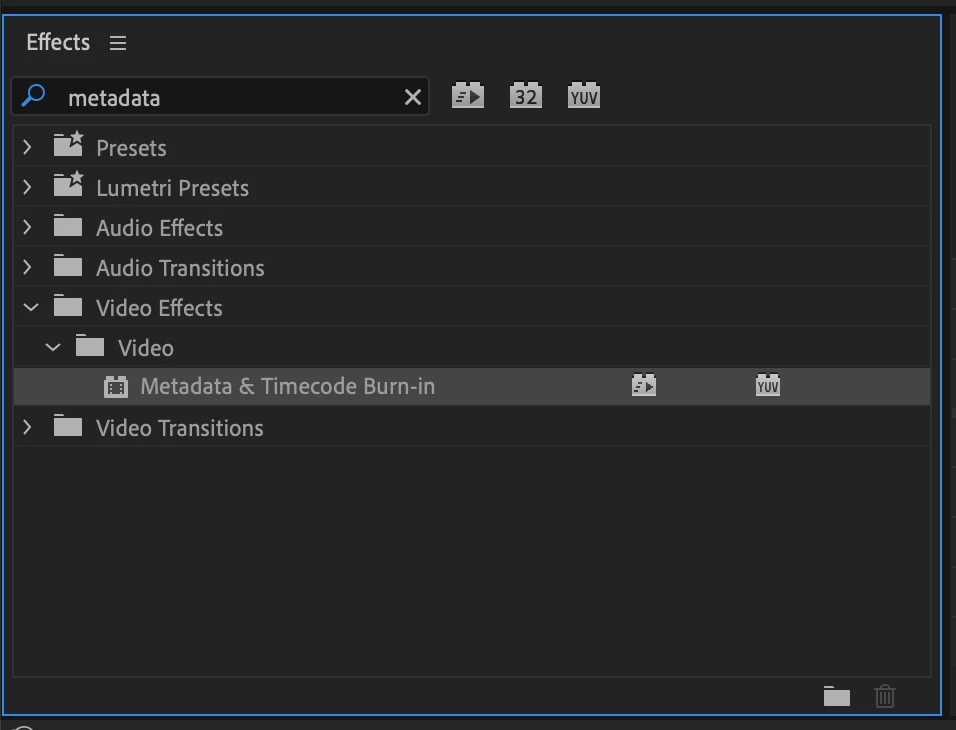
I'm looking for the new Metadata & Timecode effect, but under "Utility" I have two (2) "Cineon Converter". One of which does nothing when applied to a clip. 


R Neil Haugen
Legend
August 4, 2021

If you look at Matt's image, that is in the Video effects.


Neil

Everyone's mileage always varies ...
Participant
August 4, 2021

This is in the "Video Effects" folder. I did a reinstall of latest, and I still have 2 "Cineon Converter" and no "Metadata & Timecode"

Participant
June 2, 2021

Hi Matt,


Thanks for this explanation. I upgraded a few days ago and going to my effects panel and opening

the video folder I only have SDR Conform and Simple Text. I do not have the metadata and Burn it

effect. What do you suggest?


Thanks,

Rose

Known Participant
July 21, 2021

Same here. I just installed 15.4 on macOS 10.14.6, and the Metadata & Timecode Burn-in effect is not available.

R Neil Haugen
Legend
July 21, 2021

That is still only available in the public beta, build 30. For some reason they didn't include it in the shipping version.


Neil

Everyone's mileage always varies ...