
Community Manager
April 1, 2020
Answered

Discuss : Nvidia Hardware Accelerated Encode for H264/HEVC

  • April 1, 2020
  • 23 replies
  • 31222 views

With the latest Adobe Premiere Pro Beta build we have enabled Hardware Accelerated Encoding through Nvidia GPU card.


If you have Nvidia GPU card on your Windows machine, you will be able to use this feature.


To enable this option, select H.264/HEVC from the Format drop-down under Export Settings. Then under the Video tab, go to Encoding Settings and set the Performance to Hardware Encoding. Setting it to Software Encoding will disable hardware encoding and Adobe Premiere Pro won't use Nvidia HW to encode the media. Please see attached screenshot.

Feature is enabled in Adobe Premiere Pro Beta , Adobe Media Encoder Beta and Adobe Premiere Rush.


Please try out the feature and share your feedback.
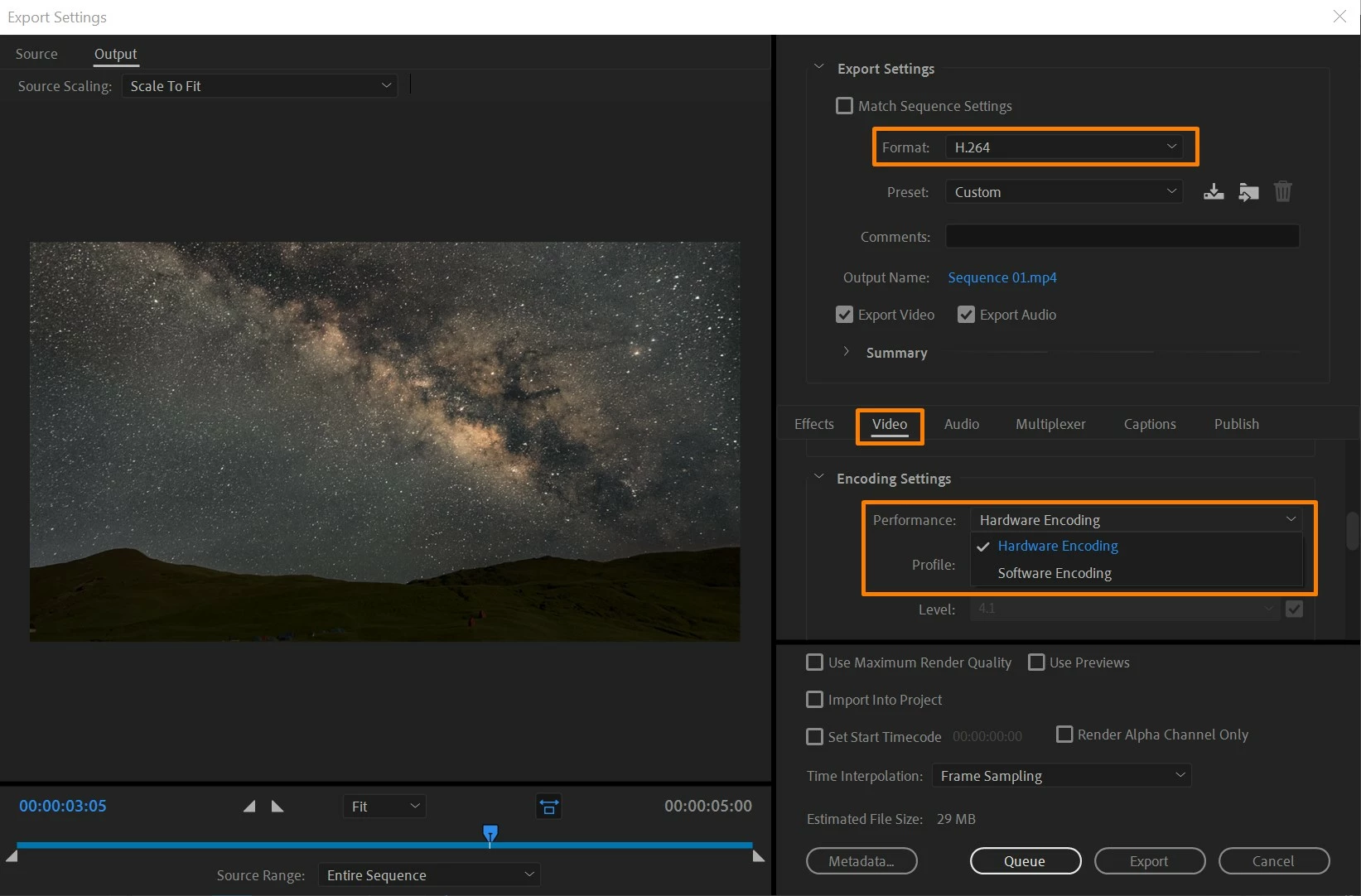
 

[Image embedded by mod]


This topic has been closed for replies.
Correct answer brajesh_kumar

Hi Everyone,

Nvidia Encode support is now available in the released (non-Beta) versions of:
- Media Encoder 14.2
- Premiere Pro 14.2
- Premiere Rush 1.5.12


Thank you to all for your feedback during the Feature Development. 


Thanks

Brajesh

23 replies

BrajeshCommunity ManagerAuthor
Community Manager
September 11, 2020

We have enabled Nvidia decode in latest Premiere beta build. Please refer to https://community.adobe.com/t5/premiere-pro-beta/discuss-nvidia-gpu-decode-for-h264-amp-hevc/td-p/11415455?page=1 for details. Looking forward to get your feedback.

Known Participant
September 12, 2020

That is a really great news! I see that scrubbing performance in Premiere BETA 14.5.0 is a bit less responsive than in Windows Movies & TV app, so I think there is a slight room for impovement, but overall I am very happy that this feature will finally be native in Premiere Pro. Been waiting this for years! Thank you!

Known Participant
July 23, 2020

Not sure if this is where I post this. Please redirect if needed. I have downloaded the Premiere Beta, mainly for the hardware accellaration. I have a Windows 10 machine, i7-6800K CPU, 64Gb ram, and am running two Titans (that I have just updated to latest drivers. I can select Hardware accelaration but get the message 'Your system's hardware does not support hardware accdelaration for teh curring settings. I am choosing H.264, and any of the presets. With HEVC, I don't even get teh option for Hardware Accleatrated... Plese help 🙂

Participating Frequently
June 23, 2020

Same thing when you use MXF files from Canon XF 705


CinegyDev
Participating Frequently
June 23, 2020
The audio issues for Canon and Sony are fixed. A new version will be issued shortly.

__________
Participant
June 5, 2020

Hi there!

I've been using Premiere Pro BETA 14.2 (now 14.3.x) for some time now. I've recently bought a RTX 2070 SUPER graphics card to utilize NVENC. At first it worked OK - the encoding speed was amazing but I'm getting no or close to none hardware acceleration when encoding my videos:


My hardware setup is:

- i9-9900k / AORUS Z390 PRO WIFI mainboard

- 32GB RAM

- Gigabyte RTX 2070 Super

- Windows 10 Preview  - version 10.0.19640

- NVIDIA Drivers - 450.82

- Premiere Pro 14.3.1


What drivers setup do I have to have in order for hardware acceleration to work? This one seems to be slacking....


Cheers!


Tomasz


DAVIDE PEPE
Known Participant
June 6, 2020

Hi Tomasz,

does it happens with any project?

Just for instance if you are using any effect on the clip you are exporting that is not GPU accelerated you loose the Cuda acceleration at all.

Have a nice day,

Davide


johnpooley3
Inspiring
May 23, 2020

Is anyone else having trouble getting Media Encoder 14.2 to export with Hardware acceleration when Premiere 14.2 will let you? M4000 on latest Studio Driver, also tried 431.70

brajesh_kumar
brajesh_kumarCorrect answer
Participant
May 19, 2020

Hi Everyone,

Nvidia Encode support is now available in the released (non-Beta) versions of:
- Media Encoder 14.2
- Premiere Pro 14.2
- Premiere Rush 1.5.12


Thank you to all for your feedback during the Feature Development. 


Thanks

Brajesh

Participant
May 21, 2020

Не дает при кодировании выбрать н264. Программа зависает. Другие форматы кодирует.

Manisoft
Known Participant
May 15, 2020

hi

my performance is grey.

vga : gtx980ti

cpu : intel 7700k

driver version : 445.87

premiere pro : 14.1

intel vga is disable.

how can do activate?

thanks

If we do only what we know, we will never progress
Participant
May 14, 2020

The hardware encoding works great and is something everyone's been waiting on for a long time, one minor thing about it though.
When using dynamic link, any frame effected by it will render very slowly with very low cpu and gpu usage. I'm not sure if this is a glitch.

Beta software installed:
Premiere Pro beta
Media Encoder beta

After Effects beta

Hardware:
Nvidia 2080 Super
AMD 3950x
64GB RAM

Participating Frequently
May 13, 2020

Can anyone confirm that this still will not work with h264 2 Pass VBR?

johnpooley3
Inspiring
May 14, 2020

Correct


Adobe is using Nvidia’s NVENC framework


Edit: as I look more into it, NVENC does actually have a 2 pass option (hidden under Maximum quality) in addition to the Rate Distortion Optimization option which is similar. It would be nice to see Adobe open up some more of these options. 

Known Participant
April 29, 2020

Performance card is blurred. Please help me to open it

BrajeshCommunity ManagerAuthor
Community Manager
April 29, 2020

If HW encode is not supported, it will default to SW encode and remain disabled. Please share GPU card that you have on this machine.

Known Participant
April 29, 2020

I have shared as shown. You have specific instructions, share yourself a little