



Francis-Crossman17221443
Community Manager
Community Manager
August 12, 2022
Question

DISCUSS: Project templates in import mode

  • August 12, 2022
  • 14 replies
  • 7293 views

You can now start a new project based on a template project in import mode.  It’s common to repeat your same workflow from project to project and pros have learned that  creating a project template speeds things up when getting started and gives you a head start on organization.
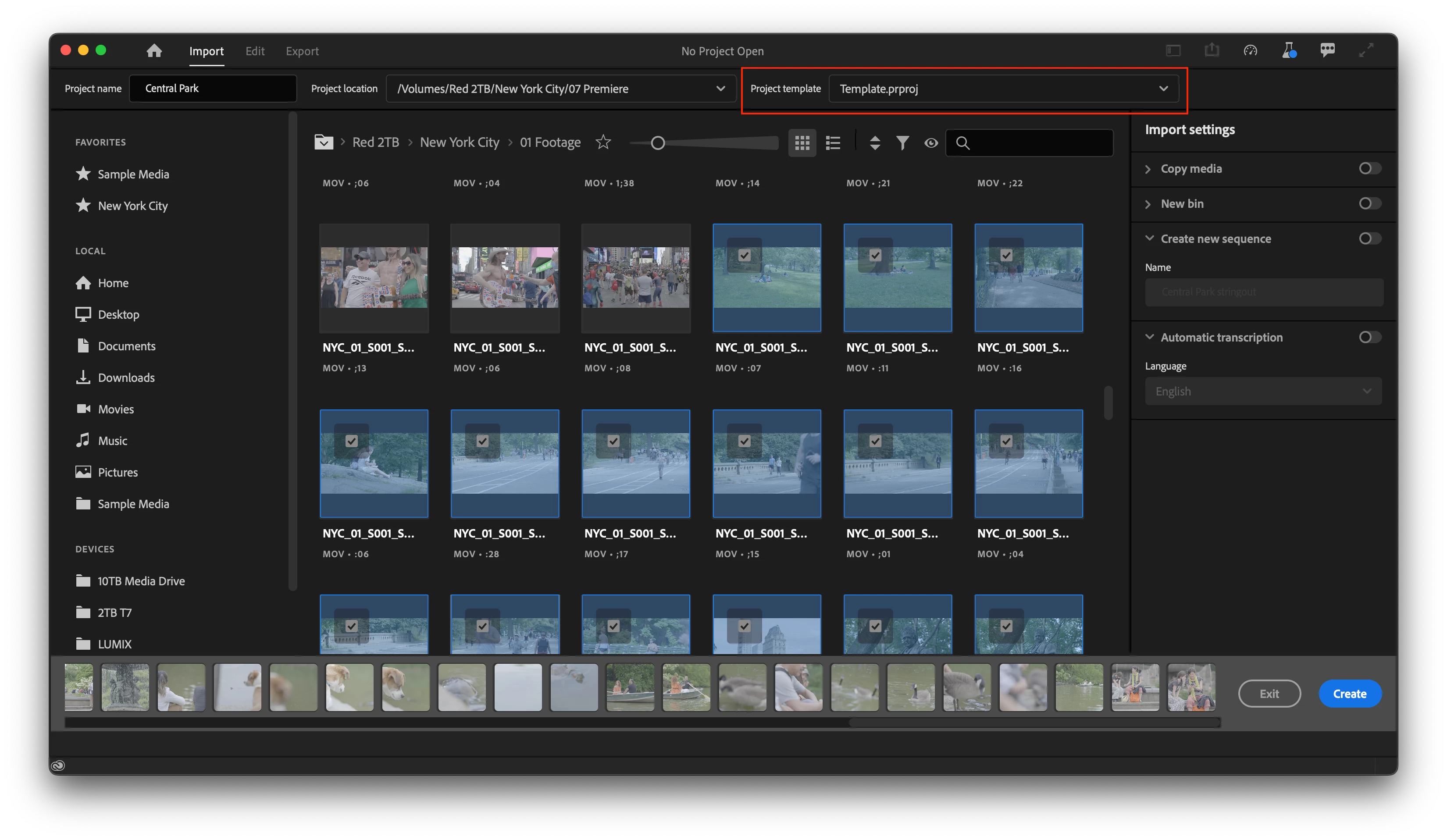
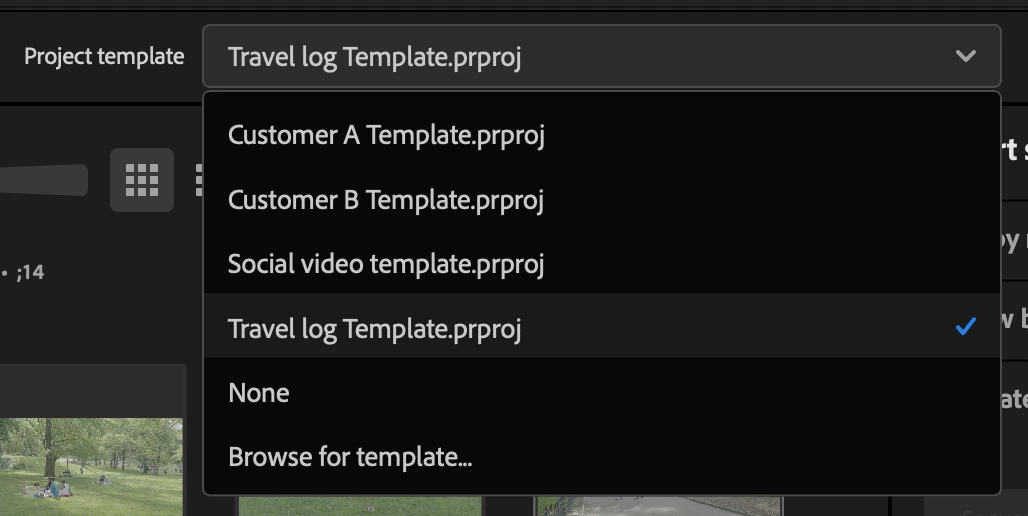
 

Any project file can be used as a template.  The entire project structure will be copied into your new project including all bins, sequences, and media.   Copying the media is handy if you have media that gets reused a lot like intros, graphics, or bumpers.  Essentially, we are creating a duplicate of the project with the new name and location.  Any media that you select during import mode will also be added to the new project, but of course you don’t have to import anything at first.


Here's how it works:

  1. Enter import mode by choosing “New project” from the home screen or File > New project.
  2. Give your project a name and location
  3. Browse for a template from the “Project template” dropdown
    - the last 5 projects will be remembered.
  4. Optional – chose some media
  5. Click “Create” in the lower right of the Import mode window


We intend to add the following features.

They’re not quite there yet, but we’re working on it so keep an eye out

  • Include a few project templates for different types of projects.
  • Create a folder location on disk where you can add project templates. This way any projects you put in this location will show up in the menu in import mode.


A few question we have for the beta community:

  1. What bin structure do you use in your projects?
  2. Do you have common sequence settings you use again and again.
  3. If you have template projects you use and would be willing to share with us, please DM me!


We want to know what you think.  Please join the conversation below.

This topic has been closed for replies.

14 replies

Tom Layson
Known Participant
October 8, 2023

I consider templating part of my secret sauce. It is vital for consitency in terms of how a show looks, and it makes cutting new shows extremely easy. I template everthing - with the template having pre-imported all the base assets for every show, all the graphics, and a rough-out of the timeline. Once I have assets in the project folder, I do one sync with Watchtower - and they're all watch folders from then on as I build. I also have a template for a project folder - which is also copied each time. It includes empty ingest sheets, spots for various types of outputs, and a standard bin system. Each template is copied and renamed with the show number and the slug - and then once I'm working in the timeline, it's basically a game of knockout - where I can quickly define and delete elements I don't need - or make th something from the pre-imported assets. I also have templated sedquences  - broadcast for instance requires me to output six channels of audio - so I make a subsequence of the show, or the promos or whatever - and drop them into the new six channel sequence etc. That sequence is where I do captions and final legalizing on audio etc. I've been using Premier this way for years - and I would have failed without developing this sytem. This gets pretty deep, but it's the way to go. I actually teach this. Below is the template's timeline without a show's project folder imported. Below that is my project folder system over on one of my aux drives. 

robmulally
Known Participant
September 17, 2023

- The Relatively "New Project" window really counter intuative and a pain, I very much dislike using it.

- Prem not having any ability to modify media on disk while most of the time works well means you needa  robust "pre" premier tool and Bridge is not it.

- Tools like "Poste Haste" and "KYNO" allow for rapid creation of proejct templates (inc copy of files) but KYNO allows for Sub Sequence, Trim, Keyword , Rename and Sub Sequence, that then can be used between projects.

- The only reasion you need a project template is if you have bad file management to start with. 


I love the idea of a project tempalte buy why wouldn't you just keep a copy of the .proj files and use post haste to generate the project from a copy.

If you really want to blow peoples minds, allow the ability for preimer to "hard link" to external files (toggle for those who want

Using project manager now to sync out a copy just dumps all the files intoa  root folder, the whole thing is just terrible


If you are planning on doing templates just to try and compete with other projects you should go above and beyond, look at poste haste, look at KYNO and think about how you can help editors work with their digial library or DAM .


While i love the idea of this feature it just looks like a copy paste of an old project file is doing the same think the issue is relative file paths and all that fun stuff. 


If you really want to do this properly it needs to look a bit wider than making the new project screen more painful than it is now. 

I try to avoid it at all costs I wish i could go back to the old screen.


Rob


robmulally
Known Participant
September 17, 2023

Looks like you can't edit posts so let me summarise:

- The New Projects screen currently is from what i've seen skipped by most people and gets in the way of what used to take a few seconds.

- The feature you suggested can be done by simply copying a previous project file.

- The fact that project files contain structure that is disconnected from the file system is great but also painful for re-use and keeping files tidy.


- This means that "PRE" premier workflow is required, Hence KYNO or POST HASTE etc.

- The built project manager could be great for generating templates but using this dumps files into a root directory and ignores BINS in the project.

- I would suggest a more holistic view rather than just hacking on something that is making a whats already overly complicated screen way more complicated.


The fact that I need two other pieces of softare and don't use bridge , and that most people I know skip the new project screen or are moving to other editing software should give you a few clues on where to focus. 


Hope its useful lmk if you want more info.


Amitzi Photography
Known Participant
September 17, 2023
There could definitely be a redesign there.
There are things I totally do on EVERY project. I create a folder for it
with a certain name, copy all the files to it and create a project with the
same name as the top folder and import all the footage under it, audio, gfx
files, etc.
Then I create a sequence bin with a sequence that's the same as the project
name but is numbered. Every time I finish an edit, I increment that number.
A 100 version of Premiere Pro later and it still adds "Copy" and a number
if you duplicate a sequence.
Perhaps someone should look at what editors actually do and need and create
something that makes sense to working editors.
Community Expert
September 16, 2023

I'd like to see something that mirrors how project templates work in After Effects.

Changing AEP to AET tells After Effects to open the After Effects template project as a new, untitled project.  If an edit needs to be made to the template project (AET), we change the extention back to AEP, then open, edit, save, and then change the extension back to AET.

So, a PROPROJ file and PROPROT file that work in the same manner (if possible) would be helpful.

Neckebba
Inspiring
September 13, 2023

1: depeniding on template we have a bin structure : 01 OUTPUT , 02 EDITING, 03 RUSHES, 04 AUDIO 05 graphics 07 RANDOM ... and now even extra bin for the caption master template style)

2:  yes depending on the edit and the need in the template is stored another sequence : and audio rooting (like news or Post production)

3: if you want i can send you some templates

Participant
August 7, 2023

This has gone away for me, any fixes?

Participant
August 10, 2023

Same, its my favourite new feature

Participant
July 12, 2023

One use case is to preload the audio track mixer with plugins set to always good enough parameters if the editor respects the naming convention of the tracks. Mainly compressors and EQ for voice over background sound and music and a global compressor. Could also be done if preloading that was possible at the sequence settings step.

Participant
June 28, 2023

Folder structure:

1. Media

a. Video

b. Audio

c. Images & animations

d. Others


2. Sequences

- FHD preset

- UHD preset

- 9:16 preset

- 4:5 preset


jasondecker
Known Participant
March 31, 2023

This is a great first step, but I definitely want to add my voice to the requests to get this implemented for Productions and to get this reflected in folder structure as per the Post Haste note above. Project organization is not isolated to the prproj file. It's a multi-faceted concept that needs to perpetuate throughout the post-production environment in order for it to be truly useful.

Det Scholz
Known Participant
March 22, 2023
  1. I prepare my template-projects with several bins for Footage, Grafic, Music and Sequence etc.
  2. I also use the sequences with prenamed audio-tracks and audio routing.

What will be very helpfull when you can name your sequences with the project-name:

I use different sequences in the project, here a sport-production example:

  • yymmdd-TeamA-TeamB-PGM
  • yymmdd-TeamA-TeamB-CLF
  • yymmdd-TeamA-TeamB-Online
  • yymmdd-TeamA-TeamB-Online-CLF

So, if you name the project 230322-ABC-DEF und you can place a placeholder eg "$project$" in your sequence-name that will replace the project-name in the sequence it will be a time-saver.

Also helpful: find & replace for sequence-names

Legend
September 19, 2022

Are you planning to have a similar function for productions?


Also the Avid 'favourite bins' feature is very useful. If I mark a bin (ie a project in Adobe productions) as a 'favourite' then it appears in any project (ie a production in Adobe) I open.


Thus my SFX, VFX etc bins appear in every project + are updated as I make changes/additions to them. They are left in the original location (Google Drive for me). 

david.parke
Inspiring
February 7, 2023

what I wouldnt give for some favorite projects... and the ability to search across an entire production

-- Current system (March 2025): Mac Studio 2023 Apple M2 Ultra 192 GB RAM macOS 15.3.2 (24D81) | Premiere Pro 25.1.0 (build 73)
R Neil Haugen
Legend
February 7, 2023

Searching the whole production is so needed. Crikey, in my little shop, running all my projects through my annual Production, I can have troubles finding something.


How do you do that in long form or doco work with a few thousand assets?

Everyone's mileage always varies ...