



mattchristensen
Community Manager
Community Manager
August 22, 2025
Question

Now in Beta: Cleaner, More Organized Menus Across Premiere Pro

  • August 22, 2025
  • 36 replies
  • 6709 views

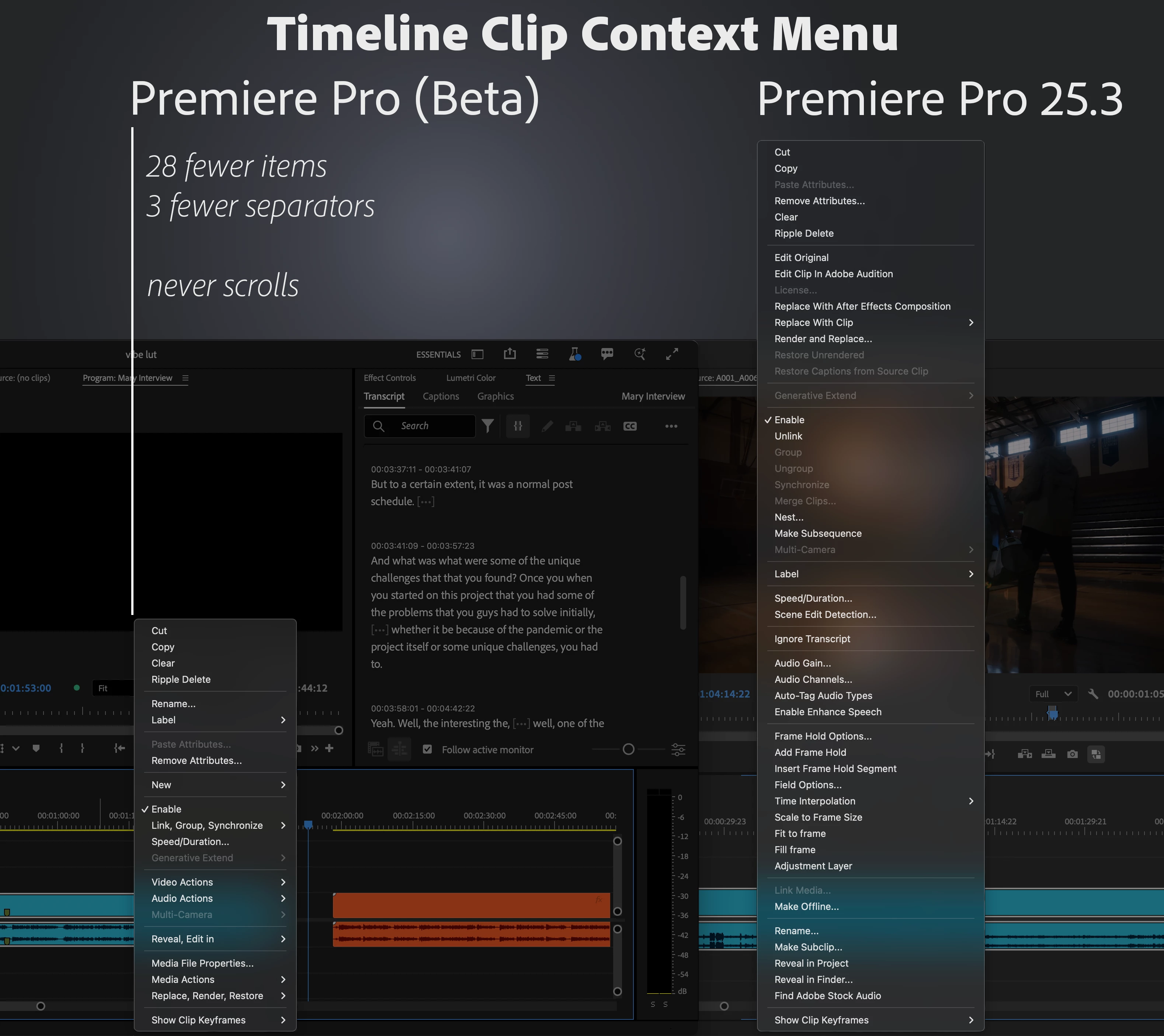
We’ve taken a fresh look at the application, panel, and context menus across Premiere Pro and developed a new organizational system to bring editors all the same functionality in a more concise and discoverable way. Even on a 13-inch laptop, you’ll never have to scroll a menu to get your work done.


Our approach to organizing the menus:

  1. Aggressively organize into submenus. Commands stay in the same menu as before, but the submenus mean the menu stays short and readable.
  2. Give useful names to the new submenus. Editors new to Premiere Pro can more quickly learn what the menu items do.
  3. Be consistent when similar items appear in different menus. Whether in the Project or Timeline panel, common items like “Label” or “Media File Properties” appear in the same parts of menus.


Across the application, menus that were updated average a 40% reduction in height, with some menus shrinking by half.


This is a big change to the feel of using Premiere Pro, and while we took time and care with these new menus, some parts may still need more work. Try them out while they’re in beta [version 25.6 build 39 or later] and let us know how they are working for you. Thank you!
 

36 replies

Inspiring
August 25, 2025

I'm going to have to agree with most here, burying things in submenus isn't the answer, it just slows everything down

Ann Bens
Community Expert
Community Expert
August 24, 2025

It looks nice and clean but as a mouse person it slows me down.

I dont use ini mini tiny laptops. My 4K screen is big enough dont have to scroll.

I regularly turn on/off video/audio view options and use Nest/make new subsequence.


Adobe is not making my workflow any easier or faster.

Already took away the colored FX badges.


As for the wrench, pop up:

left click > navigate to the desired option> have to wait for the sub menu to pop up 

Reveal in project/explorer buried in a submenu very inconvenient.


BrianLevin
Known Participant
August 22, 2025

I would get used to it the way that I did when After Effects made similar changes, but I still, even to this day, keep finding myself wondering where Reveal in Project went in the After Effects menu, even though there is a Reveal submenu.


I am a professional editor on a 1440p monitor, I don't really need this to be done for my sake, but I get it for people working on a laptop. Whenever I do coaching for new editors, inevitably when they join the Zoom call they are on a teeny tiny laptop screen and my first piece of advice is to get a big monitor. This is professional software and it requires a bare minimum of professional tools to make it work.


Personally I'm indifferent to this change as most anything I need in the menus I have mapped to shortcut keys and I'm rarely, if ever, using the right click menu. With that in mind, while I appreciate the thought for users with smaller screens, I don't love that a change like this will throw off more users than the ones it solves problems for. Frankly I'd rather more energy be spent teaching editors how to work with the keyboard shortcuts menu.

BrianLevin
Known Participant
August 27, 2025

Seeing comments below I want to second that Excalibur solves the problems this bad redesign aims to tackle. The context quick call menu exists natively in Cinema4D, it now exists in Resolve, and it should be the thing you build instead of moving menu items around to solve a problem that most professional editors do not have.


Following up on what I said about monitor size and keyboard shortcuts in professional use, it's also likely that professional editors will want to use a tool like Excalibur in their workflows more than they will want to have menu items rearranged on them.


I know this change caters to editors with small screens, but giving them a context menu tool WILL solve their small screen problem. Even better if you can make it such that you involve Ivan and Excalibur here, what he's done for this program is beyond anything I've seen third party developers do to truly help the community. He's amazing and his tool is amazing.

Shebbe
Community Expert
Community Expert
August 22, 2025

I don't like it. Cleaning up is good but this feels like a fix to aid people working on a 720p or heavily scaled hiDPI display, similar to how it's presented in the example screenshot. If you're a professional editor working in a suite your realestate is much larger so there's less to no need to compress a menu. Sub-menus increase the amount of time a function is found and clicked.


Maybe if there's a way this compacting of the menu can be dynamic where a 1440p and up display can keep showing the big menu or something. Or maybe the solution @Amitzi Photography suggests having it configurable. All the features I happen to use the menu for rather than keyboard shortcuts are in sub menus now...

Amitzi Photography
Known Participant
August 22, 2025

Interesting idea, but some changes to the UI don't consider different use cases. I would allow for two types of menus, configurable in settings, instead of changing this for all users.

Participant
September 9, 2025

Estoy de acuerdo.

mschocker7
Participant
August 22, 2025

I like it. I always think it's annoying to have to scroll all the way down for Fit To Fill.