




Now in Beta: Effects panel visual previews
The Effects panel just got a major glow-up! Animated previews give you a sense of what an effect does, and advanced search makes it more likely you'll find what you're looking for. It's visual, it's fun, and it just might help you find something creative that's been hiding in plain sight.
Say hello to the New Effects Panel — a reimagined Effects panel that shows you what an effect actually does before you commit to it.
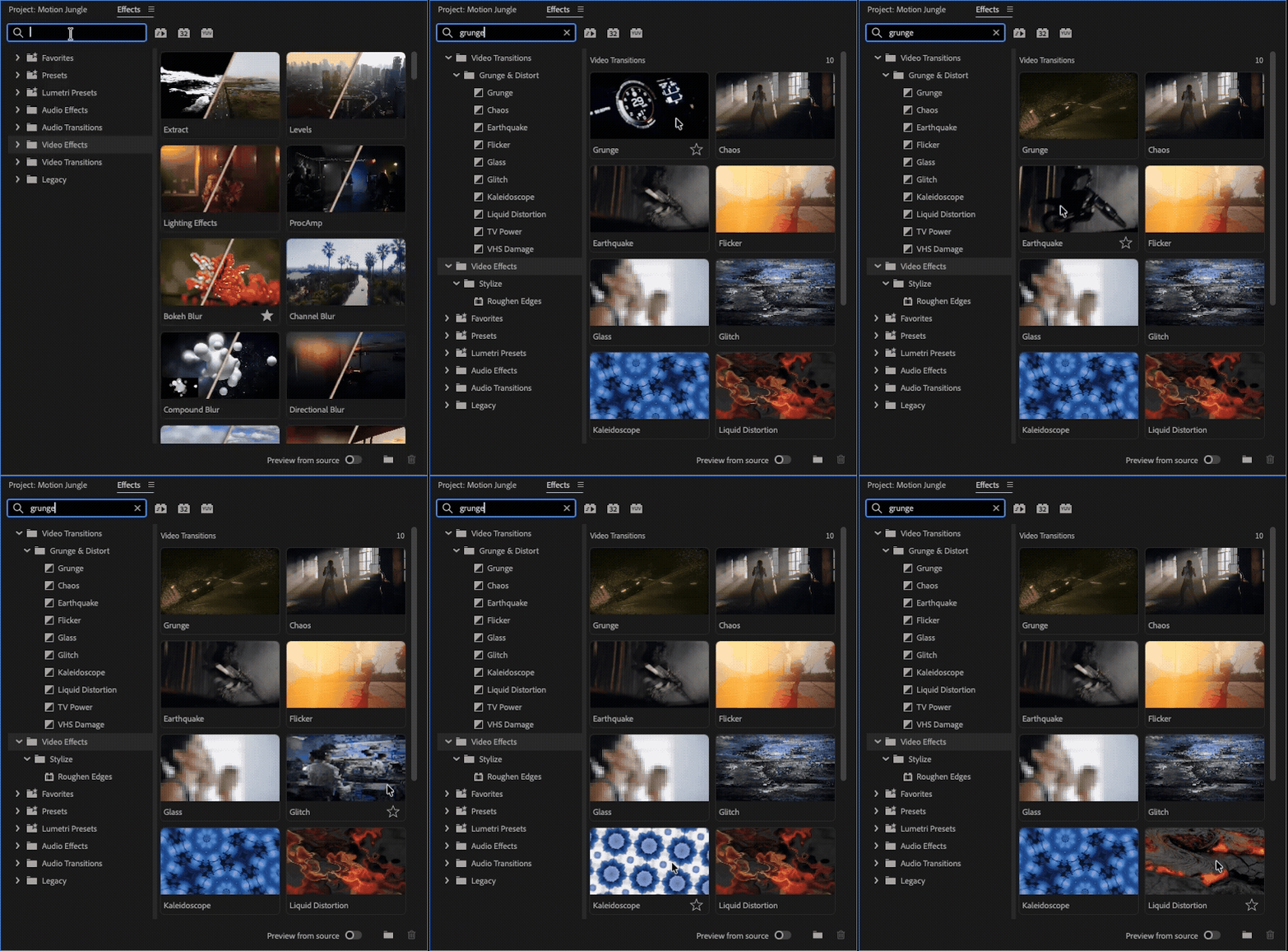
What's New
- Animated preview thumbnails. Hover over an effect or transition and you'll see a short animated preview of it in action, so you know what you're getting before you drag it onto a clip.
- Preview from Source. Want to know what an effect will look like on your footage, not a generic clip? Preview from Source is an option that shows the effect applied to whatever's under your playhead in the Program Monitor. Scrubbing stays smooth — previews update once you let go of the playhead, not while you're dragging through it.
- Smarter search. We overhauled search with keyword matching, so searching "color" surfaces obvious hits like Lumetri Color, but also less obvious ones like Brightness & Contrast or Vignette. We thoughtfully tagged each effect with terms editors (and non-editors) actually use so you don't need to know exact Adobe-specific term to find what you're looking for. “Green screen” will yield “Ultra Key” for example.
- Fuzzy search. Typo'd "Gassain" instead of "Gaussian"? We'll still find it. Search now tolerates small misspellings, giving you a greater chance of finding what you are looking for.
- Browsable by category. Click a folder in the effects tree — Blur & Sharpen, Color Correction, whatever — and the browser shows previews for everything inside it. You can still search the folder tree if that’s the way you prefer to work.
- Favorites, unchanged. Starring an effect still adds it to your Favorites bin, just like before. We haven't taken anything away — only added the visual layer on top.
This effort is closely tied to the Film Impact acquisition — a lot of the visual inspiration comes straight from the Film Impact Dashboard, which many of you have used through Window > Extensions. As the Visual Effects Browser rolls out, we will retire the Film Impact Dashboard, since its functionality is now built natively into the Effects panel you already use every day. All effects are in one place, including Film Impact which no longer have any Film Impact branding.
But wait, there’s more
The Effects panel and the Properties panel are besties! Now that you can edit effect parameters in the Properties panel, the experience of adding and manipulating effects feels way more modern. Try them both out together! Learn more about the properties panel here: Now in Beta: Effects in Properties Panel
Things to look out for
- Preview thumbnails are only for Video Effects and transitions. Audio effects and transitions don't have visual previews yet. We're investigating visual previews for these down the line.
- Preview from Source currently only works for video effects. Video transitions and audio do not support preview from source.
- 3rd party plugins will not have previews or keywords, but we will publish a plugin SDK update so they can add them in later releases if they choose.
We Want Your Feedback
Please install the beta, open a project, and take the new Effects panel for a spin. We'd especially love to hear about:
- Whether the animated previews actually help you pick the right effect faster
- How Preview from Source feels in a real project — timing, accuracy, performance
- Search: are you finding effects you expect with natural-language or misspelled queries?
- Anything that feels like it's missing compared to how you use the Film Impact Dashboard today
Drop your thoughts in the replies below — we're reading everything.
 AdChoices