


TeresaDemel
Community Manager
Community Manager
February 3, 2023
Question

Now in Beta: Introducing Text-Based Editing in Premiere Pro

  • February 3, 2023
  • 16 replies
  • 37951 views

I am pleased to introduce you to Text-Based Editing in Premiere Pro (Beta), which makes assembling a rough cut as simple as editing a Word document. Transcribe your footage upon import, search for key moments, cut and paste sentences, and watch the clips in your timeline follow your edits.


We’ve been working hard on Text-Based Editing, and we want your feedback.
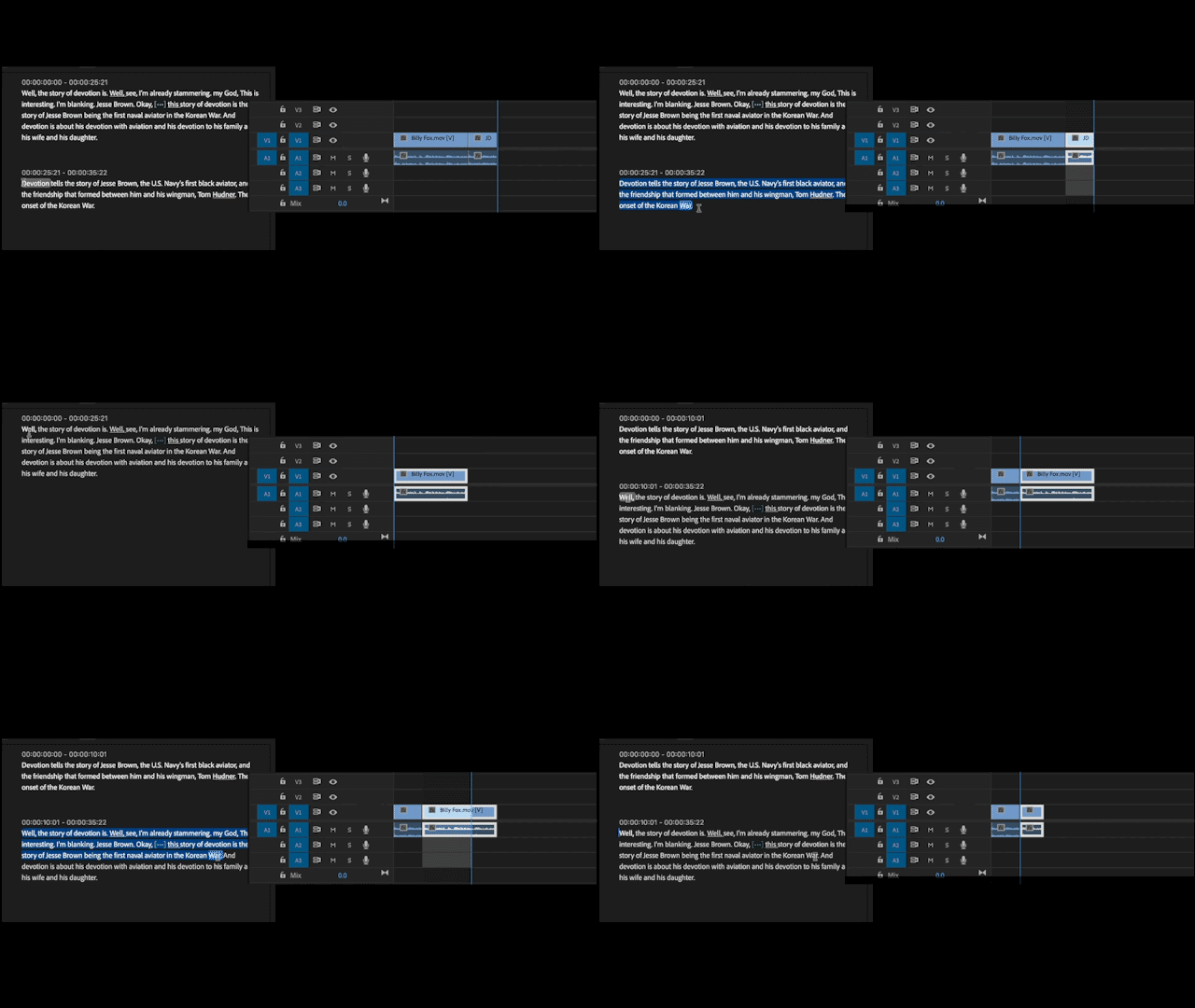


How Does Text-Based Editing Work?

Text-Based Editing is available in the Premiere Pro (Beta) which you can download and install separately from the current Premiere Pro release.


Because Text-Based Editing is a new way of working in Premiere Pro (Beta), we have created a Text-Based Editing Workspace which provides more screen real estate for the Text Panel and places the Source Monitor and Program Monitor in the same window.


Watch this tutorial to learn how to:

  • Transcribe your footage for Text-Based Editing
  • Set up the Text-Based Editing Workspace
  • Search for key moments
  • Do 3-Point Editing (Insert content from Source to Sequence)
  • Do Sequence Editing
  • Change font size and look for pauses


We want to hear from you!

You can provide your comments below, but we would also love to fill out this survey. Please share this post with your colleagues or friends so we can improve Text-Based Editing before launch.


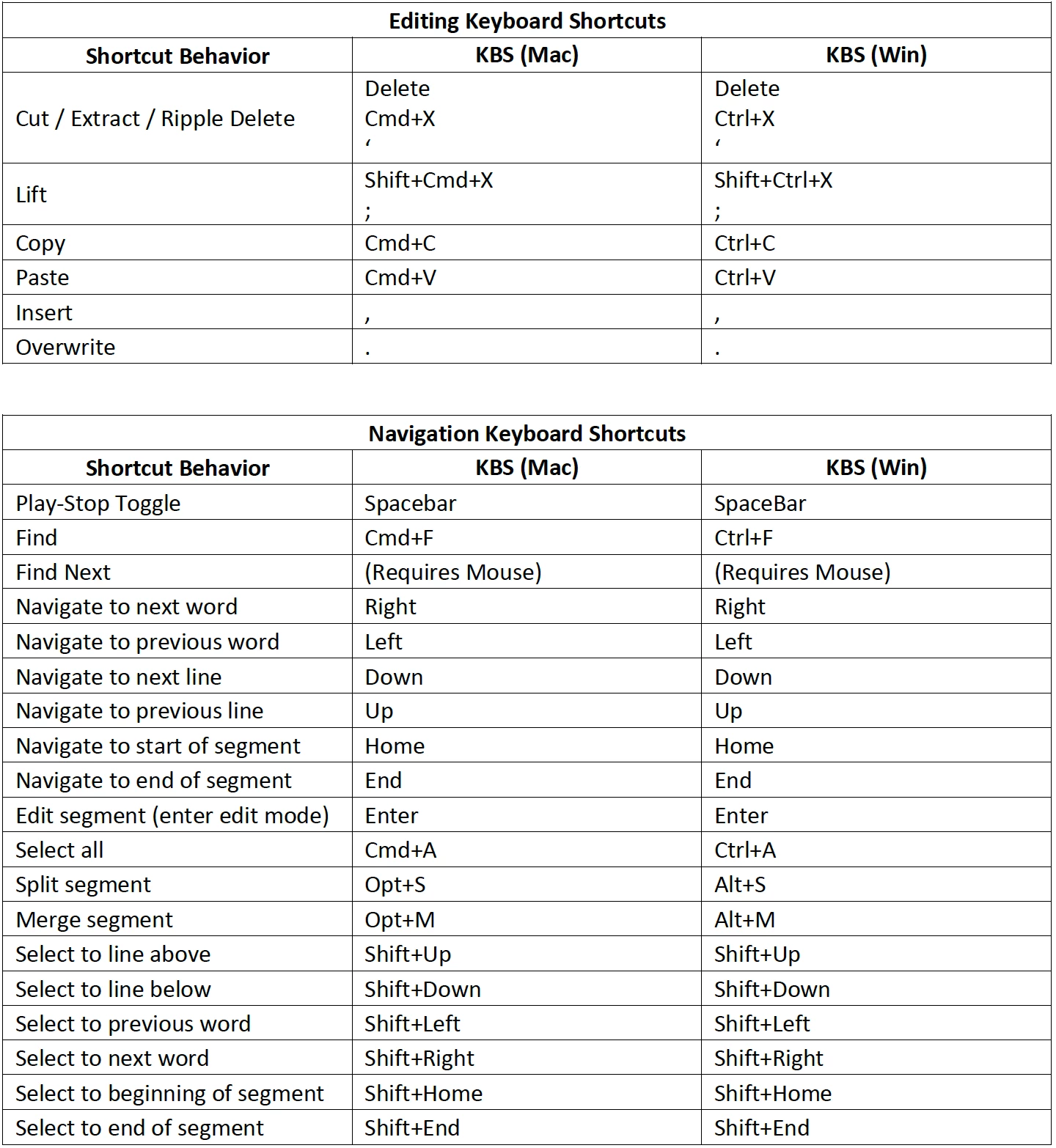
Use these familiar keyboard shortcuts to edit your video in the Text Panel


This topic has been closed for replies.

16 replies

Inspiring
March 1, 2023

Ok I have been test running this on a job where I shot mutl- camera... When editing a transcript in the seqeunce view sometimes a simple edit will create a bunch of duplicate text in that text block. Something is getting messed up when premiere tries to go back and apply the edit to the source clip which is now two nests deep. (Host sequence->Multi-Cam Sequence->Source clip)


Steps:


1. Import media...and have premiere generate clip transcriptions

2. Sync Multi-camera

3. Place multi-camera sequence in an edit timeline

4. Edit transcription in text video in seqeunce mode.

5. Werid stuff happens. 

Stan Jones
Community Expert
Community Expert
March 1, 2023

Are you seeing something like in this thread?

https://community.adobe.com/t5/premiere-pro-beta-bugs/caption-editing-inserts-a-massive-amount-of-random-chars-when-i-correct-simple-typos/idi-p/13577318


If so, it's a bug that is fixed in build 41 or newer.


Stan


Inspiring
March 1, 2023

It's not quite like that and I'm on build 49. It doesn't insert random characters it inserts like paragraphs of text that is already present. Usually the next two to three sentences. 

Inspiring
February 26, 2023

Been testing out this morning and I can't edit speaker names even when on the source clip. It will show the edit dialog for about 3 seconds and then it dissapears. 


https://youtu.be/vmI8hjBQr7M

DJP2014
Inspiring
February 26, 2023

Amazing! Really looking forward to seeing this in the release version.


I wish I could add multiple search results to a sequence without selecting them individually. For example, if I searched for the word "devotion" in your demo, I would like to press a button and add all the instances to the timeline without having to select each one manually.


I spend a lot of time on commericals creating stringouts so producers can compare different takes. However, adding this feature, what would typically take me hours could be done in less than a minute!


Participant
February 14, 2023

Will there be anyway to invite other collaborators online to do text edits (not within premiere) - e.g. within frame.io or another web based review/text editor?
This would be huge as producers, clients, directors often want to do the script/interview text edits and send those to the editor

Participant
March 22, 2023

I agree. It would be great if someone could "markup" the Transcript text file, say using highlighted text, or maybe using Strikethrough text. Then we could upload the the "edited" transcript, with markups, and make a choice to delete and Strikethrough edits using ripple delete. What a timesaver!


dacreativegenius
Community Expert
Community Expert
February 7, 2023

LOVE IT!

Stan Jones
Community Expert
Community Expert
February 6, 2023

@TeresaDemel,


I was already finding my way through the newest tweaks. Very, very nice.


A few quirks, but several earlier bugs are all sorted, and this really is a game-changer.


So far I like the Workspace you used in the first tutorials (left to right, Transcript tab, Source Monitor, Program Monitor). I was not a 3-point editing type, and maybe that's because I keep playing with it.


Stan