


Francis-Crossman17221443
Community Manager
Community Manager
June 7, 2023
Question

Now in Beta: Mirror OS directory structure on import

  • June 7, 2023
  • 21 replies
  • 6063 views

Premiere Pro will now replicate the folder structure exactly when importing folders. In previous versions of Premiere Pro, empty folders and folders containing only one file were not included as part of the import operation; the files would be imported, but not the folder itself. Now, in the latest beta build, 23.6.0 build 15 or later, all folders will now be included when importing assets using File>Import, Drag and Drop, and Media Browser. 
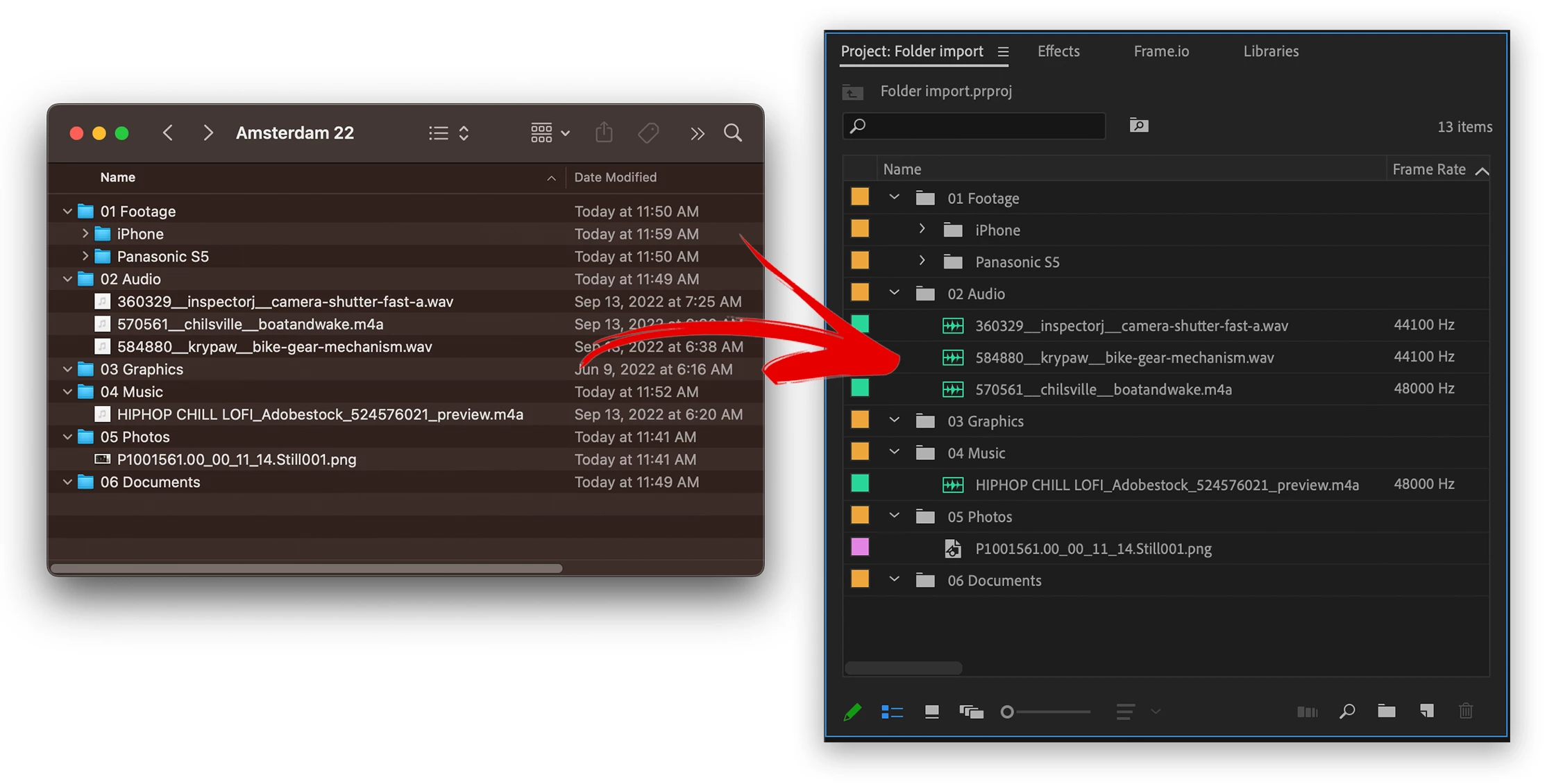
 

 In the example pictured.  The following folders would not get turned into bins, now they will.

  • 03 Graphics      – Empty folder would previously get left out
  • 04 Music           – Folder with only 1 item would previously get left out
  • 05 Photos         – Folder with only 1 item would previously get left out
  • 06 Documents  – Empty folder would previously get left out

Now all these folders are turned into bins whether or not they contain 1 or fewer items.


Things to try:

  • Please import various types of media contained within folders.
  • Import deep folder structures


Methods supported:

  • File>import
  • drag and drop
  • Media Browser


In Import mode, this behavior is different. All folders are ignored and files are just imported in a flat list.  This is the next step for us, to replicate the folder structure with Import mode.  Stay tuned for more development on that.


We want to know what you think.  Please join the conversation below.  

This topic has been closed for replies.

21 replies

Participant
July 23, 2024

My camera makes separate folders for each file so I personally hate this feature, is there any way to turn it off? Thanks!

Participant
June 27, 2024

It would be great to have the choice of method as sometimes you do want it to ignore all subfolders and just throw all the media in one bin. Is that somehow still doable now?

denis-ish
Participant
October 2, 2023

so cool. but how about after effects? 😃

Participant
September 20, 2023

Yes please! This is my single biggest complaint about Premiere Pro currently. So glad to see this being added.

Roman Lehmann
Participant
August 18, 2023

This is the logical way when importing folder structures. I didn't understand why this didn't work for some of the latest version. Was it a bug?

Thanks for this!

Participant
August 11, 2023

When I import folders via drag and drop or File > Import, it says "importing" but then nothing appears. If I import the files individually, however, they're all there, so it's definitely not a corruption issue. Anyone else having this problem?

dhlawrence
Participant
July 28, 2023

Fantastic news! Thanks for listening to feedback and making this very helpful fix!

GreatJobTommy
Participant
July 6, 2023

AWESOME! Thank you for adding this! Much appreachiated!

Ariel_Brener
Participating Frequently
July 4, 2023

WOW thanks for the much-needed update.
I've tested empty folder structure and even Folder with Hebrew characters:
1. drag & drop - works great!

2. File > import - Works great

3. Media Browser - Works great
4. Import Mode - Dont care, none of my colleagues uses it - maybe amateurs that want to edit a random birthday clip - But they don't care about folder structures. 🙂
keeding aside thank you Dev-Team very much, this was much needed for too long time.

Studio Mosha
Participant
June 30, 2023

Still don't understand why this has been removed... A nightmare for editors .... Thank you for bringing it back !