



Francis-Crossman17221443
Community Manager
Community Manager
June 7, 2023
Question

Now in Beta: Mirror OS directory structure on import

  • June 7, 2023
  • 21 replies
  • 6063 views

Premiere Pro will now replicate the folder structure exactly when importing folders. In previous versions of Premiere Pro, empty folders and folders containing only one file were not included as part of the import operation; the files would be imported, but not the folder itself. Now, in the latest beta build, 23.6.0 build 15 or later, all folders will now be included when importing assets using File>Import, Drag and Drop, and Media Browser. 
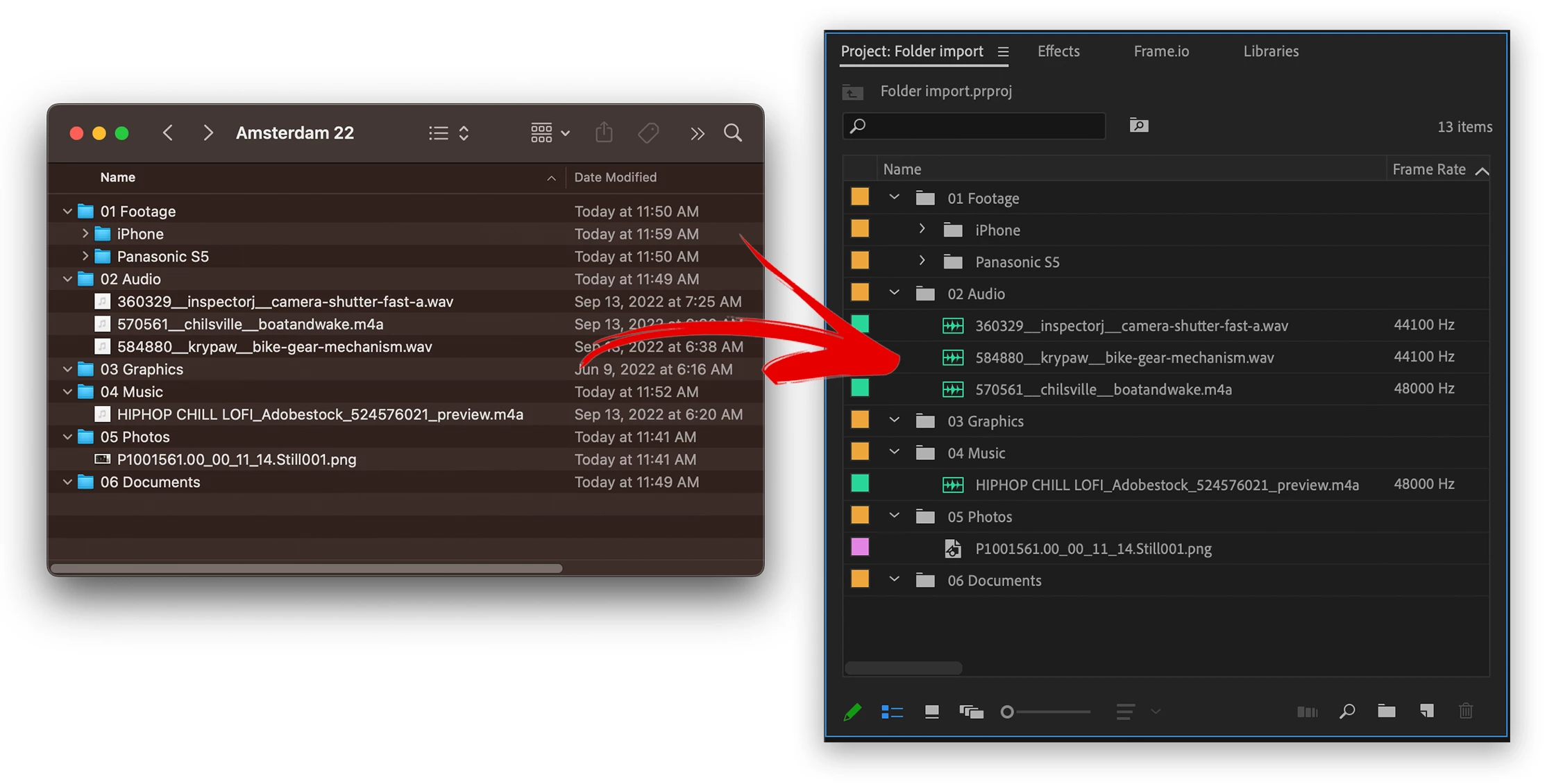
 

 In the example pictured.  The following folders would not get turned into bins, now they will.

  • 03 Graphics      – Empty folder would previously get left out
  • 04 Music           – Folder with only 1 item would previously get left out
  • 05 Photos         – Folder with only 1 item would previously get left out
  • 06 Documents  – Empty folder would previously get left out

Now all these folders are turned into bins whether or not they contain 1 or fewer items.


Things to try:

  • Please import various types of media contained within folders.
  • Import deep folder structures


Methods supported:

  • File>import
  • drag and drop
  • Media Browser


In Import mode, this behavior is different. All folders are ignored and files are just imported in a flat list.  This is the next step for us, to replicate the folder structure with Import mode.  Stay tuned for more development on that.


We want to know what you think.  Please join the conversation below.  

This topic has been closed for replies.

21 replies

Participant
June 22, 2023

Several version ago - folder structure was maintained upon import. Please, please bring this back ASAP. Very glad to see this happening.

Participant
June 16, 2023

Hey! Can I exclude some folders from being imported, as Watchtower plugun does?

Known Participant
June 14, 2023

Finally! Glad this is getting done.

Known Participant
June 14, 2023

Queue Lizzo 'It's About Damn Time'

Legend
June 13, 2023

This is a nice addition/bug fix - but it works exactly the same way as it's always worked with XDCAM, AVCHD and other camera formats. File > Import, drag-n-drop and importing a folder in the Media Browser still ignores the structure of those formats and imports all the subfolders and throws a lot fo error messages about files not being supported. So the only addition now is importing empty folders, like it should have done since version 1.0.

Now please make it work smoothly with those camera formats that use a complex folder structure with media and metadata files.

R Neil Haugen
Legend
June 13, 2023

Exactly, Jarle! Detailed but concise post there ...


Neil

Everyone's mileage always varies ...
JoshWeiss
Known Participant
June 12, 2023

Thank you for this! This has been annoying me for years!


Stan Jones
Community Expert
Community Expert
June 10, 2023

@Francis-Crossman17221443,


Excellent! This worked as described for me. I only tested Media Browser and not drag and drop.


I forget the description when I got around to testing, so tried Import also. It imported just the folders (but only one of the two folder sets I selected) - I wondered if this might be a good feature - import only folder structure.


Stan


R Neil Haugen
Legend
June 9, 2023

Thanks to the team, Francis ... so many of us have wanted this for so long!


Neil

Everyone's mileage always varies ...
Participating Frequently
June 8, 2023

Yahoo!!! I have a project coming up end of the month - thank you for unbreaking the import of folders!!

Inspiring
June 7, 2023

Thank you for bringing this feature back.