




Now in Beta: Mirror OS directory structure on import
Premiere Pro will now replicate the folder structure exactly when importing folders. In previous versions of Premiere Pro, empty folders and folders containing only one file were not included as part of the import operation; the files would be imported, but not the folder itself. Now, in the latest beta build, 23.6.0 build 15 or later, all folders will now be included when importing assets using File>Import, Drag and Drop, and Media Browser.
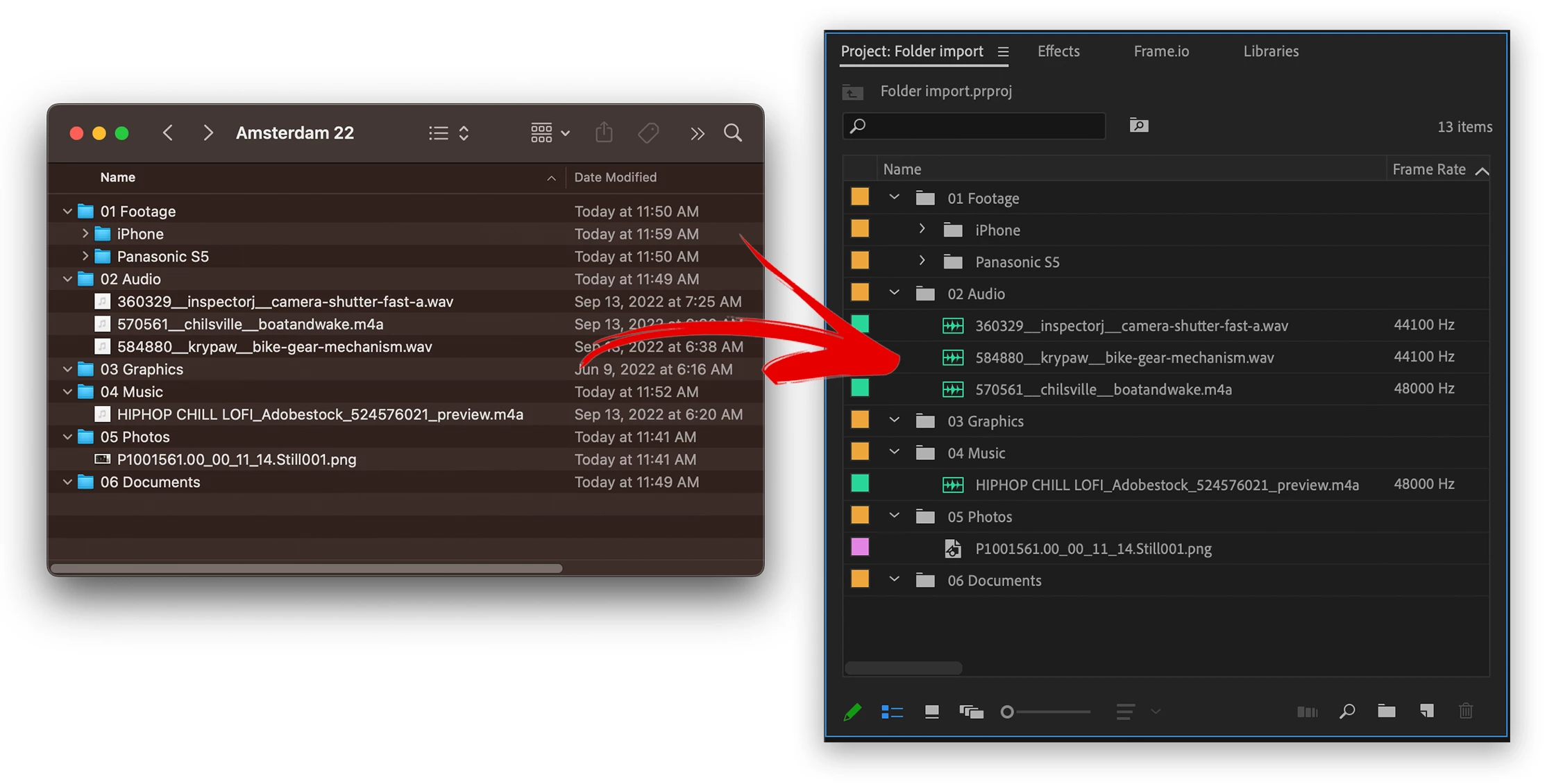
In the example pictured. The following folders would not get turned into bins, now they will.
- 03 Graphics – Empty folder would previously get left out
- 04 Music – Folder with only 1 item would previously get left out
- 05 Photos – Folder with only 1 item would previously get left out
- 06 Documents – Empty folder would previously get left out
Now all these folders are turned into bins whether or not they contain 1 or fewer items.
Things to try:
- Please import various types of media contained within folders.
- Import deep folder structures
Methods supported:
- File>import
- drag and drop
- Media Browser
In Import mode, this behavior is different. All folders are ignored and files are just imported in a flat list. This is the next step for us, to replicate the folder structure with Import mode. Stay tuned for more development on that.
We want to know what you think. Please join the conversation below.
 AdChoices