



Vaibhavi Jani
Community Manager
Community Manager
November 24, 2024
Question

Now in Beta: Translate Captions for Premiere Pro

  • November 24, 2024
  • 21 replies
  • 15369 views

Ever since we launched Text-Based Editing, you’ve been asking for translation capabilities. We’re happy to have an answer to this top request: now you can translate captions in 17 languages without leaving Premiere Pro! 


You can translate captions that are generated inside Premiere Pro or imported via .srt file. Currently, only translation of captions is supported – not transcripts.  
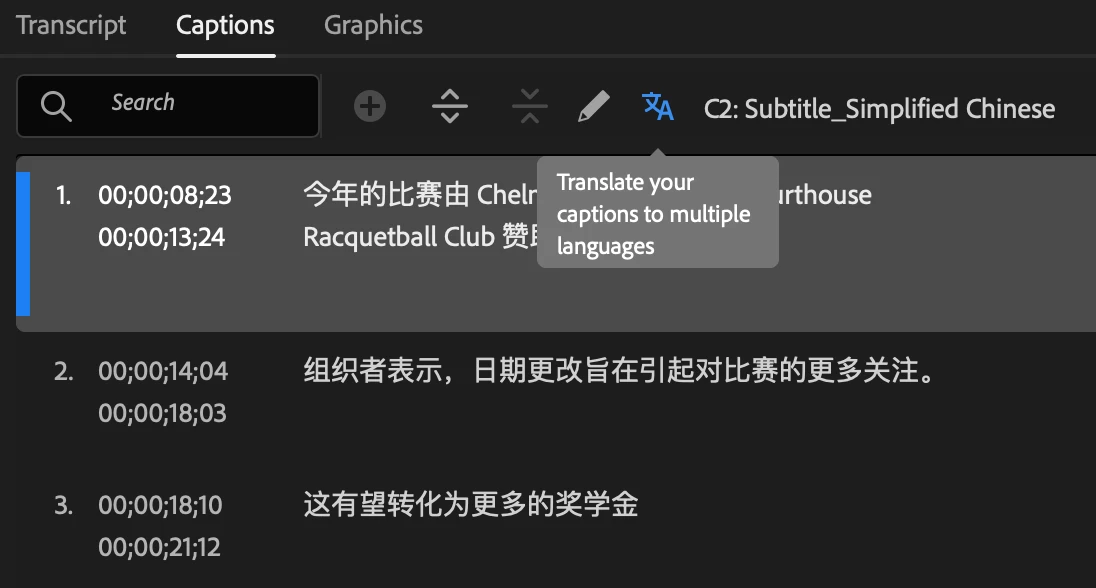


To use caption translation: 

  • Create Captions in the Text panel. 
  • Select the Translate captions icon in the Captions tab.  
  • Choose the language you want your captions translated into and select Translate. You can select multiple languages! 
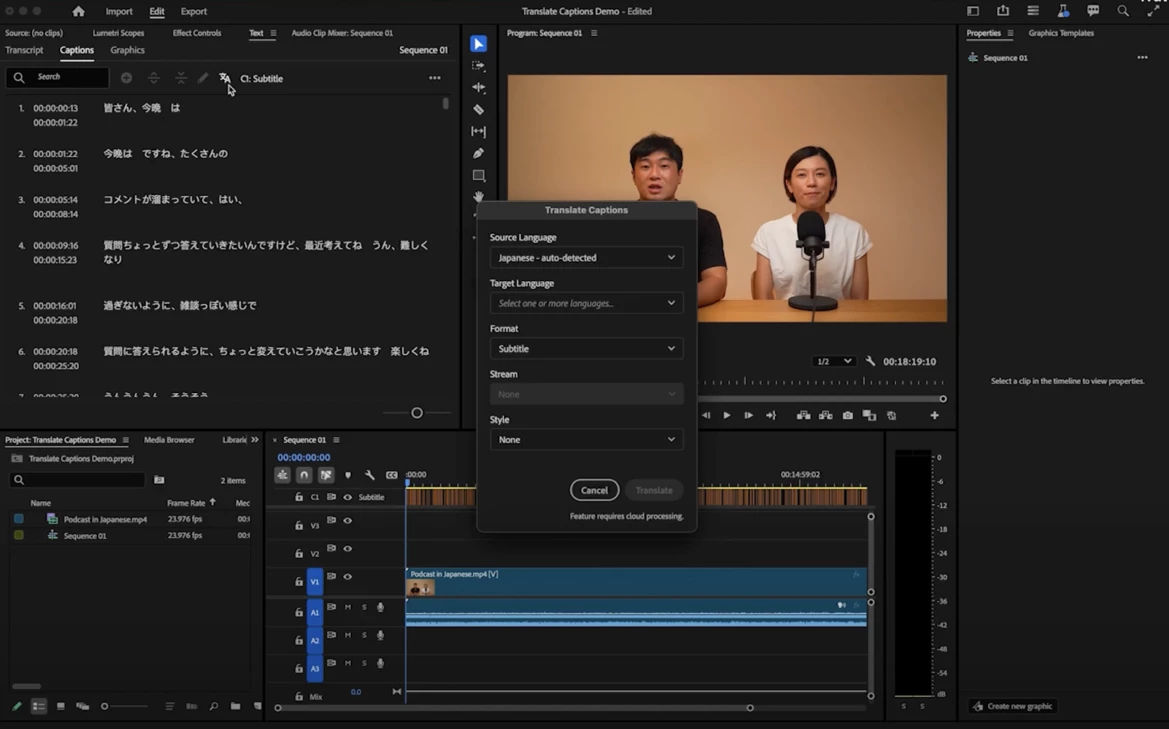


  • Captions will be translated using a cloud service and third-party translation models, and a new track will be created in the Timeline panel. The progress of the translation is displayed in the Progress panel and on the track item.  
  • You can now enable multiple captions simultaneously! Just select the eye icon for each corresponding language track to display all the captions on the Program Monitor.


Styling Captions 

You can then select and style the captions using the options in the Properties panel. Once you are done styling, apply the style to all captions in the track by selecting the Redefine style icon in the Properties panel and selecting All captions on track


Exporting Captions 

After styling the captions, you can export captions (as .srt files), or export videos with captions burned-in, or sidecar filesBurned-in captions allow exporting multiple captions simultaneously, while currently, embed and sidecar captions only support exporting one caption at a time. 


For more details you can visit the page https://helpx.adobe.com/premiere-pro/using/translate-captions.html


Your feedback is valuable!

We hope this new feature helps to breaks language barriers, enabling you to connect with global audiences effortlessly. Your feedback is critical, especially when it comes to the nuance of translation as well as the overall workflow within the app.


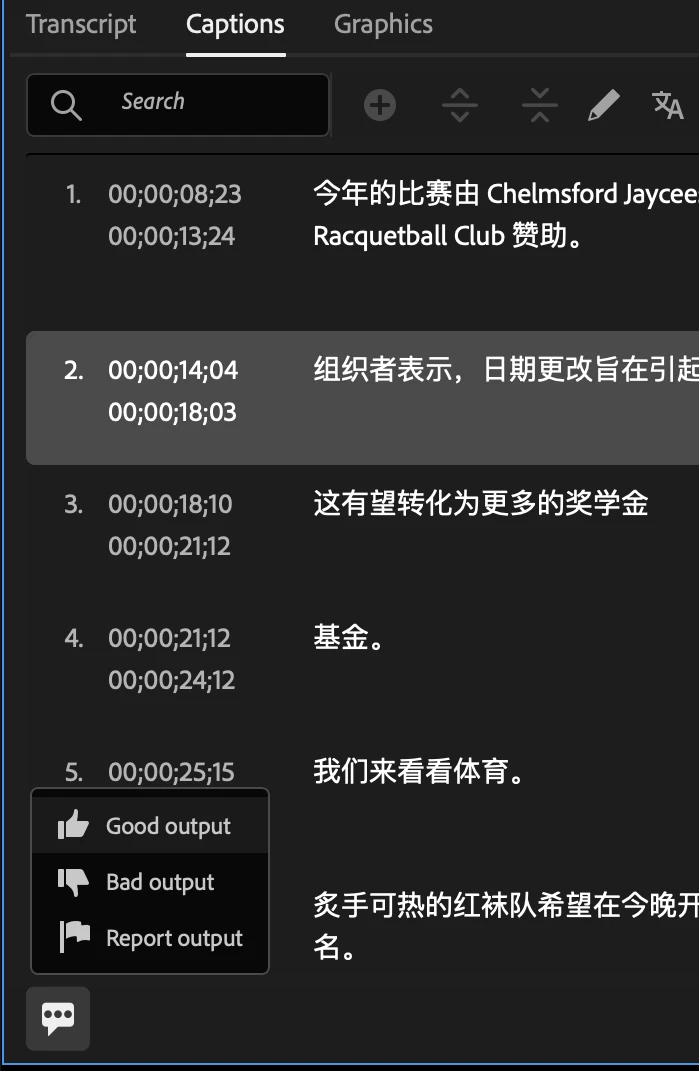
You can provide feedback on the quality and accuracy of the translation or report it for being problematic or offensive by selecting the icon at the bottom-left corner of the Captions tab and rating or reporting the content. 
 

Let us know what you think! 


Vaibhavi Jani

Senior Product Manager, Adobe Premiere Pro

21 replies

Participant
March 26, 2025

What third party services do you use to translate the captions?

Vaibhavi Jani
Community Manager
Community Manager
March 27, 2025

@ATucker32 Google & Microsoft

Participant
February 19, 2025

Hello! 

I would like to work with that tool, but it doesn't appear in my normal Premiere Pro (25.1) and the Beta (25.2), eventhough a lot of internet sources tell me it should be there. The Icon is just not there.
I am located in Germany and my Macbook language (and Adobe language) is set to german. Could that be a problem?

I would really like to try this.
Thank you!

Participant
February 19, 2025

It is Version 25.2.0 BETA (Build 116).
Device is Macbook Pro M1 MAX 32GB

Participant
February 18, 2025

I’ve downloaded the latest beta version, and I don’t have the icon. Same issue, it’s very frustrating that you showcase functionalities that don’t work.  We would like solutions because this is a bug.

Vaibhavi Jani
Community Manager
Community Manager
February 18, 2025

@lee_1475 @Maria Agustina_Macias6434 Our team is investigating this and we should be able to fix it very soon. Could you share your device details in the meanwhile? 

Participant
February 18, 2025

Thank you very much, because it is very difficult to see premiere innovations and then not be able to use them.

 
Participant
February 18, 2025

why there is no translate caption button on my premiere while the version is beta 25.2 build 117 and language pack installed, thanks

Participant
February 5, 2025

Hi all,


I started using the caption translation feature yesterday to convert English to Spanish on our subtitiles. Everything went fine for the first few videos, but today when I started trying to do the same with more videos, the translation feature always gives me an error: "Can't complete caption translations to Spanish (ES). Please try again." I have tried 10+ times and restarted Premiere. I'm not sure why it suddenly stopped working.


Participant
February 5, 2025

Having this same issue too. It worked fine yesterday and not today. I even tried a file that translated successfully yesterday and it failed today. It must be some server-side cloud issue. Hopefully, they fix it soon. I am on the latest update.

Participant
February 6, 2025

I am experiencing the same problem too. I cannot seem to convert any captions into Japanese. I am in need of a resolution as soon as possible too. I'm hoping there is a fix soon as it was working days ago.

Participating Frequently
February 3, 2025

For multi track captioniong we need a way to import more than one caption track and choose which caption track to import to.  Currently there is none. It will only allow you to import one track! 

Stan Jones
Community Expert
Community Expert
February 4, 2025

@Flight Media Specialist,


>For multi track captioniong we need a way to import more than one caption track and choose which caption track to import to. Currently there is none. It will only allow you to import one track! 


I had not noticed this before your post: in the Release version as well as this multi-track capable Beta, there is no Import option in the 3 dot menu.


To get the "import from file" option, disable all caption tracks AND make sure there is no caption selected in any of the tracks, whether enabled or not.


Yes, being able to import multiple caption tracks at once would be useful.


I can see a use-case for being able to manipulate multiple tracks (move/reorder, combine), but not really for target an existing track to import to.


Stan


Participating Frequently
February 6, 2025

The use case would be if you have 4 timed transcripts and you wanted to import all 4 seperate .srt files each to their own caption track, rather than importing one disabling it then importing another and disabling it then importing another disabling it and then importing the last one.  You would just select import from the three dot menu, then ctrl click the four .srt files to import and each .srt file would import into it's own unique caption track timed and everything thus saving a lot of labor and time rather than going through the process many times.  Just something to ponder for efficiency and optimization.

Consider this scenario you are an editor and are provided four transcripts in a timed .srt file or other format and you want to add the captions to your edit.  "Why didn't you use the built in transcription tools for each track?" You might ask. Well perhaps they aren't using a good microphone, or the mic cuts out, or the ausio is of such poor quality that even the best signal processing tools out there can't quite clean them up well enough to transcribe, or the speakers are overlapping, talking over each other (which is exactly why captioning this edit would be desirable.)  I can definatly argue being able to import multiple timed files to individual caption tracks would save a ton of labor and clicks.  Call me crazy just trying to make a great product even better! I love what your team is doing and am greatful for your dedication to the community.

Cheers-

D

dv.media
Participant
January 31, 2025

Hi,
The Translate captions   icon in the Captions tab is not visible or active in my Premiere Pro. I am running ver. 25.1  .The screenshot is from a tutorial.
This is a great time saving feauture.
Thanks.


Stan Jones
Community Expert
Community Expert
February 1, 2025

@dv.media,


The translate captions function is only available so far in the PR Beta version (25.2.0).


Stan


Participant
January 30, 2025

I'm trying to translate some captions from Russian to English -- this was working last week but now it's giving me an error and saying the language isn't supported.  Has Russian support been removed or is something else going wrong?  It appears to be uploading the captions before giving this error:


Stan Jones
Community Expert
Community Expert
January 30, 2025

@Nels36250780rjwo,


I just updated to Build 96. I do not have a Russian source sample, but I translated from English (auto-detected) to Russian and then from the Russian subtitles (auto-detected) back  to english.


Stan


Participant
January 30, 2025

Wow -- thanks for the experiment -- super helpful to know!  I'll try to figure out if there's something else going on.  (Meanwhile if anyone else has any ideas, feel free to add...)

Known Participant
January 25, 2025

I tried the new tool by importing more than an hour-long recording for a meeting held in Japanese, translated into English using the new feature. Everything went smoothly and without problems. When trying to export, the text remained in orgianle in Japanese. Is there an option somewhere to export the translation only? Maybe I missed something to export to txt file the result of the translation?

Stan Jones
Community Expert
Community Expert
January 25, 2025

@Piotr Gardecki,


See my post above:

https://community.adobe.com/t5/premiere-pro-beta-discussions/now-in-beta-translate-captions-for-premiere-pro/m-p/15075060#M10951


In particular see the paragraph that starts, "As noted in the announcement, only one sidecar file can be exported at a time."


Stan


Known Participant
January 26, 2025

thank you very much, that explains everything clearly now. I have already figured it out. The tool remains very useful.

Participant
January 21, 2025

I can't enable multiple caption tracks anymore. It used to work just fine a few days ago. Now it shows this.


Stan Jones
Community Expert
Community Expert
January 21, 2025

@leonardo_Pereira6662,


What build are you on? I suspect they're working on manipulating the caption tracks and something broke. And I'll bet it will be fixed very quickly.


Stan


Participant
January 21, 2025

Version 25.2.0 BETA (Build 87).