

David Polk
Community Manager
Community Manager
September 13, 2023
Answered

[Now Released] Enhance Speech in Premiere Pro

  • September 13, 2023
  • 29 replies
  • 32045 views

With AI-powered Enhance Speech now in Premiere Pro (beta), you can magically remove noise and improve the quality of dialogue with one click, so it sounds as if it were recorded in a professional studio! We need your feedback to optimize this feature further through adding a comment below and completing a short survey.


Here’s how to use it:

 Open the Essential Sound panel and select a clip containing speech in your sequence. Click on “Dialogue."
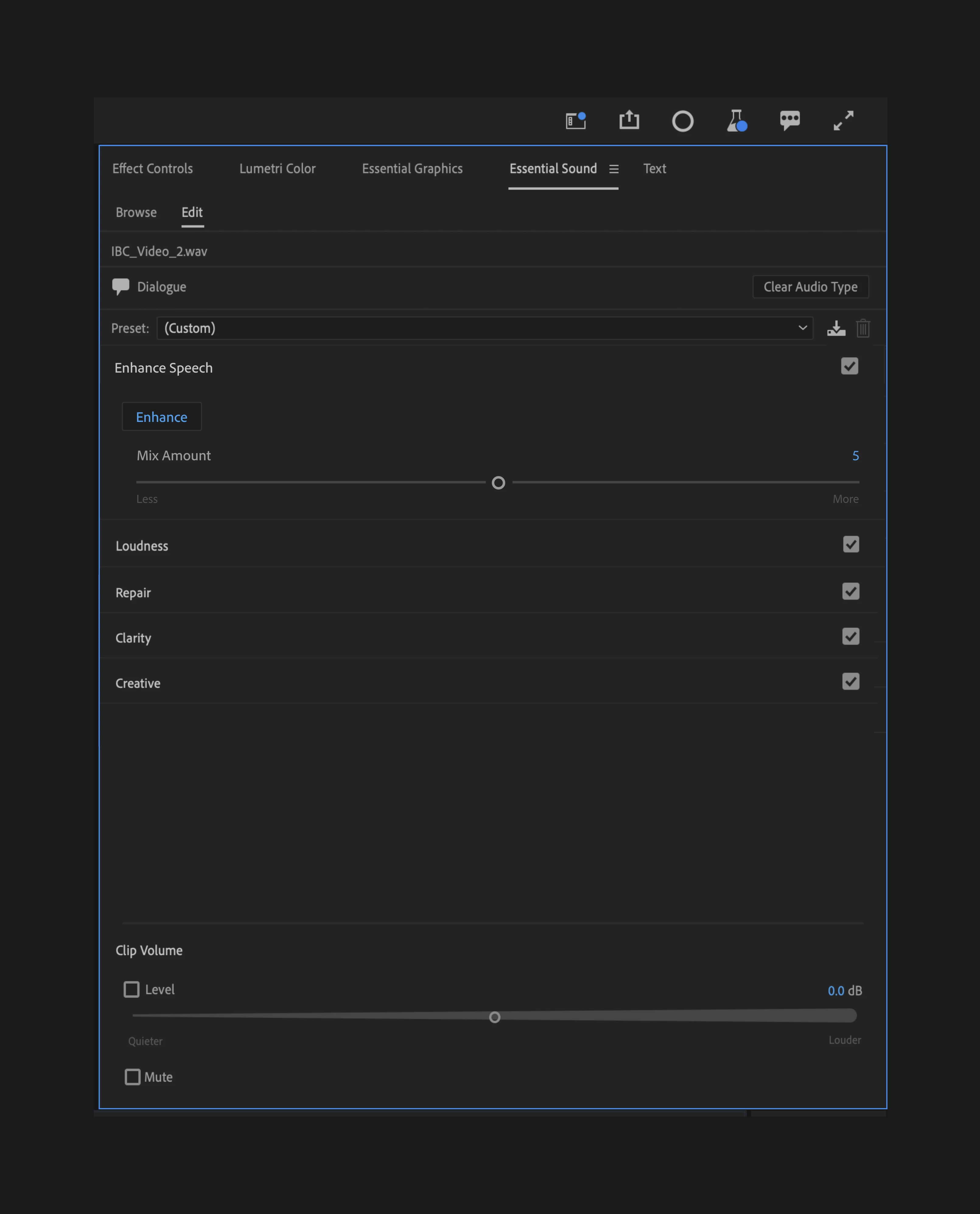
 

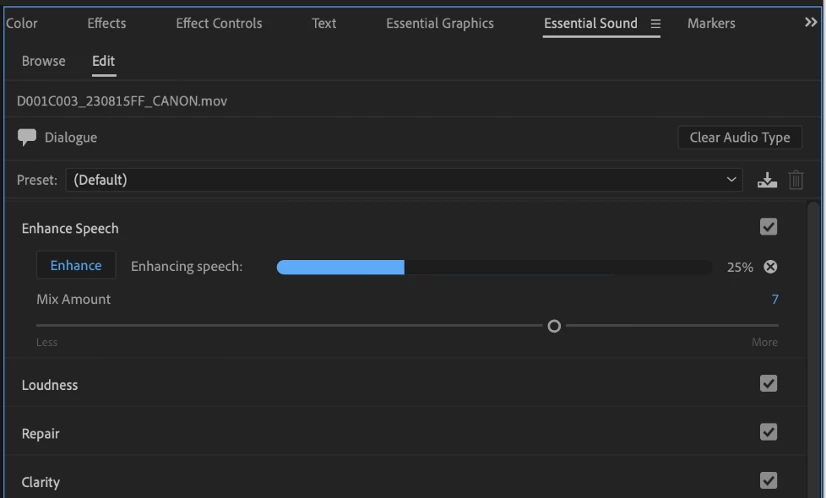
Then, just click the “Enhance” button. When processing is complete, you can adjust the amount of enhancement using the Mix Amount slider. This slider allows you to mix your raw audio with the enhanced audio, allowing natural background noise to come through.
 

What kind of recordings work well with Enhance Speech?

 Audio that is recorded with a low-quality microphone (phones, online meetings, on-camera mics) tend to be improved with Enhance Speech. It does not always work well with:

  • Extremely very poor-quality audio (e.g. a recording from an old VHS tape with heavy artifacting)
  • Multiple overlapping speakers
  • Whispers
  • Loud background music
  • Singing


How does it work?

 The version of Enhance Speech within Premiere Pro (beta) is the same feature that has been available online via Adobe Podcast. However, Enhance Speech within Premiere Pro (beta) has been optimized to perform locally on your machine, allowing you to run Enhance Speech on an unlimited number of clips. Unlike Adobe Podcast’s service, no internet connection is required. The model is not trained on your usage.


As indicated in the name, this won’t work with music, sound effects, or ambient audio. And like most AI-powered features, it requires a performant system; processing times may vary. (See Premiere Pro’s recommended hardware specifications.)


Please check out our full FAQs for this feature for more details.


What we’d love to know from you:

AI models are evolving fast and voice recordings have many unique variables we can’t always predict in our testing. We need your feedback to learn more about how you’re using Enhance Speech so we can further optimize it for all types of voices.


How has this been helpful? Have you run into any enhancement issues that prevent you from using the feature? If you’ve run into performance issues, please tell us what kind of computer you’re using.


Complete this survey and leave us feedback below.

This topic has been closed for replies.
Correct answer Oliver315800333k8f

I installed the beta just to use this feature, but when I click enhance there is no progress bar at all and nothing happens. I can change the mix amount, but this has no effect. Even when rendering out a file there is no change to the audio. Anyone else run into this?


I'm in 24.1.0 Build 77 on a iMac running Ventura 13.5.1 (22G90).

29 replies

Participant
November 19, 2023

I woud like to use it but after I analyze a track which takes a few minutes, when I go to cut the track Beta reanalyzes the track again. It makes the editing process impossible. It would make sense to me to analyze a track once in the beginning, then make your cuts but that doesn't seem possible with this beta.

Maybe enhance audio in Audition before importing into Premier?

Participating Frequently
November 16, 2023

I like the new feature and the integration in Premiere.

But it seems there are a few things that need to be optimized. I have a recording which is not to bad, but after using the enhance feature some words are altered and sound totally different than before. Letters of a word are changed (for example like: Hello in Heko) especially when there is a break after a word. Sadly the words don't make sense, so this feature is not read to use.

Participant
November 7, 2023

Tested on build 6 (I think) and worked really nicely but running into constant problems with it on build 7. Either casues app to become very unstable or unable to create audio renders, not useable currently (at least on my machine!) 

Participant
November 1, 2023

A technical question: If I am using the Enhance Speech feature and follow up by using the transcription feature in Premiere Pro for subtitles purpose; do I need to render and replace the original audio or will Premiere Pro know to transcribe from the 'Enhance Speech' audio?

Oliver315800333k8fCorrect answer
Participant
November 1, 2023

I installed the beta just to use this feature, but when I click enhance there is no progress bar at all and nothing happens. I can change the mix amount, but this has no effect. Even when rendering out a file there is no change to the audio. Anyone else run into this?


I'm in 24.1.0 Build 77 on a iMac running Ventura 13.5.1 (22G90).

Participating Frequently
May 1, 2024

Same.  I even installed it on my Windows computer because Premiere said it needed OSX 14 to run better.  It doesn't seem to do anything on Windows 10.

Participant
October 19, 2023

I can't figure out how to download the beta...it seems like it's been pulled or unavailable to me. I don't see a Beta apps tab in my creative cloud desktop app at all. There is a prerelease tab but the only option is for illustrator. What's going on here? Even when I click on the "Get the Premiere Pro (beta) app" button, it opens CC but gives me a blank screen...something has been changed since the article written on 10/10 https://helpx.adobe.com/premiere-pro/using/premiere-pro-beta.html

Inspiring
October 16, 2023

Cool feature. Been playing around with old FDR speeches to see how it reacts to archival stuff. Pretty interesting results. Some limitations/feedback below: 


Bug/Quirk

  • If enhance speech is used and mix amount is set to 10.0, any audio gain applied is not used.
    • Audio Gain...-> set to 12db, no level increase on enhanced speech track. 

UI:

  • Wet/Dry mix of enhanced speech should go from 0-100 %. 1 to 10 is arbitrary and a bit weird considering its just a wet/dry mix. 


Participant
October 16, 2023

Would love to see the FDR speeches! Are you uploading them anywhere?

Participant
October 12, 2023

I used Enhance Speech now, today, online at Adobe Podcasts, the free version, after some months. It is an improvement over some months ago, but the problem remains: I used it with audio in the romanian language, very noisy, and again the voice is sometimes distorted, when is sounds like a synthesized speech, this occurs for a few continuous words every around 2 minutes, the artificials words created are unintelligible. It is an improvement, because months ago up to half of speech was a synthesized speech with a mix of english and romanian words. I understand that the machine learning, the training, for Enhance Speech is made using english speech. I don't know why some romanian words are replaced with english words or with a mix of english-romanian word, all with a synthesized/robot voice, instead to leave the speech alone, and just to reduce what is not recognised as speech. In other software, Voice Isolation works better, without to change the speech, without to synthesize the voice, without to introduce english words and accents. 

Participant
October 15, 2023
quote

I used Enhance Speech (beta for Premiere for my problem) .... the voice is sometimes distorted, when is sounds like synthesized speech, .... artificial words created are unintelligible. 

By @lopis1


Same issue-- audio overall much improved but synthesized-ish says a one word over the top of the speaker, usually a word said earlier but clipped. It pains me to not Enhanced Speech because overall it sounds much improved but I don't know how to resolve the weird glitches. ~Rookie User

Inspiring
October 10, 2023

I don't have time to try this, but how about render and replace, or edit in Audition (which does the render/replace cycle)?

Participant
October 10, 2023

I have an issue when trying to export my timeline. I have two audio tracks, one of them is voice over with enhanced speech and the 2nd track is music that I didn't use enhance audio on.. when I go to export the result is the unrendered version of my enhanced voice over. I have used enhance speech on a project where I had 20 separate interviews, and those all exported properly. (I did also experience the strange artifacting during either mumbling or a pause. sounds like a bot). 


I believe I saw / heard somewhere that the beta version doesn't support multiple audio tracks when using enhance speech (which seems weird since I'm only using it on one track). Does anyone have a work around that will let me export my project with enhanced speech and a music track? I originally thought about nesting the tracks together but can't seem to figure that part out. I can nest the tracks individually but not together into one track. 

Participant
October 10, 2023

Okay, I finally (after a week of trying different things) figured out a work around. I duplicated the sequence, got rid of everything except for the enchanced speech track, and exported only audio as .wav uncompressed, re-imported into original sequence (also duplicated as to not mess with the original sequence), and after exporting the audio sounded like it did inside premiere. 


I'm not sure if the issue was due to having so many clips on one track with enhanced audio, but basically took an interview and chopped it up and moved the clips around out of order so I had to enhance all the clips separately since I originally edited all this outside of premiere pro beta. 


Hope this helps solve any issues for other users.