

Abhi Singh Principal PM
Inspiring
sept. 11, 2025 11:01 PM UTC

[Now Released] Send from Premiere on iPhone to Premiere Pro

Now you can start editing on your iPhone with the Premiere iPhone app and then continue in Premiere Pro on desktop. This new workflow connects mobile and desktop editing, giving you flexibility to shoot and edit on the go while still having access to all the professional tools in Premiere Pro. 


How can you try it?

You can apply to test the new Premiere on iPhone by filling out this survey. You can also pre-order Premiere on iPhone on the App Store. 


Adobe Premiere on iPhone
Next-level editing. Now in the palm of your hand. Quickly turn any idea into attention-grabbing content with amazing creative control, unique audio tools, and generative AI — and take your creativity on the go with Premiere on iPhone. 


How does the workflow between Premiere on iOS and Premiere Pro work?


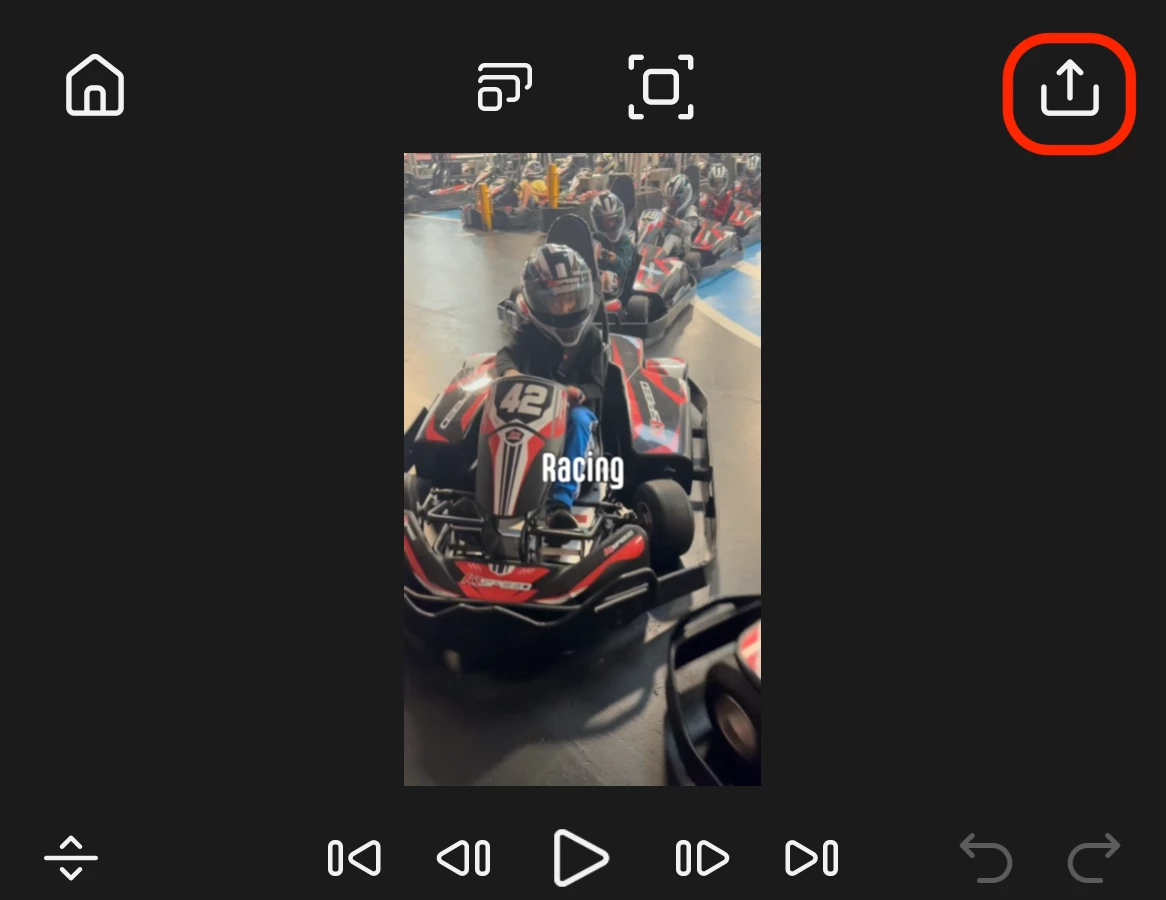
1.  In Premiere on iPhone, go to Export: 
 

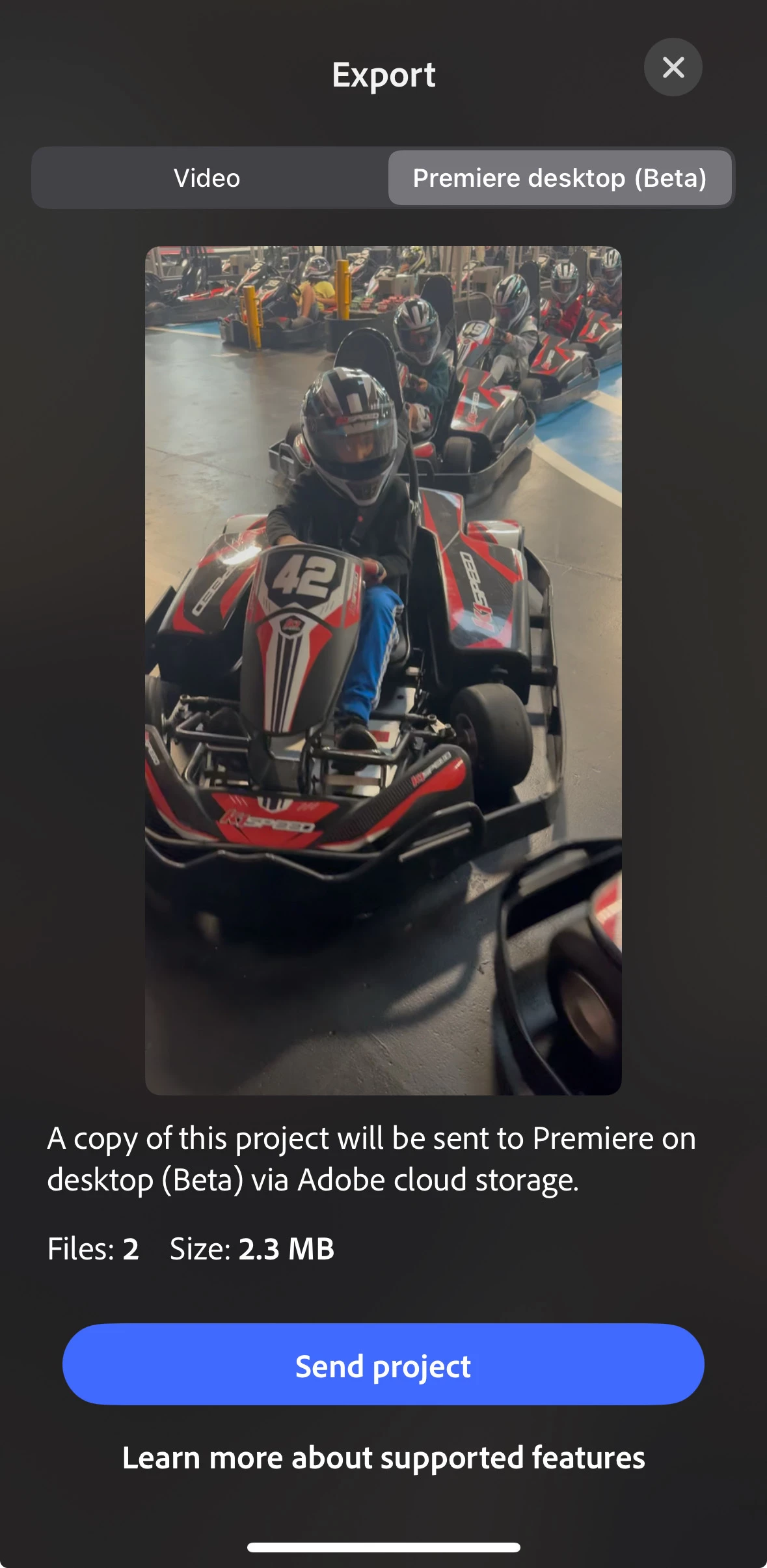
2. Select the Premiere desktop (Beta) Tab and tap Send. 
 

3. Open Premiere Pro Beta (or if you already have it open), you will receive the following notification. Select Open and continue your edit in Premiere Pro. 

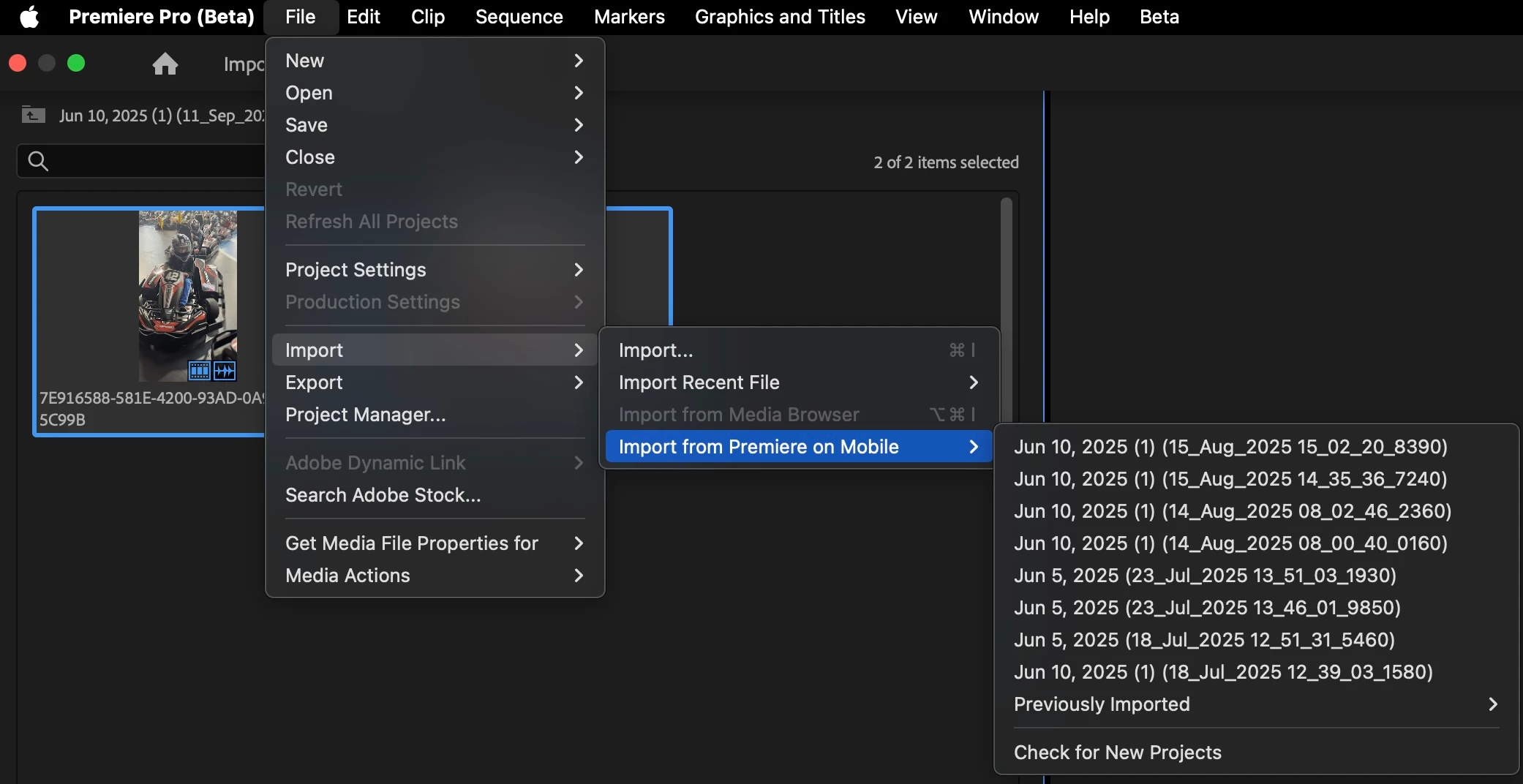
You can also access your sent Premiere on iPhone data from the File>Import>Import from Premiere on Mobile menu. The menu also allows you to check for new updates: 

We would love your feedback on how this workflow fits into your editing process. Please try it and let us know what you think here in the comments. 

Abhi Singh
Principal Product Manager, Premiere Pro 


    Ce sujet a été fermé aux réponses.

    14 commentaires

    Participant
    nov. 11, 2025 1:40 PM UTC

    I love this so much! I use it for a few days now and it's gamechanger! I was wondering how can we see the changes back on the phone? It doesn't change for me. On the phone for example it's easier to add sound effects so I would like to be able to work on both desktop and mobile depending what I want to do

    Traduire
    Bruce Bullis
    Legend
    nov. 11, 2025 3:02 PM UTC

    >I was wondering how can we see the changes back on the phone?

    There's no going back.

    Sending to Premiere Pro is unidirectional; once the PrMobile project has been imported into PPro, it becomes a PPro project.

    Traduire
    Participating Frequently
    oct. 26, 2025 6:45 PM UTC

    Please help! I do not have the import from media option on my windows laptop. How does the workflow work on a windows computer? Thanks for the help!

    Traduire
    Stan Jones
    Community Expert
    Community Expert
    oct. 26, 2025 9:00 PM UTC

    @gabio58925775,


    You must use the Beta version of Premiere Pro for now.


    Then use File -> Import -> Import Premiere Mobile Project.


    There's a new forum for  Premiere on iPhone:

    https://community.adobe.com/t5/premiere-on-iphone/ct-p/ct-premiere-on-iphone


    Stan


    Traduire
    Participant
    oct. 14, 2025 11:46 PM UTC

    I love this feature, unfortunately I've been having some problems. I tried to export to desktop a second time and everytime I try to open it on Premiere Beta, it shows my disk is full. The first notification was accurate, I didn't have enough space, (although it didn't initially say my disk was full, but showed after the 3rd attempt to open). I have since switched to two different drives that have ample amount of space but I have yet to get it working. 

    I changed the cloud media downloads folder. I restarted the program, I restarted my machine. I can't seem, to open the file. I also can't seem to find the logs to figure out whats wrong. I would appreciate any help with this!

    Traduire
    Community Manager
    oct. 15, 2025 12:10 AM UTC

    Hi Jayeee, 

    Thanks for reaching out. Just sent you a DM on this. Sorry that you are having issues. 

    Best, 
    Abhi

    Traduire
    Randune23
    Inspiring
    sept. 25, 2025 10:41 PM UTC

    I am SO EXCITED to try the iPhone version of Premiere Pro.  I love that you can create the project on the app and finish it on your desktop.  I mean, OBVIOUSLY, the Premiere Pro app will not have all the mogrts, luts, etc. that we have on our desktop versions.  Plus it was very hard in Premiere Rush (the earlier beta version of PP; think of it like PP-lite), to zoom in by squeezing your fingers together or apart to zero in.  Plus in Rush you couldn't use keyframes.  So you were pretty much stuck with only a few graphic templates.

    Hopefully my survey gets approved.


    Randy

    Traduire
    Adobe Employee
    sept. 30, 2025 11:55 PM UTC

    Premiere on iOS is now out of beta. Get it for free here: https://apps.apple.com/us/app/adobe-premiere-video-editor/id6742757464

    Traduire
    yousseftoufik
    Participant
    sept. 24, 2025 11:58 PM UTC

    Can't wait to try this workflow

    Traduire
    Participating Frequently
    sept. 17, 2025 5:20 AM UTC

    Hey,
    thanks for explaining the workflow. This information is key to me.

    Will there be also an app for the Ipad or is this "iPhone only"?

    Traduire
    Abhi Singh Principal PM
    Inspiring
    sept. 18, 2025 10:29 PM UTC

    Glad to hear that the workflow outlined is helpful. And yes you can use the Premiere app on your iPad. 

    Traduire
    Participating Frequently
    sept. 19, 2025 5:19 AM UTC

    Thank you @Abhi Singh Principal PM.
    I applied for the beta testing and do really hope, I will get the possibility to get into the programm.

    Traduire
    Community Expert
    sept. 15, 2025 8:35 AM UTC

    Nice! waiting for the Android version, hope it won't take long...

    Traduire
    Abhi Singh Principal PM
    Inspiring
    sept. 16, 2025 12:07 AM UTC

    Thanks Ali! 

    Traduire