Participant
July 23, 2026

When I apply Posterize time effect on masked layers the masking fails.

  • July 23, 2026
  • 2 replies
  • 23 views

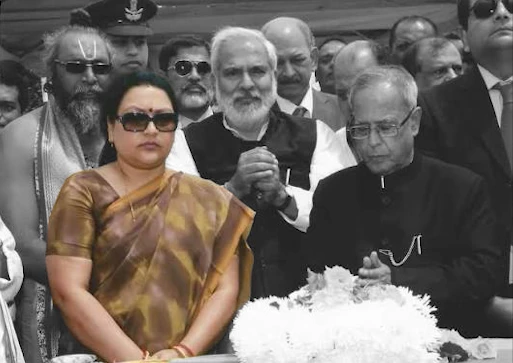
I took an image showing multiple characters in that image, duplicated the image applied making on the top layer selecting the person of interest. Applied Black & White effect on the lower layer. Next, I took an adjustments layer and applied an effect called Posterize time effect and as soon as I applied it the masking behaves unpredictive.

With Posterize time activated.
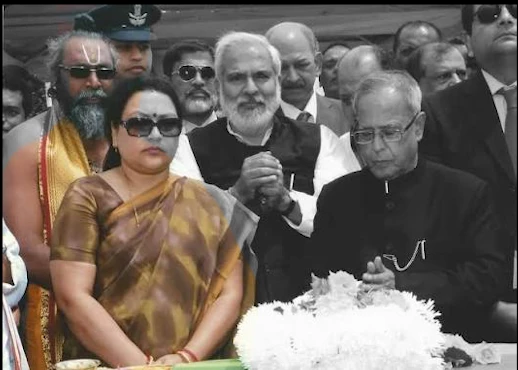
Posterize Time Activated


Posterize Time De-activated

Troubleshoot: 1. I tried to put this posterize effect on nested sequence of the two layers.
2. Without Nested sequence adding and adjustment layer on the top.​​​​​​​​​​​​​

Nothing works.

    This topic has been closed for replies.

    2 replies

    Nancy OShea
    Community Expert
    Community Expert
    July 25, 2026

    @Dilsher_Maps.

    You’ve incorrectly posted this in the Stock customer forum which has nothing to do with image editing. Please create a new post in the proper product forum (Photoshop, After Effects, Premiere Pro, etc.) where the experts there will see it.

    https://community.adobe.com/community

    Premiere Pro forum

    https://community.adobe.com/questions-729


    Thanks.


    Nancy O'Shea— Product User & Community Expert
    Jeff Arola
    Community Expert
    Community Expert
    July 24, 2026

    Which Adobe application are you using?

    Participant
    July 24, 2026

    Adobe premiere pro 2026