
Participant
August 16, 2026

I can’t generate anything. I keep getting the message: “Something went wrong. Please try again later.”

  • August 16, 2026
  • 15 replies
  • 143 views

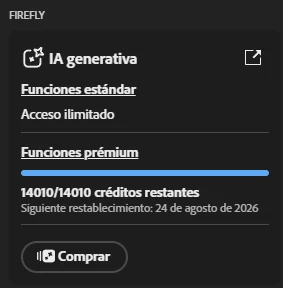
I purchased 14,000 credits for Firefly on a new account, but it won’t let me generate anything—neither videos nor images. I was just generating videos with my main account, but the new account doesn’t work.

I’ve already tried switching browsers, using incognito mode, clearing cookies, resetting firewall permissions, and nothing has worked. It doesn’t really make sense because, as I mentioned, I can generate videos without any issues on my main account, but on this secondary account, where I just purchased 14,000 credits, I can’t generate anything at all.

Please help!
 

    15 replies

    Participant
    September 29, 2026

    ​@N8. 
    same problem here. this is only happening with the google models. please give us an ETA on when the issue will be fixed. it is affecting our professional workflow.
    ​@Joyful_day58fb explained clearly what is happening and none of the listed “fixes” solve anything.

    Participant
    September 29, 2026

    Same, I keep getting a red error message


    Participant
    September 29, 2026

    I am experiencing the same “Something went wrong. Please try again later” error in Adobe Photoshop.

    My workflow:

    • Adobe Photoshop
    • Gemini 3.1 / Nano Banana 2
    • Generative Fill / image editing
    • TIFF product photography files
    • jewellery retouching

    Other AI models in Photoshop work correctly.
    The problem occurs specifically with Gemini 3.1 / Nano Banana 2.

    I have already:

    • signed out and back into Creative Cloud
    • restarted Photoshop and the computer
    • reset Photoshop preferences
    • tested different TIFF files
    • tested different prompts

    The error has persisted for several days.

    This is affecting my professional workflow.

    Please confirm whether this is a known backend issue with Gemini 3.1 / Nano Banana 2 in Photoshop and whether there is an ETA for a fix.


    N8.
    Community Expert
    September 29, 2026

    ​@Joyful_day58fb ​@paul_jmh 
    Thank you for sharing the workflow and the image. This helps a lot.

    Since this is a Photoshop issue, please post this in the Photoshop Forum: make sure to change the title to avoid being seen as spam. 
    https://community.adobe.com/p/photoshop


    Nate

    Participant
    September 29, 2026

    hlo sir i have adobe account our company pay 1year but when i open fjire fly generator i cant maek becausae they asking money . i need solution


    N8.
    Community Expert
    September 29, 2026

    ​@hopeful_ease6258 
    If you are on an Enterprise account, then you may need to talk to your boss. There are many plans in the Adobe Eco System and each plan is different and has access to different apps and such.

    If you are being prompted to purchase credits, you may not have an Adobe Firefly plan. 

    Nate

    Participant
    September 29, 2026

    Same issue here. Can’t generate anything for  :/ I paid for it though

    N8.
    Community Expert
    September 29, 2026

    ​@Cindy3346842871yv After getting a new plan, log out of the creative cloud app to reset the functions of Firefly. Log out then back in to the Creative Cloud App, after you get a new subscription or change subscription.

    If this doesn’t work, please tag me.

    Nate

    Kingdea1se56
    Participant
    September 28, 2026

    Im in the same boat i cant generate literally anything doesn't matter how basic im actually about to cancel my subscriptions because of it

    N8.
    Community Expert
    September 29, 2026

    Help us. Help you ​@Kingdea1se56 
    Sorry to hear you're running into that "Something went wrong" error. Could you provide more information; so, the team can proceed to troubleshoot? Without the requested information it is difficult to assist you and resolve the issue. By providing the requested info we can better assist you. 

    Something went wrong troubleshooting

    A Full Screenshot or short video:  Please provide a screenshot of your entire browser or application window, including your avatar in the upper right corner. Many errors have multiple causes; seeing the full context is much more helpful than a zoomed-in image of the error message alone.
    >>Make sure to remove person details: email address, name... before posting<<

    • System Details: Specify your Operating System (OS) and Browser (including version numbers).
    • Workflow Context:
      • Which Firefly function were you using? (e.g., Text to Image, Generative Fill, Text to Video, etc.)
      • Which model was selected? (e.g., Firefly Image 3, Image 4 Ultra, Imagen 3).
      • The full prompt you were using.
      • Copies of any reference images, keyframes, or original images used.

    Other suggestions

    1. Try a different web browser (or an Incognito/Private window) to rule out browser extensions or cache issues.
    2. Disable any active VPN, ad-blockers, or strict firewall settings temporarily.
    3. Clear your browser's cache and cookies (see image below):

     For more details and additional troubleshooting steps, you also check this article as well!


    Resources & Suggestions on How to Prompt
    Generate images from text descriptions
    Writing Effective Prompts
    Adobe Firefly Resources
    Cheers

    Nate


    N8.
    Community Expert
    August 17, 2026

    Help us. Help you. ​@Whimsical_interest6534 ​@practical_Spirit1a0e 

    Could you create a full screen video of your workflow showing us what is happening? This would help considerably.
    Could you provide an example of your prompt and ref image?

    >>Make sure to hide your personal information: email account, name and anything other personal details.<<

    Cheers

    Nate


    N8.
    Community Expert
    August 16, 2026

    Hey ​@Whimsical_interest6534 
    Help us. Help you.

    Could you try logging out of your Creative Cloud app and then log back in? This has helped me with other issues before.

    Cheers

    Nate


    Participant
    August 16, 2026

    man i have the same issue like for 3 weeks and the reason is  {"error_code":"timeout_error","message":"system under load"}

    no one due today answer why this happened and how we can fix it  this is the reason why we got 

    Something went wrong Please try again later.