


Chris530530
Participant
March 26, 2026
Sticky

P: Generation button greyed out for Text to video (merged thread)

  • March 26, 2026
  • 15 replies
  • 148 views

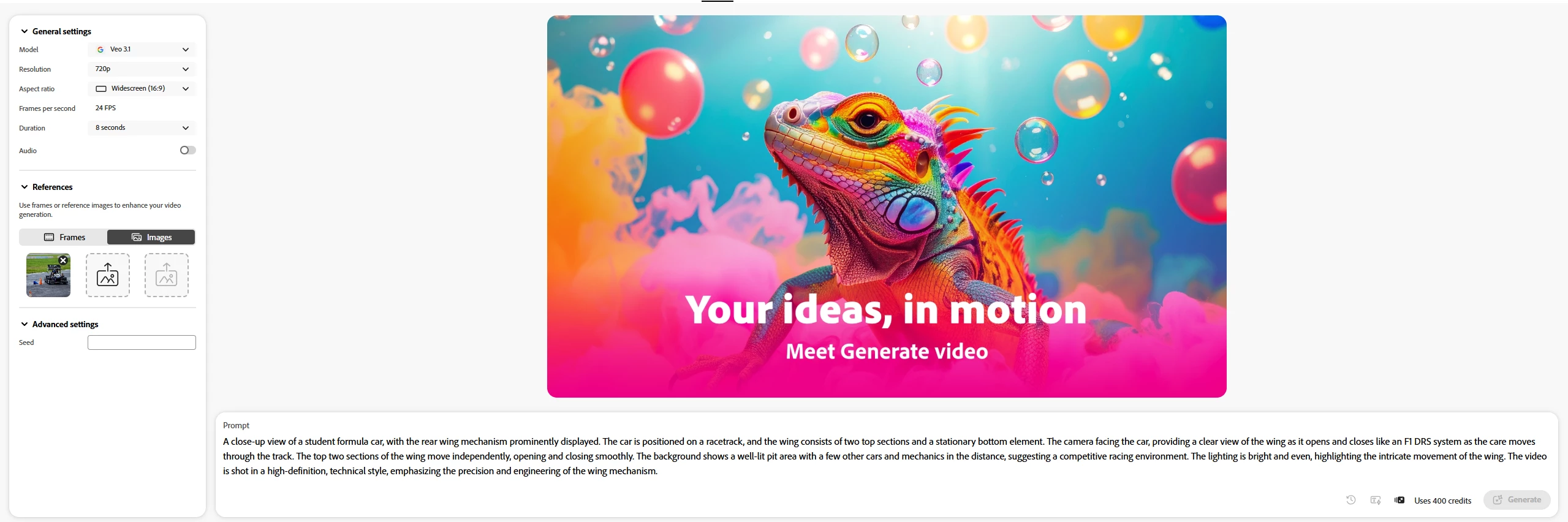
Will not generate a video, i hit generate and nothing happens, button becomes unclickable, and no indication of loading or generation present. Cannot generate. 
 

    15 replies

    Participant
    March 29, 2026

    AI video generation problem
    Hi,

    I couldn’t generate AI videos using veo3 or veo3 fast. I tried several prompts but all of them returns;


    “Can't load

    We can't display the generated video.
    You can edit and try again.”

    Could you pls solve this issue?

    Participant
    March 27, 2026

    Je n'arrive pas à convertir une image en vidéo. Le bouton « Créer » devient grisé et rien ne se passe.
    J'essaie d'importer des images, mais quel que soit le modèle choisi (Google Veo 3, Rayz, etc.), le problème persiste. Lorsque je clique sur « Générer la vidéo », le bouton devient grisé et rien ne se passe. J'essaie depuis hier. J'ai utilisé différentes options et différentes images, mais le résultat est toujours le même. Est-ce que tout le monde rencontre ce problème en ce moment, ou est-ce que je suis le seul ? J'ai essayé avec un autre navigateur, et je me suis déconnecté puis reconnecté à mon compte, mais rien n'y fait. Il me reste 1800 crédits et seulement 1 jours pour les utiliser.

    Participant
    March 27, 2026


    Mahiv
    Participant
    March 27, 2026

    Hi when is this gonna resolve not able to. 

    Participant
    March 27, 2026

    when im converting an image into a video, at first works but then i can't generate mote. button is now in gray. i have all my credits

    grknd5819718
    Participant
    March 27, 2026

    I can't generate image to video, create button turn to grey and nothing happens
    I am uploading images, but no matter which model I choose—whether it's Google Veo 3, Rayz, etc.—it makes no difference. When I click 'generate video,' the button turns gray and nothing happens. I've been trying since yesterday. I've used different prompts and different images, but the result is exactly the same. Is everyone experiencing this issue right now, or is it just me? I've tried using a different browser, and I logged out and back into my account, but the situation hasn't changed. I have 2,000 credits left and only 1 week remaining to use them.

    jamesl26
    Participant
    March 27, 2026

    For the last 2 days I have been unable to generate any videos from images using Firefly. I have enough credits for 33 such videos, with 17 days to reset.
    When I upload the reference image, select the model, then click generate.  The screen just stays there, without showing the furly animal with the hair swaying the wind.  It goes nowhere,  but no credits were taken for the task.  I have 2590 credits left for the current billing cycle.

    Hajar Toutsi
    Community Manager
    Community Manager
    March 27, 2026

    Hi jamesl26,
    Thanks for flagging this to us.

    This issue seems to happen to different users trying to generate a video. Could you please confirm whether this occurs only when generating with the Veo model, or if it also affects other models?

    Once we have this information, we can escalate the matter to the product team and provide them with as much useful data as possible.

    We appreciate your help and feedback!


    Hajar

    Mahiv
    Participant
    March 27, 2026

    All models not working fix immediately 

    ilama
    Participant
    March 27, 2026

    Добрый день! Проблема с генерацией видео. Задание и изображение загружено. Кнопка-генерировать-неактивна. Как исправить, в чем проблема? 


    Hajar Toutsi
    Community Manager
    Community Manager
    March 27, 2026

    Hi ilama,
    Thanks for flagging this to us.

    This issue seems to happen to different users trying to generate a video. Could you please confirm whether this occurs only when generating with the Veo model, or if it also affects other models?

    Once we have this information, we can escalate the matter to the product team and provide them with as much useful data as possible.

    We appreciate your help and feedback!


    Hajar

    Jacek5C5C
    Participant
    March 26, 2026


    I can not generate ANY video with any prompt and any refference frames. Button is greyed out. As in the picture: I have more than enough credits

    lea5mx
    Participant
    March 26, 2026
    I don't know if you have implemented another code or update, but the platform simply doesn't work to generate a simple motion prompt for a motion graphics video. It won't let me access the button to create the video, and even though I've already changed the AI model that can be used to create the video, it's still useless.
    After entering the prompt, the "create" button was unavailable, and when I refreshed the screen, it would deduct my credits without creating any material.


    kinggandroff
    Participant
    March 26, 2026

    I'm having an issue trying to generate video in Firefly. I can set up the start frame and end frames, using VEO 3.1, but the Generate button remains inactive (greyed out). Note image generation works.


    And here’s what’s being reported in Chrome dev tools:

    chunk.6cc1651e6f2fc356.min.js:3 Uncaught (in promise) TypeError: Unhandled Promise Rejection: e is not a function
        at r.<anonymous> (chunk.6cc1651e6f2fc356.min.js:3:184890)
        at s (chunk.6cc1651e6f2fc356.min.js:3:184679)
        at u (chunk.6cc1651e6f2fc356.min.js:3:184884)
        at p (chunk.6cc1651e6f2fc356.min.js:3:184938)
        at r.render (chunk.cc3b9e1e3a95b1f9.min.js:4784:1197)
        at push.279414.r.value (chunk.6cc1651e6f2fc356.min.js:3:185570)
        at push.279414.r.value [as render] (chunk.6cc1651e6f2fc356.min.js:3:185570)
        at r.update (bundle.5b67d17ece604d72.min.js:216:3386)
        at r.performUpdate (bundle.5b67d17ece604d72.min.js:50:159944)
        at r.scheduleUpdate (bundle.5b67d17ece604d72.min.js:50:159478)
        at r._$EP (bundle.5b67d17ece604d72.min.js:50:159386)​​​​​​​
