Participant
June 29, 2026

P: The video generation page becomes unresponsive, and buttons are no longer clickable

  • June 29, 2026
  • 103 replies
  • 900 views

i cant click on generate, it does not get clicked on genrate or anywhere else on that page, it freeze everything

    Pinned Reply By Hajar Toutsi

    Hi everyone, 

    Update:

    We appreciate your patience while the team worked on a fix. Good news, this bug is now resolved. Thanks for bearing with us.


    We were able to reproduce the same issue on our end. The product team is actively investigating the issue.

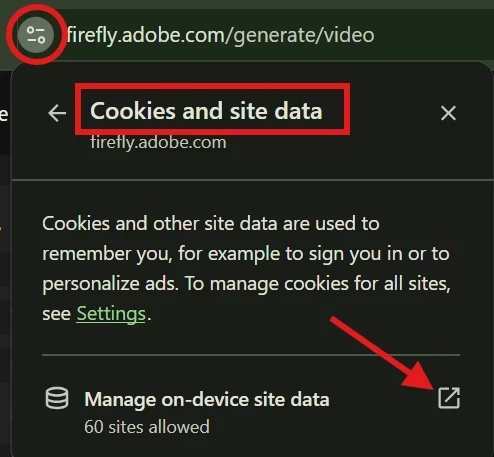
    As a temporary workaround, please try clearing your browser cookies (specifically for the site) and then reload the page. Until the team comes up with a fix, this workaround should restore the ability to temporarily type prompts and upload images.


    We appreciate your patience while we work on a fix.

    Hajar

    103 replies

    Little Big Ideas
    Participant
    July 30, 2026

    I clicked on the ‘More’ button in the Create Anything panel. Once in to the comprehensive editor, all options on the page, that should be clickable, such as options, prompt area, menu links etc. do not function. I have tried this in Firefox and Chrome, with the same issue in both. I tried entering the prompt in the first page and then going into the main editor, the prompt is there but cannot be selected and all other functions are unresponsive.

    yori_2006
    Participant
    July 30, 2026

    Firefly Web App freezes when using Generate Image and Generate Video
    The Firefly Web application is not working properly. The "Generate Image" and "Generate Video" buttons freeze and become completely unusable. I have already tried:

    - Clearing the browser cache and cookies.

    - Allowing pop-ups.

    - Using Google Chrome, Microsoft Edge, and Brave.

    The result is exactly the same in every browser. This issue affects the Firefly Web application and makes it impossible to use these features normally. Please Adobe, investigate this issue and fix this bug as soon as possible.


    kirlisefa
    Participant
    July 30, 2026

    I have the same issue on the image page, it used to work when you refreshed the page but not anymore. 

    sens_6922
    Known Participant
    July 30, 2026

    Most of these fixes arent working for me, even after i allowed popups and cleared cookies, but incase anyone else has the same issue, if you are getting the welcome popup for a fraction of a second, if you can hone in on exactly where the get started button is, when you refresh the page you can click it just before it disappears. Then you can generate. Unfortunately you will have to do this every time you go on the page.

    Hitra+Amazon
    Participant
    July 29, 2026

    i also face the same issue from almost 2 weeks i guess.

    Hajar Toutsi
    Community Manager
    Community Manager
    July 29, 2026

    Thanks Hitra+Amazon, for reporting.

    The product team is currently investigating this matter, so far we suggest that you clear your browser cookies (specifically for this site) or allow your browser to send pop-ups and use redirects and reload the page as a temporary workaround.


    We appreciate your patience as we work on a permanent fix.
     

    Hajar

    Enjoyneer
    Participant
    July 29, 2026

    I can't generate videos, the webpage is just frozen. It won't allow me to add prompts or click on any button. However if I go to the generate image, I have no issues at all!
    I can no longer use the generate video function through Adobe Firefly in a web browser. The webpage is just frozen. It won't allow me to add prompts or click on any button.

    However if I choose ‘generate image’, I have no issues at all and have full functionality.

    This issue started last week for me. I still have 830 of 4000 credits left until 1 August when it resets.

    Hajar Toutsi
    Community Manager
    Community Manager
    July 29, 2026

    Hi Enjoyneer,
    Thanks for reporting.

    Your post has been merged into this thread! The product team is currently investigating this matter, so far we suggest that you clear your browser cookies (specifically for this site) or allow your browser to send pop-ups and use redirects and reload the page as a temporary workaround.


    We appreciate your patience as we work on a permanent fix.

    Hajar

    AlAvram
    Participant
    July 28, 2026
    AlAvram
    Participant
    July 28, 2026

    Every time I try to generate a video using Adobe Firefly, the page becomes completely unresponsive after I select the AI model and video format.

    The issue occurs consistently with the following steps:

    1. I open the Firefly video generation tool.
    2. I select the model I want to use.
    3. I select the video format or aspect ratio.
    4. Immediately afterwards, the entire Firefly window freezes.

    Once the window freezes, I cannot change any settings, enter a prompt, start the generation, or interact with the page. I have to refresh or close the window, but the same problem happens again every time I repeat the process.

    I have already cleared my browser cache and restarted the browser, but the issue still persists. The problem is reproducible every time and currently prevents me from generating any videos with Firefly.

    Participant
    July 27, 2026

    P: The generation page becomes unresponsive, and buttons are no longer clickable…. 

    I've had the same thing for two months.
    Participant
    July 26, 2026

    Adobe Firefly not working
    When I start using Adobe Firefly and try to use a tools, the site seems to "freeze"—though not literally, as I can still perform some actions; however, I can't generate images, videos, or anything else, even though I still have available credits. I’ve tried using a different browser and clearing my cache and cookies, Turn off ad block, Tried incognito, log out, refresh etc. but the problem persists. The site gets stuck, and I’m unable to do anything on it (It is not taking even credits). Only thing I can do is to choose which tool to use.