Participant
June 29, 2026
Sticky

P: The video generation page becomes unresponsive, and buttons are no longer clickable

  • June 29, 2026
  • 76 replies
  • 535 views

i cant click on generate, it does not get clicked on genrate or anywhere else on that page, it freeze everything

    Pinned Reply By Hajar Toutsi

    Hi everyone, 

    We were able to reproduce the same issue on our end. The product team is actively investigating the issue.
     

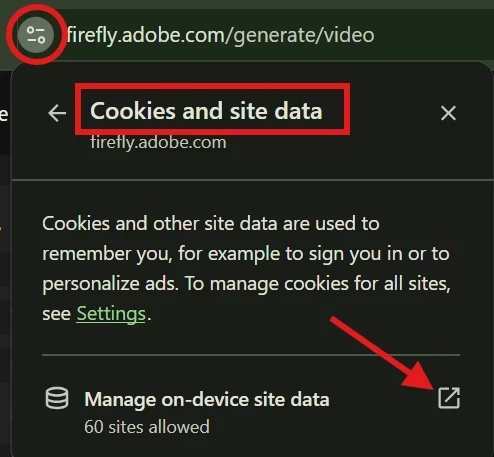
    As a temporary workaround, please try clearing your browser cookies (specifically for the site) and then reload the page. Until the team comes up with a fix, this workaround should restore the ability to temporarily type prompts and upload images.


    We appreciate your patience while we work on a fex.

    Hajar

    76 replies

    Participant
    July 23, 2026

    Video generation is not working for me most of the time. I often have to reload the page multiple times to make it run. On mobile it works just fine. But on desktop (it doesn’t make any difference if Chrome, Firefox, Edge or whatelse is used) the buttons are mostly not clickable, you can’t even write a prompt. You just can change the model you are using, but nothing happens because the page is still not clickable.

    I also tried inkognito mode, but it’s not working. I thought, maybe the firewall is creating issues but even that is not the solution. I cleared all cache, I changed the settings for popups. Nothing works for me.

    It seems to be a desktop issue only.

    Participating Frequently
    July 24, 2026

    Here is a fix that worked for me.

    Here are the instructions for Edge browser (but it will be similar to other browsers):

    1. Go to Settings
    2. Select to “Privacy, search, and services”
    3. Under “Customised behaviours”
    4. “Allowed to send pop-ups and use redirects”
    5. “Add Site”
    6. https://firefly.adobe.com
    Participating Frequently
    July 23, 2026

    In the absence of any meaningful response or a fix from Adobe in the past 23 days since this issue was first reported, here is a fix that worked for me.

    Here are the instructions for Edge browser (but it will be similar to other browsers):

    1. Go to Settings
    2. Select to “Privacy, search, and services”
    3. Under “Customised behaviours”
    4. “Allowed to send pop-ups and use redirects”
    5. “Add Site”
    6. https://firefly.adobe.com
       
    Hajar Toutsi
    Community Manager
    Community Manager
    July 24, 2026

    Thanks ​@Woolfy,
    Your post identified the same pop-up/cookie behavior we've since confirmed and pinned above. That finding has been shared with the product team and remains under review.
    Hajar

    Participant
    July 23, 2026

    está acontecendo a mesma coisa comigo


    Participant
    July 23, 2026

    Can't add the attachment pictures for the AI image creation
    Okay, here’s the deal. I’ve tried this today on 23th of July with three different browsers: Edge, Firefox and Chrome. I’m no longer able to add the attachment (reference) pictures when I try to create the AI pictures. The button that should add the picture doesn’t work, it doesn’t do a thing. 


    Participant
    July 23, 2026

    I have been experiencing an issue with Adobe Firefly for several days now. At first, I thought it was just a temporary bug, but the problem has now persisted for more than three days.

    The screen completely freezes and I am unable to use Firefly properly. Even after refreshing the page, the issue remains. I cannot import images or even type a simple prompt. 

    Hajar Toutsi
    Community Manager
    Community Manager
    July 23, 2026

    Thanks keomrt, for reporting.

    The product team is currently investigating this matter, so far we suggest that you clear your browser cookies (specifically for this site) and reload the page as a temporary workaround.


    ​​​​​​​We appreciate your patience as we work on a permanent fix.

    Hajar

    Participant
    July 23, 2026

    I have been experiencing an issue with Adobe Firefly for several days now. At first, I thought it was just a temporary bug, but the problem has now persisted for more than three days.

    The screen completely freezes and I am unable to use Firefly properly. Even after refreshing the page, the issue remains. I cannot import images or even type a simple prompt.

    Participating Frequently
    July 23, 2026

    I’m still waiting for a response from anyone from Adobe to my posts about this...Adobe are you there, anyone….there?  In the meantime, I have found a fix (for me at least). I hope it helps someone else.
    Here are the instructions for Edge browser (but it will be similar to other browsers):

    1. Go to Settings
    2. Select to “Privacy, search, and services”
    3. Under “Customised behaviours”
    4. “Allowed to send pop-ups and use redirects”
    5. “Add Site”
    6. https://firefly.adobe.com

      Absolutely pathetic response from Adobe to a critical bug that was reported 23 days ago.
    Participating Frequently
    July 23, 2026

    На відео я намагаюсь натискати на різні кнопки та ввести текст, але реакції немає

    Participating Frequently
    July 23, 2026

    також зіштовхнулася з проблемами навіть на цьому сайті, поки надсилала звернення, сайт дуже тормозить і іноді видає цікаві глюки

    Participating Frequently
    July 23, 2026


    Participating Frequently
    July 23, 2026

    Проблема з firefly adobe
    Проблема з firefly adobe, сайт ні на що не реагує, відкрита сторінка редагування відео і які б кнопки і функції не натискала, реакції - 0. Хоча годину тому все працювало, пробувала 2 браузера Google і Edge, якщо вийти через посилання на головну сторінку то в історії генерування немає передостанього відео, хоча кредити було списано, Повернуть кредити за передостаннє генерування - 600 кредитів, і вирішіть проблему зі сторінкою генерування, бо неможливо нічого згенерувати через непрацюючий функціонал сайту

    Participant
    July 23, 2026

    Os botões de geração de imagem não estão funcionando! Nao consigo digitar o comando, nao consigo voltar, nao consigo subir a imagem