Participant
June 29, 2026
Sticky

P: The video generation page becomes unresponsive, and buttons are no longer clickable

  • June 29, 2026
  • 76 replies
  • 538 views

i cant click on generate, it does not get clicked on genrate or anywhere else on that page, it freeze everything

    Pinned Reply By Hajar Toutsi

    Hi everyone, 

    We were able to reproduce the same issue on our end. The product team is actively investigating the issue.
     

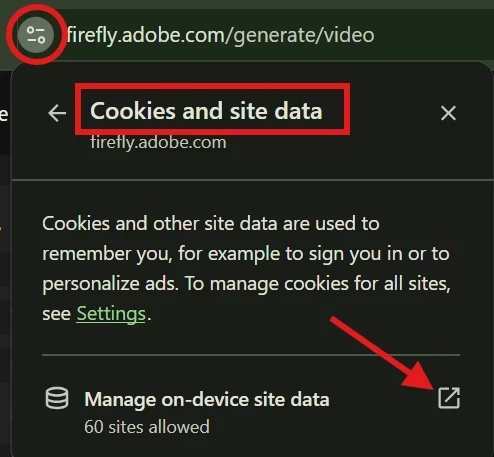
    As a temporary workaround, please try clearing your browser cookies (specifically for the site) and then reload the page. Until the team comes up with a fix, this workaround should restore the ability to temporarily type prompts and upload images.


    We appreciate your patience while we work on a fex.

    Hajar

    76 replies

    Hajar Toutsi
    Community Manager
    Community Manager
    July 3, 2026

     Hi Kevin_1111,
    Thanks for reporting this.  
     

    We were able to reproduce the same issue in the past. It appears to be caused by a problem with the site’s stored data.
    As a workaround, please try clearing your browser cookies (specifically for the site) and then reload the page. This should restore the ability to type prompts and upload images.


    Let us know if the issue persists after that.

    Hajar
     

    Participant
    July 3, 2026

    Adobe Firefly regularly won't generate, and if it does it won't allow download or Edit
    Over the last week or so on using Firefly, I have set a reference image and asked firefly to make changes to it as I have been doing for the last year or more. When I hit the Generate button nothing happens. It also doesn’t Download or allow Edit. 

    Even for images it successfully generated days before, it won’t allow Download or Edit.

    I keep swapping between the Model options when trying to Generate, which occasionally helps, but not today.

    I am falling behind in the project I am working on so would greatly appreciate your help in resolving this issue.

    I am currently using Chrome browser.

    Participant
    July 1, 2026
    Participant
    July 1, 2026

    @Oh.N8 Nate, I'm in Sao Paulo right now, and here is 8AM, so I restarted the computer, then I tried again and the problem persisted.

    For example, when I click a reference image, the front end of the browser firefly is not responding. I can't upload.

    Now I can write the prompt, but sometimes I can't even type.

    Sounds the page stop works.

    Please, communicate with the programmers Adobe platform to review the possible problem. Also, when I've generated an image, I have problems downloading the image. When I click to download the image doesn't download. I need to turn off the firefly, access it again and download from my files history.

    Really instable

    and the Firefly got some problems. Attach a print screen like U ask. Thanks Nate!!

    dpeter70
    Participant
    July 6, 2026

    exactly what happend to me too. And some other buttons are the same. Long list of errors see in the console of the browser

    July 1, 2026

    Hey ​@Linco7n 
     

    Could you please reply with the following information:
    • A screen shot of the whole browser or application window (including your avatar in the upper right corner) with the error or problem showing or when the problem is happening (not just the error message itself).

    • What model were you using (such as Firefly Image 3, Firefly Image 4, Firefly Image 4 Ultra, Imagen 3, etc.)?

    • A copy of the keyframe(s) or reference images (if any) you were using.

    This helps us help you. Sometimes there might be a trigger word in the prompt.


    Cheers

    Nate

    Participant
    June 30, 2026

    The Firefly need an app, the browser is not working…. none of buttons recognize my clicks and actions!!! Help me Adobe!!! Why…. is so bad…. why Adobe!!!!

    Hajar Toutsi
    Community Manager
    Community Manager
    June 30, 2026

    ​Hi Cedric Marchal,
    Thanks for reporting this.  


    We were able to reproduce the issue. It appears to be caused by a problem with the site’s stored data.
    As a workaround, please try clearing your browser cookies (specifically for the site) and then reload the page. This should restore the ability to type prompts and upload images.


    Let us know if the issue persists after that.

    Hajar


    Participant
    June 30, 2026

    firefly video gen doesn't work
    Few hours Firefly Video gen doesn’t work. impossible to put prompt in the text box. Impossible to load an image. Only change the AI and the resolution work correctly.

    Hajar Toutsi
    Community Manager
    Community Manager
    June 29, 2026

    Hi saurab_nautiyal,
    Thanks for writing in and sorry to hear Generate isn't cooperating, let's get this sorted.

    We have successfully generated both an image and a video, and the issue doesn’t seem replicable on our end. Can you please try these steps, and let us know if any of them helped:

    1. Clear your browser cache and cookies, then reload the page and try again

    2. Try a different browser: Chrome and Firefox tend to be the most stable for Firefly

    3. Disable browser extensions: ad blockers and script blockers in particular can interfere with the generate button

    4. Check your internet connection: a dropped or unstable connection mid-request can cause the UI to lock up

    5. Log out and back into your Adobe account, then retry


    Also, are you seeing any error message at all when it freezes, or does the page just go completely unresponsive? And does this happen only on image generation, or on other Firefly features too?
     

    That'll help us narrow things down quickly!

    Hajar