Participant
June 29, 2026

P: The video generation page becomes unresponsive, and buttons are no longer clickable

  • June 29, 2026
  • 103 replies
  • 901 views

i cant click on generate, it does not get clicked on genrate or anywhere else on that page, it freeze everything

    Pinned Reply By Hajar Toutsi

    Hi everyone, 

    Update:

    We appreciate your patience while the team worked on a fix. Good news, this bug is now resolved. Thanks for bearing with us.


    We were able to reproduce the same issue on our end. The product team is actively investigating the issue.

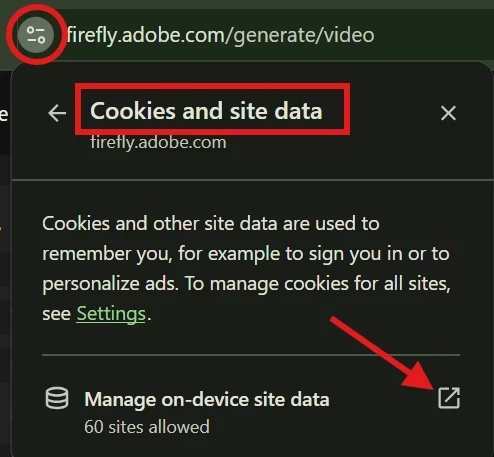
    As a temporary workaround, please try clearing your browser cookies (specifically for the site) and then reload the page. Until the team comes up with a fix, this workaround should restore the ability to temporarily type prompts and upload images.


    We appreciate your patience while we work on a fix.

    Hajar

    103 replies

    Participant
    July 22, 2026

    Website keeps freezing, cannot submit requests to generate image. Cannot change settings, cannot copy text, cannot click on anything.
    Website freezes when generating image. I can select different things, like ratio, model, resolution etc. But I cannot select text, edit text or click generate. 

    Hajar Toutsi
    Community Manager
    Community Manager
    July 22, 2026

    Hi Demi28887477wqjf,

    Thanks for reporting this!
    ​​​​​​​

    While the team is still investigating the root cause of the freezing, a temporary workaround is to clear your browser cookies (specifically for this site) and reload the page. That should restore your ability to click and generate.

    We appreciate your patience as we work on a permanent fix.

    Hajar

    sens_6922
    Known Participant
    July 21, 2026

    I am having this issue constantly but its not just video its image too. Sometimes i can refresh the page but sometimes nothing else helps. At the moment it is every single time i open firefly i need to refresh or go back to the beginning and open the URL clean

    July 21, 2026

    Hey ​@ahspares 

    I am having the same issue. If you could create a short video of your workflow this would help considerably.

    I had to log out of my Creative Cloud app and then log back in. If that doesn’t work, I generated an image and then pressed create a video uploaded my image and choose a model.

    Cheers
    Nate

    ahspares
    Participant
    July 21, 2026

    The video generating screen freezes, i.e. I cannot edit or add new text and none of the buttons function.
    None of the buttons or text on the screen are clickable or editable. I have to use the browser back button to get out of the screen.

    Hajar Toutsi
    Community Manager
    Community Manager
    July 21, 2026

    Hi everyone, 

    Update:

    We appreciate your patience while the team worked on a fix. Good news, this bug is now resolved. Thanks for bearing with us.


    We were able to reproduce the same issue on our end. The product team is actively investigating the issue.

    As a temporary workaround, please try clearing your browser cookies (specifically for the site) and then reload the page. Until the team comes up with a fix, this workaround should restore the ability to temporarily type prompts and upload images.


    We appreciate your patience while we work on a fix.

    Hajar

    sens_6922
    Known Participant
    July 21, 2026

    Unfortunately this is not working for me. However, when i cleared all the cache/cookies, AND agreed to all cookies and tracking then it worked. But honestly i dont think whether or not a site works should depend on accepting all cookies surely? Isn’t it meant to be optionlal?

    Participant
    July 21, 2026

    Impossible to use the page generate a video from an image. no buttons work...
    When i click on a button, nothing happens. I can’t upload an image. I can’t write a prompt...

    Hajar Toutsi
    Community Manager
    Community Manager
    July 21, 2026

    Hi Estepa37,
    Thanks for letting us know about this!

    Please check out the pinned message on this thread for a quick workaround. We'd love to hear back from you on whether it helps get things working again.

    Hajar

    Hajar Toutsi
    Community Manager
    Community Manager
    July 20, 2026

    Hi HeartLight_Studio,
    I'm sorry to hear that Firefly is freezing when you try to switch to the video generation page.

    To help us investigate and troubleshoot this issue, could you please reply with a brief screen recording of your workflow right as this behavior occurs? Please make sure that the exact URL you are using is fully visible in the browser's address bar.

    We look forward to getting this sorted out for you.

    Hajar

    HeartLight_Studio
    Participant
    July 28, 2026

    Hi,

    it is quite hard to me recording the page while it doesn’t work.

    Please consider that the perfect descriction is above: Once i switch to Video generation page, firefly stop working and i must close the page. I can’t create any video. 

    Literally i can’t do anything, no geration, no parameters changing, anything.


    I lost lot of time, i probably switch tool couse i cannot continue is this way.


    Kind regards,

    Hajar Toutsi
    Community Manager
    Community Manager
    July 29, 2026

    Thanks for getting back to us, HeartLight_Studio
    I’ve merged your post into this thread, as it describes the same issue you’re experiencing: the page becoming unresponsive and buttons being unclickable.

    The product team is currently investigating this matter, In the meantime, we suggest that you clear your browser cookies (specifically for this site) or allow your browser to send pop-ups and use redirects, then reload the page as a temporary workaround.


    ​​​​​​​We appreciate your patience as we work on a permanent fix.

    Hajar

    HeartLight_Studio
    Participant
    July 18, 2026

    I can’t create any video.
    Once i switch to Video generation page, firefly stop working and i must close the page. I can’t create any video. 

    Participant
    July 17, 2026

    Some parts of Firefly don't open even when I click on them. For example, nothing happens when I click "Add image" to create a video. It also doesn't open when I click on my name in the top-right corner to check my remaining credits.

    Hajar Toutsi
    Community Manager
    Community Manager
    July 17, 2026

    Hi Emre,
    Thanks for taking the time to report this.  
     

    We were able to reproduce the same issue in the past. It appears to be caused by a problem with the site’s stored data.
    As a workaround, please try clearing your browser cookies (specifically for the site) and then reload the page. This should restore the ability to type prompts and upload images.


    Let us know if the issue persists after that.

    Hajar
    [Moved to bug reports]

    dpeter70
    Participant
    July 5, 2026

    Es sieht so aus als ob einige Buttons/Schaltflächen nicht mehr auf den Mouse-Click reagieren. Die Webversion von adobe firefly. Ich habe es in Google Chrome, MS Edge und Mozilla Firefox versucht. Sofern ich alle Cookies und Browserdaten lösche, geht es kurz. Aber nach einer Weile wieder nicht mehr. Jedes mal die Browserdaten löschen ist für mich keine Lösung. Problem besteht seit ca. 5-6 Tagen.