wschroed
Participant
July 28, 2026

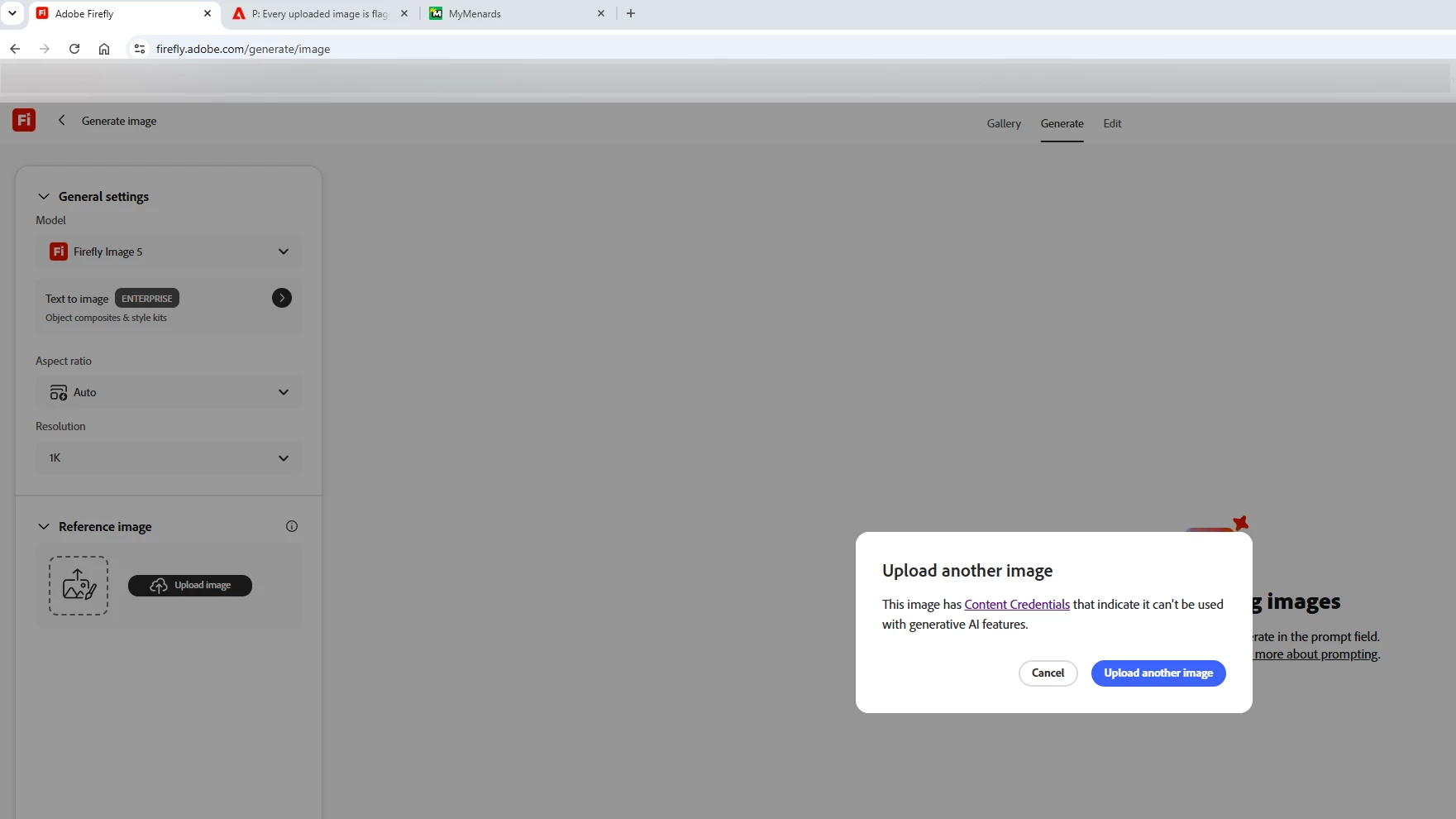
'This image has Content Credentials' error received on every Reference Image attached to Firefly Image 5 Model

  • July 28, 2026
  • 4 replies
  • 33 views
  • I have been using the Firefly Image 5 Model and uploading a ‘Reference Image’ before entering my prompt
  • Today when I tried to upload a Reference Image, I received the error screenshot below, saying the image has Content Credentials and cannot be used
  •  

  • I went in and tested several images that I have used in the past as Reference Images within the Firefly 5 Model and I got the same error now, despite using them successfully in the past.
  • I also logged out of my account/logged back in and tried changing the file extension and color mode.
  • I have attached the reference images I was attempting to upload to this ticket - but as I said, it gives me the same error regardless of what image I use.


    4 replies

    Hajar Toutsi
    Community Manager
    Community Manager
    July 28, 2026

    Hi wschroed,

    First off, I checked the reference images you provided in the attachment, those are some awesome designs!
     

    Regarding the error you are experiencing, we did see similar behavior a few months ago that impacted some of our Enterprise account holders, but that specific issue was resolved. I also went ahead and conducted a test on my end using one of your provided reference images, but I wasn't able to reproduce the error.


    Before we escalate this to the product team for further investigation, could you help us with a couple of additional details?

    • Model Scope: Is this error only impacting the Firefly Image 5 model, or are you also experiencing it when switching to other models, regardless of which reference image is uploaded?

    • Browser Logs: Could you generate and attach a HAR file while reproducing the exact workflow that triggers the "Content Credentials" error message? You can follow these instructions on how to generate a HAR file to collect the network logs. (make sure to attach it in a direct message to protect your personal data)

    Once we have this confirmation and the log file, we'll get this investigated further by the team.
    Thanks for your patience and for helping us troubleshoot!

    Hajar


    wschroed
    wschroedAuthor
    Participant
    July 28, 2026

    @Hajar Toutsi Thank you for the reply, to answer your questions:


    Model Scope: It is impacting all FIrefly models - I primarily use Firefly Image 5, but I checked Firefly Image 4 Ultra, Firefly Image 4, and Firefly Image 3 and got the same error in all when trying to upload a reference image. The partner models seem to allow me to upload reference images, though.

    Browser Logs: I have sent you a direct message with a link to the HAR file

    ​​​​​​​

    Hajar Toutsi
    Community Manager
    Community Manager
    July 29, 2026

    Thank you for providing the file and confirming the model scope, wschroed.

    We've shared the details with our product team and the investigation is still ongoing, but we wanted to share what we've found so far in case it helps.

    The error appears before anything runs because Firefly checks for Content Credentials (C2PA metadata) at the moment an image is uploaded, before any generation is attempted. When those credentials indicate the image shouldn't be used for AI inference, it's blocked at that stage. This typically happens with images taken on a Pixel phone or processed through a Google service like Gemini or Google Photos, which can embed those credentials automatically.

    That said, our initial look suggests this could also be a false positive. One scenario we're looking into is whether the restriction might be inherited from another image that was embedded or layered into yours at some point, which the system may be treating too aggressively. We're not certain yet, and that's part of what's being reviewed.


    In the meantime, two workarounds that may help:

    • Take a screenshot of the image before uploading, screenshots generally don't carry embedded metadata
    • Use a metadata-stripping tool to remove the C2PA data from the file before uploading

    We'll follow up once we have a clearer picture from the product team. Please let us know if either workaround helps in the meantime.

    Hajar