



Thiago Guimarães
Participating Frequently
June 18, 2024

After Effects Freezes after some time with error: "Direct2D Drawbot Error. HRESULT:-2005270523"

  • June 18, 2024
  • 159 replies
  • 53195 views

I can't say for sure, but after two or three more recent versions of AE Beta I started to get a random error, after working for a few minutes the whole computer crashes and then this Direct2D Drawbot Error box. HRESULT:-2005270523 appears, but I can't close it, it keeps reopening endlessly and then I have to force close the program.


I've been using AE Beta since they redid the interface, it's just become another program! It's very fluid and enjoyable. I'm not using to use the retail version because he not received the interface update., but I can say that the problem is in the beta, because when i use the reail version there is no issue i don't have any errors or freezes.


Here's a picture of the error I get when I close.
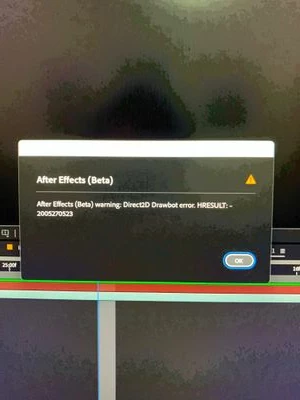


AE Beta V24.6.0 b23

Windows 11, i7 9750H, GTX 1660TI 6GB, 32gb de RAM, 512gb SSD.

Driver Nvidea Studio  555.99.


159 replies

Community Manager
February 13, 2025

Hello @edddim,

Appologies that you and others are having this issue. Have you had a chance to try any of the suggested work arounds in the pinned post?

This is still being actively investigated for further improvements on AEs side.

All the best,Jessica McMillan - AE Engineering
Participating Frequently
February 13, 2025

No, it's FINE. I LOVE to reboot my pc 10x every day. Especially when the AE material is stupid simple, after updating every possible bios WIN11 and driver, resetting the UI, purging everything 5x and working in safe mode (not like i was actually using any plugins). No problem!. And the most time is taken in figuring out what exactly to do. I don't mind doing it two or three or four times again because AE+AI crash the graphics driver, knocking out half of windows. Really! It's no problem that my project is two days behind schedule and my customers are pissed off. This is fine.

In the past, i have shied from AMD GPUs for fear of compatibility / driver issues. These days are now over.

Freedom is just another word for nothing else to lose.

Actually, i think i will be able to get by in the future without Adobe products. It will be a little work to transform,

But I am really looking forward to it.

Participant
February 13, 2025

FYI, hoping this helps someone, Microsoft Windows 23H2 has known issues with the Direct2D framework. You may observe this if you use Firefox ESR to play back video with hardware decoding enabled. Update to 24H2 and the latest production grade GPU drivers and you should be all set. https://www.askvg.com/windows-11-22h2-2022-update-resolved-or-fixed-issues/#issue_you_might_receive_an_error_with_apphelpdll_from_apps_using_directx

Participant
February 11, 2025

Hi, just to add to the data you may or may not be collecting for this, I am also having the same issue, with the same error code: Direct2D Drawbot Error. HRESULT:-2005270523, ever since updating to AE ver 25.1.


My system:

Nvidia GeForce RTX 2060 Super

Nvidia Driver Version: 572.16

64GB RAM

Intel Core i7-9700K CPU @ 3.60GHz 3.60 GHz

Windows 11.


Hope that helps and hope it gets fixed soon.


Participating Frequently
February 11, 2025

now relaunching/ rebuilding  this stupid simple project for the 5th time.


Participating Frequently
February 11, 2025

Still a thing. Even after updating BIOS, GBU-Nvid driver,, Adobe ... I was not even using AE when it happened. This is some OS-NVIDIA driver thing. @Adobe: you need a WAY MORE ROBUST  error handling solution. I have to click on the error field 'ok' for EVERY FRAME in the comp? seriously.?

MASSIVE work on the error handling infrastructure is necessary. CC has become cash cow the next disruptor is now despeately awaited.

Participant
February 9, 2025

Update : Uninstalled Animation Composer and didn't had any poroblem at all ! 

AngeliqueGeorges
Participating Frequently
February 8, 2025

Joining the party with the same issue...


AE 25.0.1

Windows 10

Motherboard: Gigabyte Z390 Designare

RAM: 4x Samsung DDR4-2666 32GB

CPU: Intel(R) Core(TM) i9-9900K CPU @ 3.60GHz 3.60 GHz

GPU: Nvidia GeForce RTX 2070 8GB Blower Fan

Participant
February 8, 2025

Hi, 

Got the same issue since a long time and never really understood why... 


And looking at your post made me realise that I'm also using Animation Composer so I guess it should come from it or from AE dealing with thid-party plugins... 


Not a big news with my message but I hope maybe it will help dev teams to find a fix 🙂 


Have a good day all !

Participating Frequently
February 7, 2025

Try to disable GPU acceleration in windows settings, that worked for me