



Thiago Guimarães
Participating Frequently
June 18, 2024

After Effects Freezes after some time with error: "Direct2D Drawbot Error. HRESULT:-2005270523"

  • June 18, 2024
  • 160 replies
  • 53537 views

I can't say for sure, but after two or three more recent versions of AE Beta I started to get a random error, after working for a few minutes the whole computer crashes and then this Direct2D Drawbot Error box. HRESULT:-2005270523 appears, but I can't close it, it keeps reopening endlessly and then I have to force close the program.


I've been using AE Beta since they redid the interface, it's just become another program! It's very fluid and enjoyable. I'm not using to use the retail version because he not received the interface update., but I can say that the problem is in the beta, because when i use the reail version there is no issue i don't have any errors or freezes.


Here's a picture of the error I get when I close.
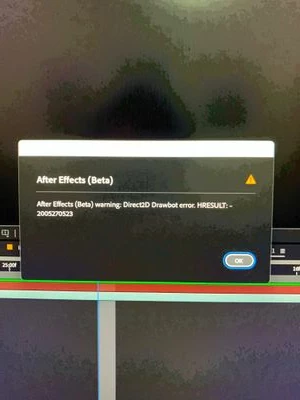


AE Beta V24.6.0 b23

Windows 11, i7 9750H, GTX 1660TI 6GB, 32gb de RAM, 512gb SSD.

Driver Nvidea Studio  555.99.


160 replies

Participating Frequently
February 7, 2025

Try to disable GPU acceleration in windows settings, that worked for me

Participating Frequently
February 6, 2025

I recently upgraded my system from my 2080 Ti to a 4080 Super and upgraded back to Windows 11. The new GPU has fixed my crashing issues. On Windows 11, with the 2080 Ti, my system was crashing on both v24 and v25. On Windows 10 it wasn't crashing on either. My secondary system absolutely crashes if I try and edit in Pr/Ae now that it has the 2080 Ti, but it's not used for editing, so that's not really relevant for me now. Probably the most expensive fix, but there ya go, buy a new GPU for an exorbitant amount of money and solve all your Adobe problems.


System 1

5700X3D

RTX 4080 Super 16GB

64GB Ram

1000w PSU

Nvidia Studio Driver 572.16


System 2

3700X

RTX 2080 Ti 11GB

16GB Ram

650w PSU

Nvidia Studio Driver 572.16

charmander4444
Participating Frequently
February 5, 2025

I've noticed it crashes a lot when those stupid little tool tips pop up. I keep turning the stupid little tool tips off in Preferences, but then it crashes and I have to reset my preferences which means those stupid little tool tips pop up again 😞

Participant
February 3, 2025

I am having this issue 10 times a day. Is there any fixes avalable?

Known Participant
February 3, 2025

So my Quadro 4000 is now out of this workstation and replaced by an TUF 4080 Super. So far so good, but dude how laggy is AE 25. Opening projects, saving, formobjects, GeoLayers cards. Its not funny. really pls make this more responsive. Since my system is more than good enough:

Supermicro M12SWA-TF
AMD Ryzen Threadripper PRO 5965WX 24-Cores
RTX 4080 SUper 16 GB VRAM (TUF) 
128 GB DDR 4 RAM
2 TB SSD NVME WD Blue SN570 (Cache)
1 TB SSD Samsung 980 PRO 1 TB (OS)
10 Gbit Network Adapter


Participant
February 3, 2025

The error still continues, it only happens when I try to change the browser in min another monitor. It happens every 10 minutes, how is it possible that such a large company cannot identify the error, many days have passed and many users have reported this problem

Participant
January 31, 2025

After a lot of debugging, I found out that it happen with certain files only, which I believe is related to the codecs. MP4 - MPEG-4 are the most affected.


Setting to Windows 8 compatbility mode apparently fixed the issue. What also fixed it was to disable hardware decoding in AE, so I'm pretty sure there's something going on with the GPU when trying to decode some video files.


I'm running AE on Windows 11 with an RTX 2060 Super, by the way.

Participant
January 30, 2025

I am encountering an issue while using Adobe After Effects. The error message displayed is as follows:

"Direct2D Drawbot Error. HRESULT: -2005270523"

This error is affecting my workflow, and I am unable to proceed with my project. I have attempted basic troubleshooting steps such as restarting the software and my system, updating my graphics drivers, and resetting preferences, but the issue persists.

Could you please assist me in resolving this issue at the earliest? Let me know if you need any additional information regarding my system specifications or project settings.

Looking forward to your support.

Best regards,
Jitendra Ghodgekar

kglad
Community Expert
Community Expert
January 30, 2025

in the future, to find the best place to post your message, use the list here, https://community.adobe.com/

p.s. i don't think the adobe website, and forums in particular, are easy to navigate, so don't spend a lot of time searching that forum list. do your best and we'll move the post (like this one has already been moved) if it helps you get responses.


<"moved from using the community bugs">
nishu_kush
Legend
January 30, 2025

Merging this post with a thread with more details on this issue.


Thanks,
Nishu

Known Participant
January 30, 2025

@jitendra35274439ovdf unfortunately there is not much to do, then trying the "fixes" here that are mentioned.
Since Adobe is aware, hopefully it will get fixed or more Info about it how to solve it or avoid it can be shared.

Participant
January 30, 2025

I have same issue, what should i do ?