



Thiago Guimarães
Participating Frequently
June 18, 2024

After Effects Freezes after some time with error: "Direct2D Drawbot Error. HRESULT:-2005270523"

  • June 18, 2024
  • 160 replies
  • 53541 views

I can't say for sure, but after two or three more recent versions of AE Beta I started to get a random error, after working for a few minutes the whole computer crashes and then this Direct2D Drawbot Error box. HRESULT:-2005270523 appears, but I can't close it, it keeps reopening endlessly and then I have to force close the program.


I've been using AE Beta since they redid the interface, it's just become another program! It's very fluid and enjoyable. I'm not using to use the retail version because he not received the interface update., but I can say that the problem is in the beta, because when i use the reail version there is no issue i don't have any errors or freezes.


Here's a picture of the error I get when I close.
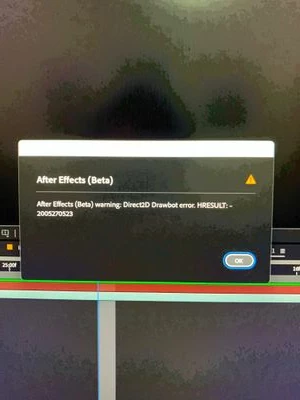


AE Beta V24.6.0 b23

Windows 11, i7 9750H, GTX 1660TI 6GB, 32gb de RAM, 512gb SSD.

Driver Nvidea Studio  555.99.


160 replies

Participant
January 23, 2025

Leaving a comment so Adobe is aware of this constant issue.


I am also getting "Direct2D Drawbot" error. Like everyone else is experience the same thing: screens freeze, goes black, and comes back—but have to restart. I'm gambling against my deadlines wherever I click and it freezes!


My GPU and BIOS are update to date. I cannot downgrade to version 24 because it will not open my current 25.0.1 aep working files. I am stuck in a cycle working every 10 minutes on repeat: freeze, reboot, open files, freeze again, and reboot.


Third-party plugins:

  • Bodymovin
  • GifGun 2
  • EaseCopy
  • PuppetTools 3


My system specs:

  • Operating System: Windows 11 Pro
  • Motherboard: ROG STRIX B550-F GAMING (Wi-fi)
  • CPU: AMD Ryzen 3950X 16-Core Processor
  • RAM: 64 GB
  • GPU: GeForce RTX 2080 Super
  • Power Supply: 800 Watts


Participant
January 21, 2025

Same problem every 30 minutes. I tried to delete 3rd party plug-ins with all cache files and updated GPU drivers. Still occur. (2025 version) 

Khalid Walid
Participant
January 19, 2025

After updating After effects to 25.01, it keeps giving errors and crashing, I can't do anything, the files are not opening and I can't render. I'm about to go crazy, please someone help me, I deleted and reinstalled it many times but the problem didn't change.
Followings are my PC specifications:

CPU - Intel 13th Gen Intel(R) Core(TM) i9-13900

GPU - Nvidia T1000

32GB RAM

hollowgrm
Participant
January 16, 2025

Same issue here, updated drivers from yesterday.
I did not appears until I send to media Encoder.


Participating Frequently
January 15, 2025

Interesting! For some reason I'm not getting the bug in Windows 10. I'm on Pr, Ae, and Me v25.1

Windows 10 Home 10.0.19045

Nvidia Studio Drivers 566.36

Participating Frequently
January 15, 2025

FYI, this bug exists on Windows 10. Will try the Windows 8 compatibility mode though.

Participant
January 15, 2025

tengo el mismo error y me esta vovliendo loco, me entorpece mi flujo de trabajo es gravisimo que pase esto 

Participating Frequently
January 15, 2025

TL;DR Set Premiere Pro, After Effects, and Media Encoder to run in compatibility mode with Windows 8. Until an official fix is issued this should allow you to run the programs without crashing on Windows 11.


Just chiming in again. I took my secondary sytem (3700x and a gtx 1070, popped in my RTX 2080 Ti, and the issue is happening now. It's related to the GPU. I've tried older drivers and that didn't solve the problem. So I'm not even sure that's a driver issue. I also tried a registry edit changing the TDR timeout to 8 seconds (Win 11 defaults to 2 seconds) and that still caused the system to crash.


I have found a temporary solution to those on Windows 11 who can't revert back to Windows 10 like I could. Find the .exe file for both Premiere Pro and After Effects (maybe even Media Encoder), right-click and go into the properties, click the compatibility tab, and check the compatibilty box, set it run in compatibility mode for Windows 8. I'm not sure if this is disabling dx12 or what, but so far, on my secondary system I'm experiencing no crashes. 

Participating Frequently
January 15, 2025

Oops, spoke too soon. Unplugging the second monitor does NOT fix the issue. I went a miraculous 40 minutes without a crash and thought it was gone, but it's still freezing with the same error message.

Participating Frequently
January 15, 2025

Can people coming across this thread with the same issue please upvote it so Adobe sees how critical this is?


I have personally lost hundreds of dollars in wasted work on this already. I'm turning tasks down because of this error. Downgrading to 2024 does not fix the problem. It still freezes in the exact same situations, just without an error message.


It seems to work okay if I unplug my second monitor, but because of my specific setup that means I can't have audio. Oh, and if you do try turning off your second monitor, make sure you close Premiere and After Effects first, because if not - you guessed it - you'll get another crash 😄