



Thiago Guimarães
Participating Frequently
June 18, 2024

After Effects Freezes after some time with error: "Direct2D Drawbot Error. HRESULT:-2005270523"

  • June 18, 2024
  • 160 replies
  • 53571 views

I can't say for sure, but after two or three more recent versions of AE Beta I started to get a random error, after working for a few minutes the whole computer crashes and then this Direct2D Drawbot Error box. HRESULT:-2005270523 appears, but I can't close it, it keeps reopening endlessly and then I have to force close the program.


I've been using AE Beta since they redid the interface, it's just become another program! It's very fluid and enjoyable. I'm not using to use the retail version because he not received the interface update., but I can say that the problem is in the beta, because when i use the reail version there is no issue i don't have any errors or freezes.


Here's a picture of the error I get when I close.
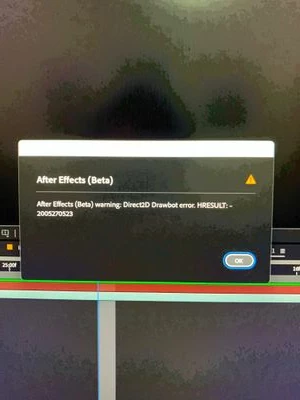


AE Beta V24.6.0 b23

Windows 11, i7 9750H, GTX 1660TI 6GB, 32gb de RAM, 512gb SSD.

Driver Nvidea Studio  555.99.


160 replies

matthew1129
Participant
January 15, 2025

I’m reaching out because this ‘Direct2D Drawbot’ error has been killing my productivity. My screens freeze, go black, and eventually come back—but by then, I’m either rebooting or scrambling to save my work. It’s happening so often that it’s affecting my ability to meet deadlines, which has started to cause some frustration at work.

I’ve tried a few fixes, but no luck so far. Here are my system specs:


  • Operating System: Windows 11 Home
  • Motherboard: ASUS PRIME Z390-A
  • CPU: Intel Core i9-9900K @ 3.60 GHz
  • RAM: 64 GB
  • GPU: NVIDIA RTX 2080 Ti (11 GB VRAM)
  • Power Supply: 800 Watts

Let me know if you need anything else from me. I’d really appreciate any help you can send my way.

Thanks,
Matthew


Participating Frequently
January 15, 2025

I reverted my PC back to Win 10 (recently upgraded to Win 11), still using the same hardware and on Premiere and After Effects v25.1 and I don't have this issue on Windows 10. No crashing, no Direct2D Drawbot Error. I have another system, 3700x, GTX 1070 8GB, 16gb ram on Win 11 with the same graphics driver version, and this issue doesn't appear to happen at all. I'm wondering if it's specific to the 20xx series cards, maybe some 30xx series? I think I saw someone with a 30 series card that also had this issue.


The Direct2D Drawbot Error was annoying, but if you started up Premiere and After Effects again after the first crash and it crashed again, the system would fully restart. Without prompting to save anything. 

Community Manager
January 14, 2025

@WellsMcKenzie While we work on this issue, I recommend downgrading to version 24. We have an improvement we are working on that will be out to Beta soon. This won't completely resolve the issue, but will stop infiniate dialogs from displaying. This still results in a state we cannot fully recover from so it will prompt you to save your work and require the application to be restarted. This seems to be an easy state for people to get into who have experienced this, so while this is an improvement, we understand there is more work to be done here to resolve the issue which may involve coordination with the companies who make the affected GPUs.

We will update here when the improvement is available in a released beta build. 

All the best,Jessica McMillan - AE Engineering
Participating Frequently
January 14, 2025

I'm also running into this issue. It tends to happen while switching from After Effects back to Premiere. My system freezes, the monitors go black (1x 3840x2160 and 1x 1920x1080). After 30 seconds the system usually recovers, but sometimes it restarts. If it recovers, Premiere won't play any video, and After Effects has these same issues appearing constantly. I'm going to test out using a single monitor and hope that works. This is my job and currently I can't complete any of my active projects which is going to start costing me money and causing issues with clients.


Custom built system - 

Ryzen 5700X3D

64 GB Ram

2 TB SSD

ROG Strix B450-F Gaming

EVGA RTX 2080 Ti

Win 11 10.0.22631 

Studio Drivers 566.36

Participant
January 14, 2025

@Steve RovettiHi friend, apparently the error disappeared after I uninstalled version 2025 and installed the latest (old) version 2024.

Steve Rovetti
Participating Frequently
January 13, 2025

I've been dealing with this issue as well, and it's absolutely killing my time on projects. It's embarrassing. Not sure how it's possible that my 2080 Super card and Ryzen 9 12core cpu with 128 GB of RAM is getting dragged to a standstill with these issues. Added bonus is the fact that it throws like 30 errors in a row, and doesn't even allow me to access my PC during that time. Is there any understanding of how to fix these issues permanently, or is this another issue that we just endure until Adobe pushes a newer release?

These bizarre issues cause myself (and I'm assuming a lot of other designers) time and money.

Participant
January 13, 2025

Hello, upon rereading the comments, I noticed that some people experiencing the Direct2D Drawbot Error box. HRESULT:-2005270523 have an RTX 2060 Super. I have all my PC drivers updated, with the latest versions of both After Effects, Windows, and GPU, but the error still persists. However, I swapped my GPU for an older one, a GTX 1050 Ti, and the error simply stopped. But I want to understand why the error occurs with the newer, more powerful graphics card. I made a significant investment in this card and want to continue using it. I would like an update on this issue—whether it's still being worked on or if Adobe will release an update to fix this error.

_Maik
Known Participant
January 11, 2025

Hello! I have brought the solution to the problem for everyone! Let me tell you, I faced the same issue as you, where the screen would go black and in worse cases, it would restart the PC. I'm currently on a 7-day free trial, haha, so if this works for you (which I know it will), leave a like on the comment—maybe the developers of "Ae" will consider rewarding me with a license, haha. Here’s what I did to solve this problem:

#1 I downloaded these DirectX exe files and installed both (I am aware that Windows already comes with these libraries, but to be safe, it was better to reinstall in case something was missing).


Link : https://www.microsoft.com/en-us/download/details.aspx?id=35     

#2 Then I installed all the old versions of ".NET Framework" that were compatible with my system (version 2016 and later). I did not install versions like (Net.8) as the system had already installed them when updating Windows.


Link : https://dotnet.microsoft.com/en-us/download/dotnet-framework


As a final step, I reinstalled the drivers for my GPU using the "Nvidia App" software. I chose the "custom installation" option and selected the "clean installation" option as shown in the image. This would ensure a clean installation to eliminate any driver issues (I use Nvidia Driver Studio). Make sure to disable Windows automatic updates before doing this, to prevent it from installing drivers and to ensure a proper installation using "Nvidia App."

When you start the installation, it will first ask you to restart your PC. When you turn it back on, you will see that the screen is at a very low resolution. Do not change it. Just open the "Nvidia App" again and proceed with the installation.


I also recommend running the "CMD" as an administrator and repairing the Windows image to avoid other conflicts with corrupt Windows files! Command: DISM /Online /Cleanup-Image


I did all of this myself! It took me a lot of time to think of these solutions and draw conclusions! ... ChatGPT also helped me a lot, guiding me and providing opinions and conclusions 😉 My GPU is a GTX 1660, i5 9th, 24GB RAM.

Do this and I assure you the issue will be resolved!! Leave a like on the comment to see if the developers consider rewarding me 🙂 since my trial will end in 3 days, lol

Community Manager
January 10, 2025

Correcting the state of this ticket.

This is being actively investigated. We know that our dialog is being shown due to a TDR. 


For those curious of what that is, here is a document from Microsoft: WDDM Support for Timeout Detection and Recovery (TDR) - Windows drivers | Microsoft Learn. Though this article is directed towards developers of drivers for displays/graphics cards. 

The OS attempts some recovery steps which then are problematic for the application. Currently that results in the looping of this error dialog. 

Thank you for providing the additional details for actions taken when this occurs: setup (duel monitors), GPU version and driver versions. This is important for us to have conversations with our partners to investigate root cause beyond the symptoms.

We will continue to update this thread as work continues.

All the best,Jessica McMillan - AE Engineering
Participating Frequently
January 10, 2025

Have you different resolution between the differents screens? For myself I have different resolutions, maybe this is a problem to question.