


UON VISUALS
Known Participant
December 11, 2025

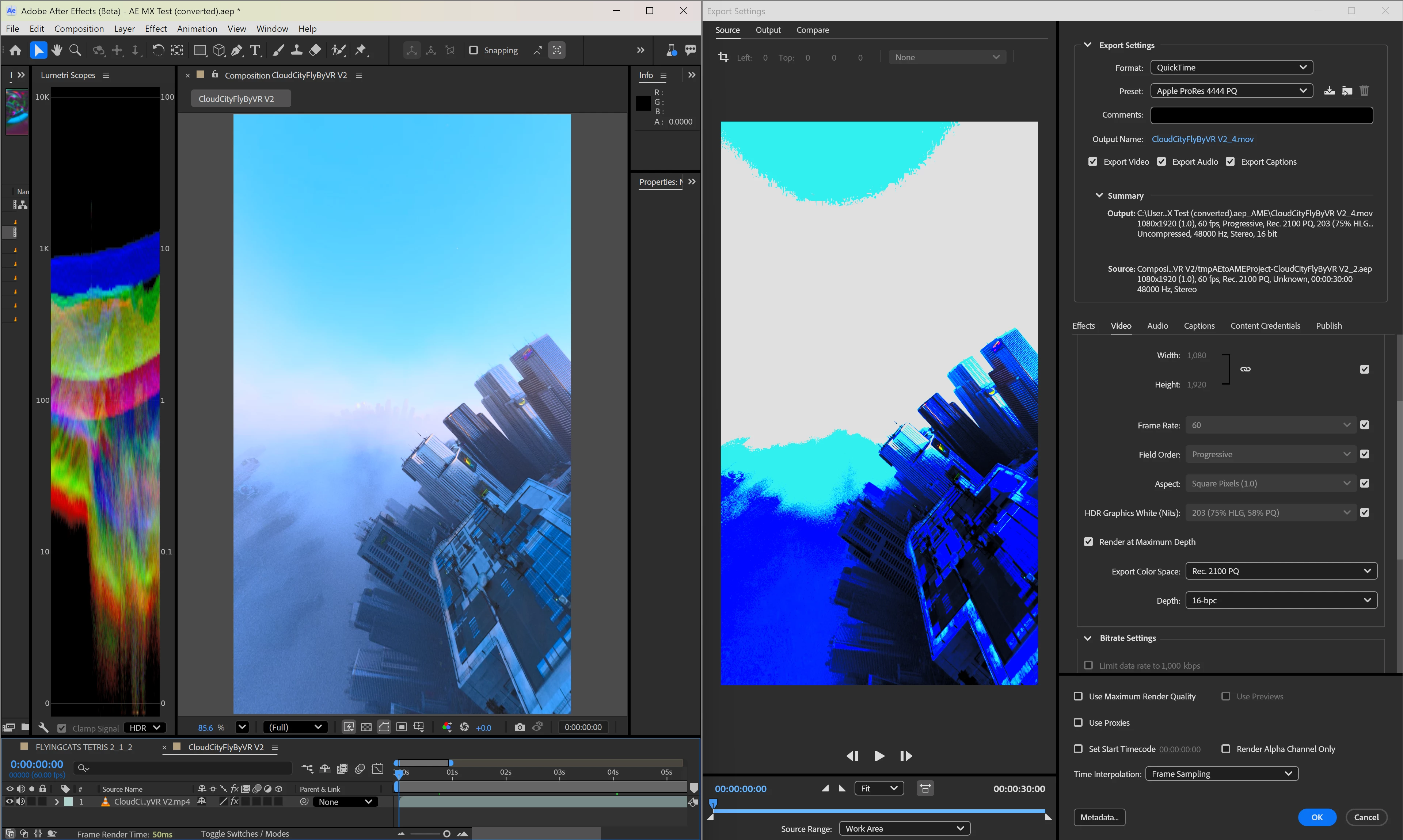
Color Management still completely broken sending AE project to Media Encoder (AE 25.5 and up)
  • December 11, 2025
  • 8 replies
  • 318 views

UONVISUALS_0-1765492586834.png

For the past few months I've been trying to talk to support about this issue because I'm unable to use any version of AE past 2025.1


Something is really wrong with the color management for HDR projects when sending them to Media encoder. I've had tech support remotely connect to my computer to try and figure out (like disabling all my plugins which of course didn't work, the issue is internal to AE/ME themselves). Every time the beta versions get updated I download them and check to see if it's finally fixed and nope. I am still waiting for responses from higher levels of support and honestly this is pretty frustrating.

Even 2025.1 isn't working 100% like when I import h.265 HLG project the image is interpreted way brighter than it should be. Can you please stop focusing 100% of your time on the AI features and get the color management fixed? 

-UON


PS I posted this directly from Media Encoder beta "Report a bug" and it says it copied my system info, but it didn't paste and I don't see it as an attatchment so here:
MSI Raider A18 HX A9W
Amd 9950X3D AI processor

64GB Ram

RTX 5090 mobile 24gb Vram

Windows 11 

Note, this same bug happens on my other computers I've installed the software on too, in the same way.

8 replies

jefubbudu
Inspiring
January 27, 2026

Jokes on you, it took them 7 years to re-add MP4 output. Mind you, i have added output formats to things i C++ myself. I wouldn't say otherwise, but i did it on one of my study projects as a kid. It's not hard. They just don't care if it's not something a shareholder will clap and throw money at.

UON VISUALS
Known Participant
January 26, 2026

I'm coming back to this thread because After Effects 2026 was released and the issue still hasn't been fixed

There's a few reasons I use Display Color Management and will need to continue doing so. Especially if I want to view my HDR content in AE in HDR on my HDR monitor. That's not the problem though as I keep saying, with DCM on of off the video sent to media encoder is still messed up. 

Here is my video file loaded into AE, and what happens when I send it to Media Encoder directly. Take note of the file format plus the lumetri scope data:

UONVISUALS_0-1769382985826.png


If I export that video, without modifications at all to the exact same format, then import it into the same AE project, look at how its values in lumetri scopes look.

UONVISUALS_1-1769383386507.png


Do those lumetri scopes values look familiar? Because they look just like what was happening in another post I made here about After Effects 2025.2, where the video itself looked correct but the scopes were off the chart.

After Effects 2025.2 - LUMETRI SCOPES INACCURATE - Adobe Product Community - 15255907


Is this enough information to convince the AE software team that this is an actual bug and stop trying to shift the blame on my plugins, settings, video formats etc?

Since AE 2026 is a new release I could download it easily without overwriting AE 2025.1 so I could do some experiments.
I FOUND A WORKAROUND that allows me to send my video PROPERLY from AE to ME:

- File -> Export -> Add to Render Queue
- Set output module to OpenEXR sequence
- Click Queue in AME

Look what happens: the file is accurately loaded in AME looking as it should!

UONVISUALS_2-1769384499921.png


So does this help in narrowing down where in the code the bug is? 
Further info: I tried a couple other formats in AE's built-in render queue. AVI, PNG etc still send it to Media Encoder looking broken, it seems like only when I set it as formats supporting floating point color depth like OpenEXR or TIFF does it properly send the video to Media encoder correctly

This should be enough info for the software team to see exactly what is going on here. There are a zillion silly bugs in After Effects that should be fixed before spending time and resources on new features (example, why in the world does Color Balance HLS clip all values to SDR 100 nits despite being a 32bpc effect?!). 

UONVISUALS_3-1769385537531.png

I end up having to use Hue/Saturation effect to change the hue properly, though I can't control the value with expressions, only keyframes.

UONVISUALS_4-1769385672673.png


It's things like this that don't get fixed for years while we pay ever-increasing monthly prices and watch even more things get broken

@uon.visuals on IG & youtube.com/@UON
Inspiring
December 28, 2025

Uon, if you are working in Rec2100PQ and then exporting in Rec2100PQ, can you explain why you have Display Color Management enabled? DCM in AE is likely doing a HDR>SDR preview transform, which does not transfer to ME.


Display Color Management enabled: colours in ME look different 

11.png


Display Color Management disabled: colours in ME look the same

12.png

UON VISUALS
Known Participant
December 28, 2025

That's not the problem though, the problem is that After Effects isn't sending a rec2100 project to media encoder in any of the new versions, despite the source saying it's rec2100 in the Export settings it looks like an absolute mess.

From adobe premiere pro I send a rec2100 project to media encoder and it looks fine both in the export preview and the export itself. So does After Effects 2025.1, that's why I'm stuck on that version till this glitch gets figured out

@uon.visuals on IG & youtube.com/@UON
jefubbudu
Inspiring
December 27, 2025

@EckiAME 

Tell me it's spaghetti code without saying "spaghetti code"

Inspiring
December 23, 2025

In after effects, I can see you have Display Color Management enabled. This means that the color's you are seeing at in AE have been temporarily converted to match your monitors color space for previewing purposes only. DCM does not actually change the color space of your project, it only shows you what it could look like if viewed in a certain color space, which is helpful if you are, say, working with Log footage in a project that will be exported in Rec 709. Unfortunately, if you have been color correcting on a Rec 2100 clip while viewing it in Rec709, you will only be able to export your colors accurately if you export in Rec 709. 

EckiAME
Community Manager
Community Manager
December 22, 2025

Moving to After Effects Team because the rendering of after Effects comps in AME is still managed by After Effects components.

UON VISUALS
Known Participant
December 11, 2025

Also before anyone asks, I've tried every combination of tweaking every color management setting mentioned in my previous threads plus what tech support tried and it happens consistently. My default projects settings for all my workflows are 32bpc Rec2100PQ with Mercury hardware acceleration (CUDA). I've tried full re-installs and different Nvidia drivers.

If you want to recreate the issue, follow those project settings and import an HDR file, then export it straight to ME and you'll see the colors messed up. Premiere pro doesn't have this problem at all when exporting to ME, only AE

@uon.visuals on IG & youtube.com/@UON