



UON VISUALS
Known Participant
April 7, 2025

After Effects 2025.2 - LUMETRI SCOPES INACCURATE

  • April 7, 2025
  • 18 replies
  • 869 views

I just updated AE to 2025.2 and opened my project, the lumetri scopes now interpret my footage with WAY overblown values. I render/composite/output in HDR on an SDR monitor and rely on the scopes to work on my content, now it is useless:
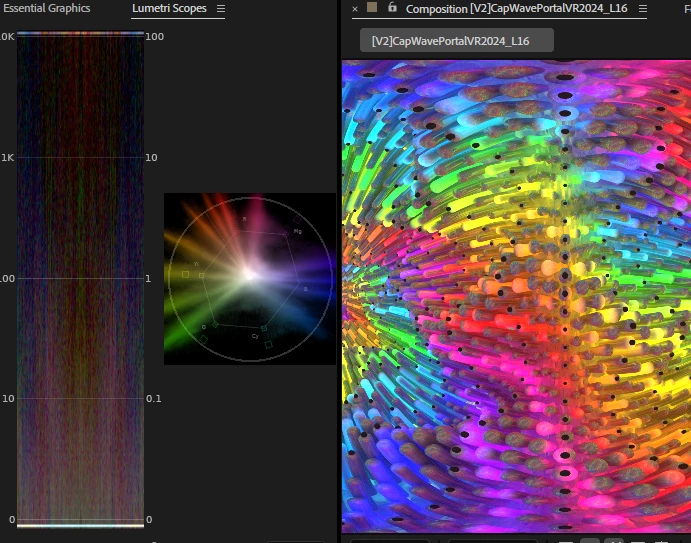
 

I've tried changing all the settings to try and get it to display the accurate data. For the record, this is how the Lumetri scopes is supposed to interpret the same file, from AE 2024:
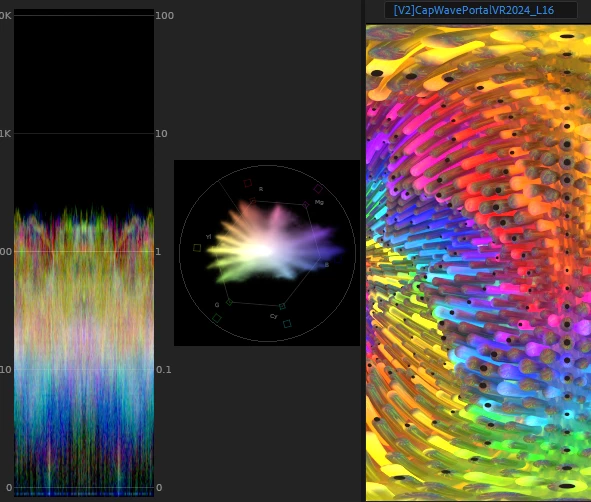
Please fix this, I absolutely need to get this to be working right again.

18 replies

movingimage
Participating Frequently
May 13, 2025

There is a big problem with dynamic-linking AE->PPro 25.2.


If you work in a linearized space in AE, it will not be converted properly to the PPro working space. I tried every setting in the new color workflow - for an entire day of troubleshooting. The only fix was to go back to 25.1


Using the newest beta of each did not fix it.


PPro doesn't seem to "know" that the AE colorspace is linearized, and so it doesn't re-map the gamma. There is no combination of manual settings that will do this. I almost resorted to creating my own LUT to go from linearized AdobeRGB to Rec709. 

UON VISUALS
Known Participant
May 7, 2025

@VladP it works as it should in the beta. I had to install it today (in an attempt to get Adobe Dynamic Link to export my AE comps to Media encoder, a whole other issue plaguing me for years)

@uon.visuals on IG & youtube.com/@UON
Adobe Employee
May 2, 2025

Could you try the latest beta and see if setting Color space in scopes menu to a value other than automatic, for instance, Rec. 709 or Rec. 2020 makes scopes appear as expected? Automatic will use the working space and will be showing linear data in your case. Other settings should take linear part out.

UON VISUALS
Known Participant
April 30, 2025

Hello, bumping this is still a problem even after updating 2 releases later (2025.2.2)


I can turn off linearize color space in my project working space settings, and the lumetri scopes look correct again


but all my AE projects are linearized so now I have to downgrade back to 2025.1.
Please fix this 😞

@uon.visuals on IG & youtube.com/@UON
UON VISUALS
Known Participant
April 8, 2025

I definitely need to work in a linearized color space, my entire compositing workflow is linearized up until premiere where I just use that for simple edits of the final outputs. So looks like I'm stuck on 25.1 until that's fixed

@uon.visuals on IG & youtube.com/@UON
Jenkmeister
April 8, 2025

We believe the issue here is related to the use of the Linearize working color space. Premiere Pro doesn't support Linearize which is why we believe it is showing up correctly for you in that app. We'll take your sample project/files and make sure that our theory is correct and post back. But if you don't need the Linearize option enabled, 25.2 should show correctly in the scopes.

UON VISUALS
Known Participant
April 8, 2025

Here is an example project file and footage that should replicate the issue. 
If you open it in 25.1 the lumetri scopes will look normal
Open it in 25.2 and the values reach the upper stratosphere:
https://drive.google.com/drive/folders/1FPFMDoIpd6XPAOB-JSOoRBNhvN8Ebcqo?usp=sharing

@uon.visuals on IG & youtube.com/@UON
UON VISUALS
Known Participant
April 8, 2025

Can't really try anything right now as I uninstalled it and went back to 25.1. I have work to get done and 25.2 is unusable to me in that state

@uon.visuals on IG & youtube.com/@UON
Adobe Employee
April 7, 2025

I assume that in Pr you can't linearize Working Space. Try the exact same settings between Pr and AE.

Adobe Employee
April 7, 2025

What would happen if you turn off linearization for Working Space? Or use some other Working Space like ACES, for example?