Known Participant
Apr 14, 2025 5:12 PM UTC
Open for Voting

Colorspace clipping using add blend modes in OCIO v25.2.2

Hi,

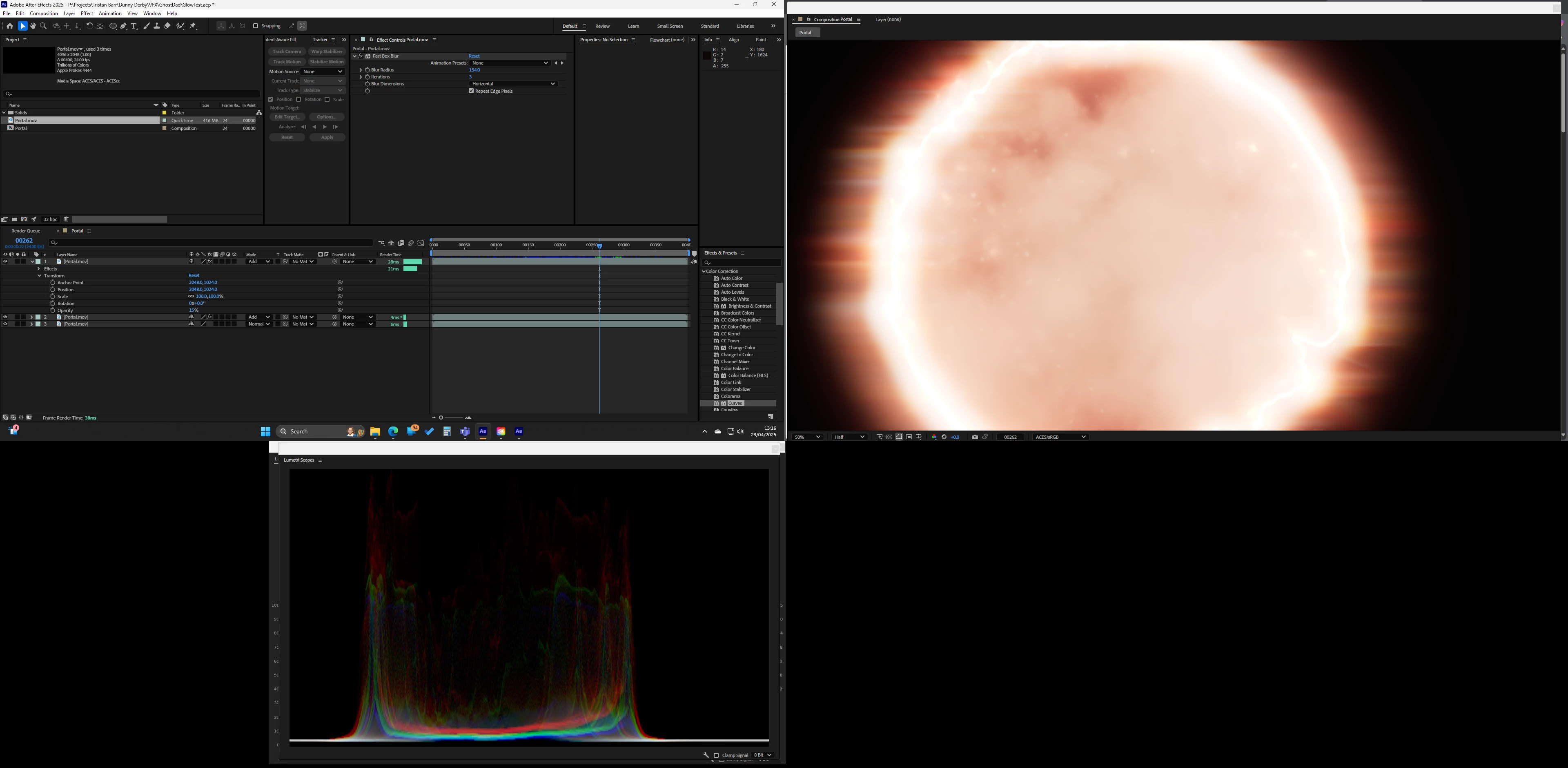
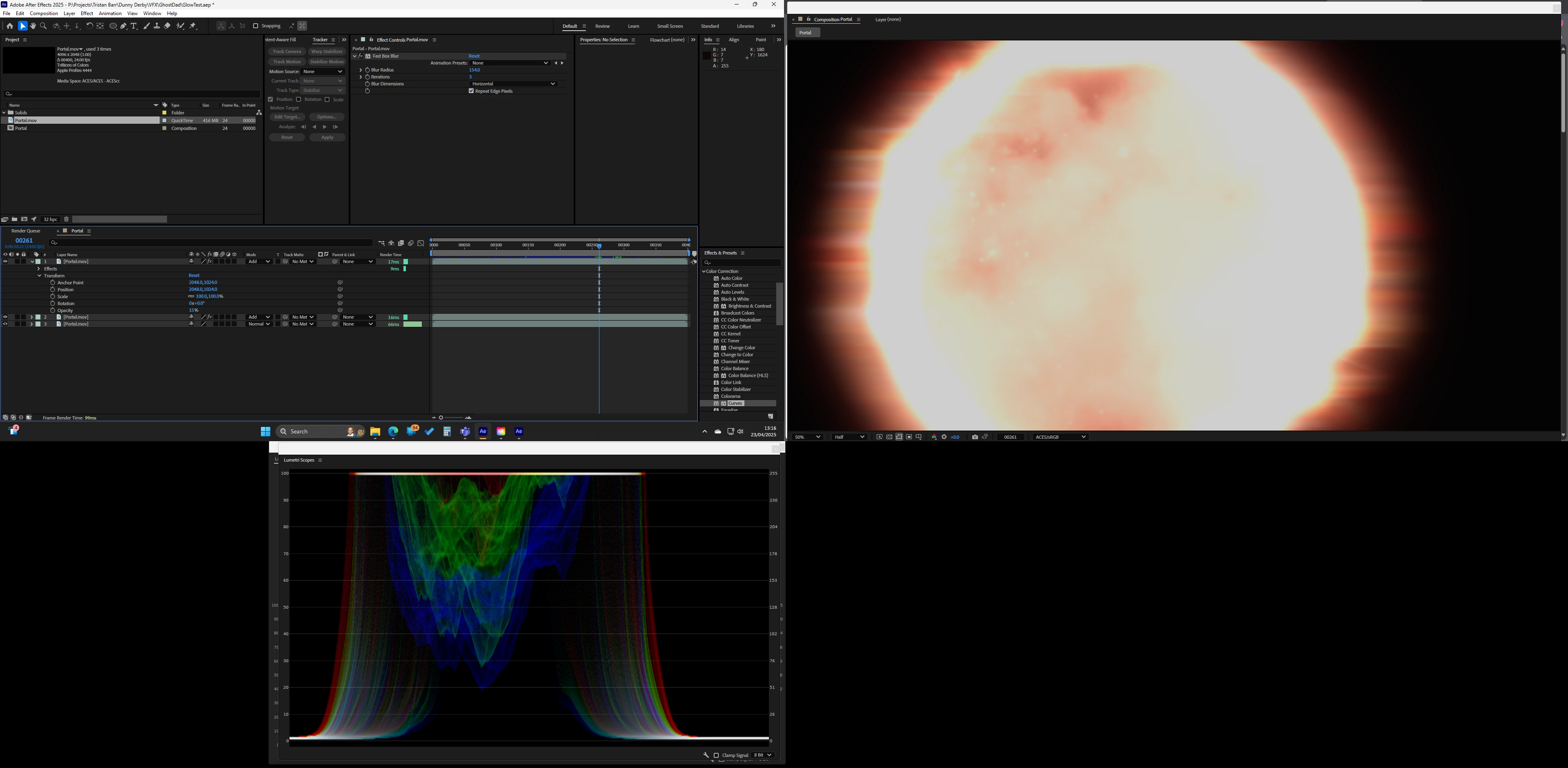
Just upgraded to 25.2.2 and I am having a strange issue with adding layers its like it randomly clips or switches color space from one frame to the next. Only started happening after upgrading AE and NVIDIA.

The screenshots are from the same project just different frames, as you will see it also affects the scopes. Only effect used is 'Fast Box Blur'

Switching to 'Software Only' fixes the issue
56 replies

Known Participant
Nov 5, 2026 11:22 AM UTC

Adobe please please please. I already sent you 2 projects that reproduce this problem 100% of the time. In 2 months you’ll be releasing AE 2027, we now have support for ACES2.0 - great. But we’re still on AE 2025.1 and we’re going to stay on that version until this is fixed! It’s bad enough that we still don’t have a grain effect that works in ACES, but this? This is a show stopper.

Translate
malcolmmoore
Participant
Nov 5, 2026 11:27 AM UTC

I cant even run 25.1 at the minute on windows as due to either windows or nvidia updates 25 now just crashes on launch as stated earlier in this thread.

Translate
malcolmmoore
Participant
Oct 20, 2026 9:32 AM UTC

Bug is still happening in 26.5 I just tested. You have introduced aces 2.0 finally but because of this bug in 32bit there is no point in even having it or trying to work in 32bit aces. Please fix this.

Translate
Known Participant
Sep 29, 2026 9:35 AM UTC

October 2026, latest Beta - the bug is still there. Why is this not a priority??? We’re still working on 2025.1 exactly because of this bug - what is the point of introducing any new features if people are not going to upgrade?

Translate
CallumBedwardJask
Participant
Sep 14, 2026 1:45 PM UTC

Update, This is definitely partly a windows issue now. I work between 3 different machines all with NVIDIA cards (1x 3090 Ti, & 2x 4090s) I’d been using After Effects 25.1.0 strictly for compositing up until August 2026.

However, there must have been some kind of update or change to either Adobe or Windows, because now the entirety of After Effects 25.x.x immediately crashes upon opening. Rendering it completely useless. I’ve verified on all 3 machines, removed plugins and wiped one machine to check. 

None of this fixed the problem, so I’m forced to use AE 26.x.x and above which is fine until we get back onto the compositing question. Disabling GPU acceleration is an unfortunate handy cap for 32bit compositing, so I’m gonna have to switch to either Maxon Autograph or Da Vinci Resolve to composite for the time being.

At the very least disabling the GPU acceleration means that I don’t lose 3 years worth of composited renders. Hopefully this does get sorted at some point.

Translate
TheFosterHouse
Known Participant
Aug 29, 2026 10:03 PM UTC

For those that are still having this issue, my fix is to DISABLE Mercury GPU Acceleration (CUDA) in the Project Settings under Video Rendering and Effects and change it to Mercury Software Only. I have found that ANY blur will cause this if you are using a OCIO ACES (I’m using ACES 1.3 Studio.). This has been a constant irritation for the past couple of versions, but an easy fix. 

Translate
Participant
Aug 30, 2026 10:34 AM UTC

It works, but lets be honest, this is not a real fix, everything gets super slow without hardware acceleration!

Translate
felixs17274976
Inspiring
Jul 31, 2026 10:01 AM UTC

This is still a bug, is there no fix?

Translate
Julian Cortizo
Participating Frequently
Jul 21, 2026 6:42 PM UTC

This is still a bug!! please fix it! 

Translate
Known Participant
Jul 20, 2026 10:23 AM UTC

Still nothing? Are we sure Adobe support is even reading this forum?

Translate
jordanc75789874
Known Participant
Jul 3, 2026 7:56 AM UTC

THIS IS STILL A BUG


Translate
jordanc75789874
Known Participant
Apr 15, 2026 9:37 AM UTC

THIS IS STILL BROKEN


Translate