

Sidneytsilva_
Participant
October 10, 2023

Layer is deselected when creating the first keyframe

  • October 10, 2023
  • 16 replies
  • 1925 views

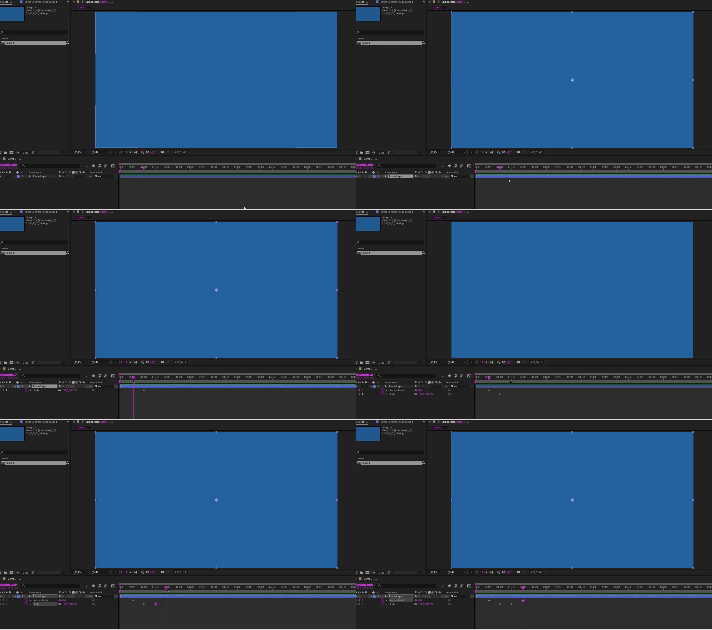
Good morning, I have the most up-to-date version of After Effects, 24.0, and the most up-to-date version of Mac Os Ventura, 13.6. And I started facing the following problem. Whenever I use the shortcut to create a keyframe, the layer is automatically deselected (Attached is the video where I show it). And the most bizarre thing: this only happens when I create the first keyframe for each attribute. From the second of the same attribute this does not happen again.
This topic has been closed for replies.

16 replies

JohnColombo17100380
Community Manager
Community Manager
November 14, 2023

This issue has been fixed in After Effects 24.0.1 and later. If you continue to experience this bug, please let us know.


- John, After Effects Engineering Team 

nishu_kush
Legend
October 26, 2023

Hi all,


This issue has been fixed in the After Effects version 24.0.1. Update your After Effects if it's not already.

Let us know if you experience the issue in 24.0.1.


Thanks,

Nishu

Participant
October 26, 2023

When a layer is selected, and I apply a keyframe with a keyboard shortuct, the layer automatically is deselected.


It only happens on the very first keyframe for the coorisponding attribuite.


For instance, if I have a new layer and I want to animate the opacity, I selecte the layer, hit option > shift > T, a keyframe is applied but the layer deselects. I jump ahead in the timeline with the shortcut, control > shift > right arrow, and set another keyframe, it sets a keyframe for every layer in the timeline. Then, when you try and undo, it says, undo iterpolation change and you ahve to undo for as many layers as there are in the timeline. 


First time this has happend in the past 20 years of doing this. It's messing up my workflow, big time. SUPER ANNOYING


Dustin 

Community Manager
October 26, 2023

Hi Dustin!

Really sorry you hit this bug, but the deselection bug been fixed in 24.0.1 which should be available in Creative Cloud for you to update to! This also takes care of the multiple-undos.

Sidneytsilva_
Participant
October 17, 2023

Good evening, I tested the beta version of After Effects (24.1) on Mac Os and Windows and the problem is corrected as shown in the attached video. I would also like to talk about the new functions implemented (I don't know if it's just in the Beta, but I hope it continues for the final version) which are these new buttons in the top right corner of the software that show what's new in the program and the other which gives access to the Adobe and After Effects community, and also the possibility of reporting bugs. As shown in the attached image. Congratulations to whoever developed it. It seems like a small change, but it will definitely make a big difference.
Thank you @jenkmeister17177426  and Adobe team.


Sidneytsilva_
Participant
October 16, 2023

I'll download the new version to see if everything is ok, I'll be back with the results soon. Thanks!

Participant
October 15, 2023

2023 Version:

when I keyframe with Opt+Shift+(Key), the layer will be selected.


2024 Version:

it automatically cancels the selection of the layer after keyframe with shortcut key.


I'm not sure if this is a new feature or a bug. Could you please explain or fix it?

October 15, 2023

It's a bug. Search the forums and you'll find a few reports of it. It is fixed in the 24.1 beta and we are looking at a 24.0.1 release this week to fix this. 

October 14, 2023

24.1x54 is rolling out to CCD in the Beta section over the next 20 minutes. It contains a fix for this issue. If you're able to try it out and confirm the fix is working for you, that will help us get this fix out in a 24.0.1. Thanks.

October 14, 2023
You should be able to do a Save as version 23.x from the File menu to get a project that works with AE 23.

We are targeting the fix going to 24.1 beta later today, and a 24.0.1 release by the end of this coming week.
Participant
October 14, 2023

Also uninstalling 24.0 doesnt work for macbook at least. If you transfered your project to new version (Apple Arm64), when you reinstall older versions your projects doesn't work. Please release the update quick we are suffering 🙂

dolphinganz
Known Participant
October 13, 2023

Hello,

I always do alt + S or P or T while animating and I came across an issue that After when I have a selected layer the second alt + keyframe goes on All layers. Really anoying and on top of that when I want to redo it redoes it one by one, not the whole multikeyframe activation in one. So I'm there pushing my CMD + Z forever. Please fix it, before I never had an issue like that. Thank you!