Participating Frequently
March 7, 2023

No correct display of RGB under OCIO

  • March 7, 2023
  • 12 replies
  • 2804 views

Hello Community, 


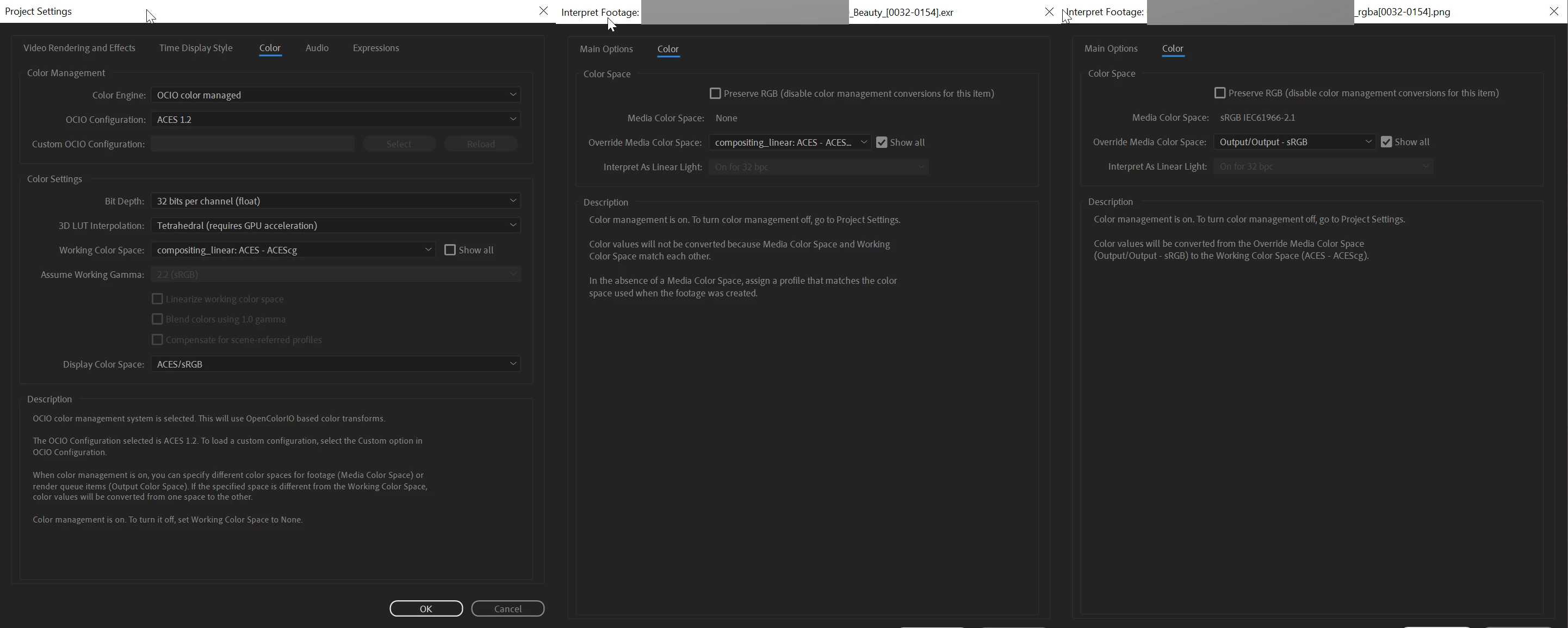
in my company we often work with 3d renderings in ACEScg color space, combined with footage from other sources mostly in sRGB. I have set up the Project Settings in After Effects as described in Adobe Help, Color Engine: OCIO color managed, OCIO Configuration: ACES 1.2, 32 bits per channel, Working Color Space: compositing_linear: ACES-ACEScg, Display Color Space:ACES/sRGB.

I set my ACES exr 3D renderings under Interpret Footage to compositing_linear: ACES-ACEScg and my sRGB png images to Output/Output-sRGB.

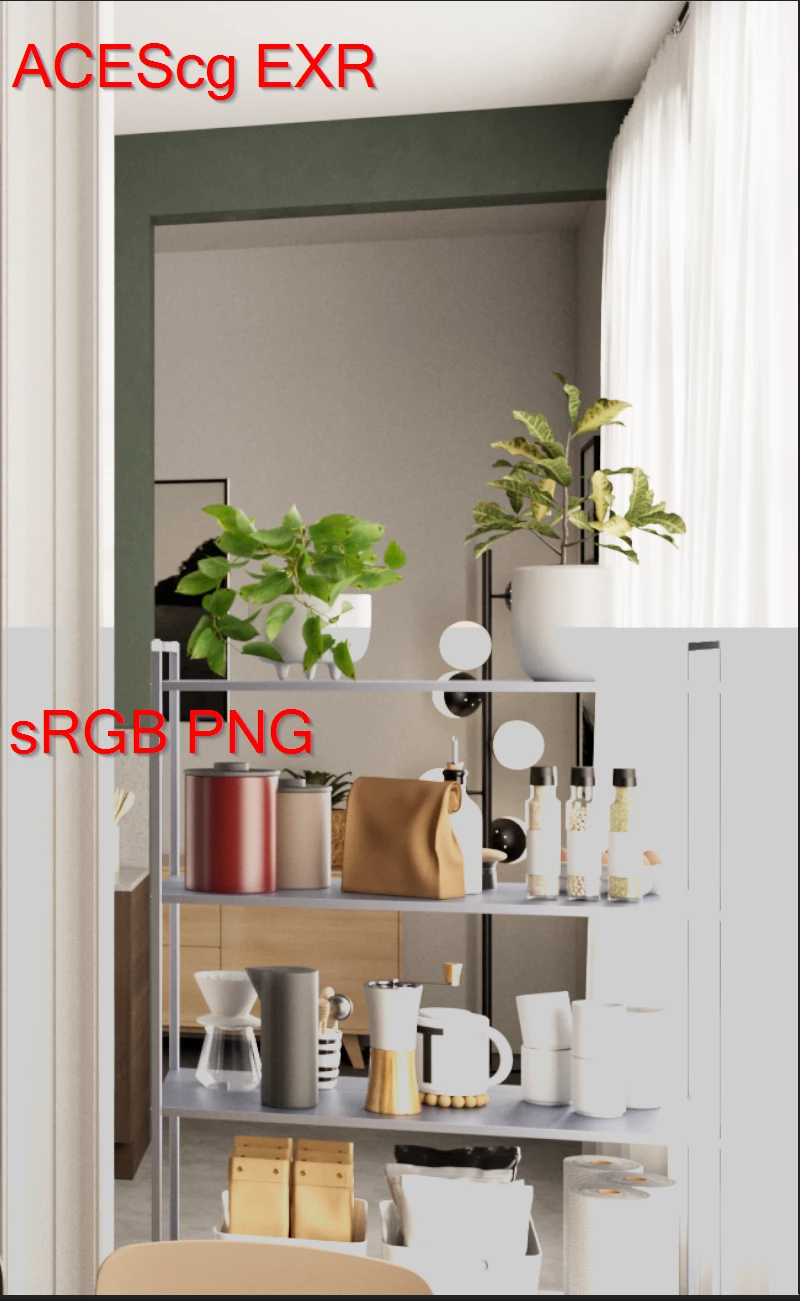
Now when I view both in a composition, the highlights of the sRGB png lose information. In parts of the image where previously fine gradations in the highlights are now a plain white withe the value 1 as you can see in the attached image in this post.

All further attempts with other settings in the OCIO plugin brought no success.
To check if with the images are correcly I use Nuke.


After Effects 23.2.1 (Build 3)

Windows 10 


Best 

Sven 
 

This topic has been closed for replies.

12 replies

Sven5FD0Author
Participating Frequently
October 29, 2024

Hi Chetana Nanda, 


I know it's been a long time ago, but I have another problem.


I am working in After Effects with the OCIO color managed Color Engine and the ACES 1.3 CG v1.0 configuration. The Working Color Space is "scene_linear: ACEScg and the Display Color Space is “sRGB - Display/ACES 1.0 - SDR Video”. If I now import png's into After Effects, I want them to have the color space “sRGB - Display/ACES 1.0 - SDR Video”.


But when I edit my config file as shown, it does not work and the png's are interpreted in the working color space ACEScg. What am I doing wrong?


Adobe Employee
September 6, 2023

Hi @Kinetogenic ,

Yes, file_rules are available for OCIO configs with profile version  2.x only.

Kinetogenic
Participating Frequently
September 4, 2023

This is not working for me. I navigated to the specified directory (I'm on macOS), made a backup of the existing config file I was using (1.2) and pasted in the code you provided into the original. Once I saved that and restarted AE, aces 1.2 no longer shows up as an option. I also copied that config file to another location, made the addition, and pointed to it manually, but I am greeted with a message that is not a valid config file. Is there a syntax issue? 

Or does this only work with profile version 2.1? I noticed the 1.2 config is profile version 1, in the 1.3 config files, which are profile version 2.1, I see a "file_rules:" section already there. If thats the case and thats the only way to do this, am I risking issues by changing profiles mid project?

Adobe Employee
September 4, 2023

Hi @Kinetogenic ,

We are packing OCIO configurations in the Application bundle.

These can be located at (for MacOC)

/Applications/Adobe After Effects.app/Contents/Resources/OpenColorIO-Configs/


These configurations has .ocio file in them. You need to add rules there. 

These are builtin OCIO configurations and you have to restart application after making changes there, or alternatively you can copy these from app bundle and modify the local copies and use it as Custom configuration.


Let us know if you need any help in adding rules to these files.


Thanks.


Kinetogenic
Participating Frequently
September 3, 2023

Where does one go about making these changes to file_rules? Is that within a preference file somewhere? I cannot locate a clear place to add these rules and would love to not have to manually set every file's color profile manually.

Adobe Employee
March 10, 2023

Hi Sven,

Thanks for confirming that JPEG is working as expected. We need to check if issue in PNG rendering is OCIO specific or a bug in general with PNG rendering in the application. We have created an internal issue to debug it further.


For your second question regarding the default color space assignment, and you said its not working for you. How are you modifying the default color space?
We are shipping two version of ACES configurations with application.


ACES 1.2 - This is based on OpenColorIO Config profile version 1

  Under this, you need to modify the default role to appropriate default color space e.g. changing default under roles to something like below will results in assigning ACEScc to all imported media.

      `default: ACES - ACEScc`


ACES 1.3 CG and Studio - These are based on OpenColorIO Config profile version 2

   For these configs you can add rules in the config file e.g. Adding following rule results in all .exr to have ACEScg color space, and all .png to have sRGB color space assigned automatically,

  e.g.


file_rules:
- !<Rule> {name: OpenEXR, extension: "exr", pattern: "*", colorspace: ACEScg}
- !<Rule> {name: Texture, extension: "png", pattern: "*", colorspace: "sRGB - Texture"}
- !<Rule> {name: Default, colorspace: ACES2065-1}


Note you need to restart the application to pick changes in configuration shipped with application.

Sven5FD0Author
Participating Frequently
March 10, 2023

Hi Chetan, 


yes the jpeg looks correct. Does this mean that there is a bug in the processing of png's under OCIO color management in After Effects? 


Then I have some more questions regarding OCIO. Is it possible to set default color spaces depending on the file format? In the After Effects online help it says that the files Color Space are set depending on the default color space in the OCIO config under the project settings. But After effects seems to ignore this and always sets it to ACES-ACES2065-1. So you have to change manulay the color space for all the files. This is quite a time consuming process when you work with as many layers as we do. 


Cheers 

Sven 

Adobe Employee
March 10, 2023

I tried with converting the PNG to JPEG, and seems JPEG is not clipping the heighlights. Please help to check once.
Need to check with the PNG rendering issue. 

Adobe Employee
March 10, 2023

Hi@Sven5FD0,

Thanks for sharing the media files. 
Just one more question, did you see the same behaviour with JPEGs as well. Do you have some sample JPEGs to share.


Thanks,


Thanks,

Chetan Nanda

Sven5FD0Author
Participating Frequently
March 9, 2023

Hi John, hi Chetan, 


thaks for your replies. I send you two files fron an older job, the cropped pictures from my original post are still in prduction. Again the exr is in ACEScg and the png in sRGB and my problem is still visible. 


I cant't post the exr at this point because it is not supported. I will try to send both pictures direct to you Chetan. 


Best

Sven