


Participant
April 8, 2025

Template Export: file_stream_device iostream stream error

  • April 8, 2025
  • 13 replies
  • 2272 views

I try to export a graphical template with essential graphics. New Project, I add just a color layer and add the scaling as a editable option.


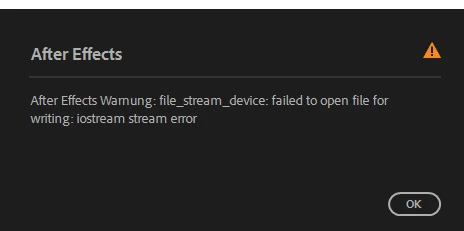
When I hit export as template this appears: 
 

13 replies

Participant
June 15, 2025

My solution is to modify the environment variables, My Computer Properties, Advanced Options Environment Variables, change the TEMP path to another drive, create a document TEMP in the other drive letter, fill in the path, modify it successfully and solve it perfectly

Participant
June 15, 2025

我的解决方法是修改环境变量、My Computer Properties、Advanced Options Environment Variables,将 TEMP 路径更改为另一个驱动器,在另一个驱动器号中创建文档 TEMP,填写路径,修改成功并完美解决

Participant
June 15, 2025

After Effects警告: file_stream_device: failed to open file for writing: iostream stream error

Participant
May 22, 2025

Yo, bro!

It seems that Adobe After Effects 2025 has a bug that prevents exporting Motion Graphics Templates (.mogrt).
Even after trying various methods such as clearing the cache and resetting preferences, I was unable to export .mogrt files using the 2025 version.

Therefore, I decided to downgrade to an older version of After Effects.

Using the Creative Cloud Desktop app, I downloaded After Effects 2024, then launched the 2025 version and saved a copy of the project in 2024.x format.
After opening that copy in After Effects 2024, I was finally able to export it as a Motion Graphics Template.


Take it easy!
Safe travels

Participant
May 14, 2025

Hi, I have the same exact issue ! Hope there will be a solution

Participant
May 13, 2025

When exporting a motion graphics template,
the following error occurs and it is not saved.


=================================================

file_stream_device: failed to open file for writing: iostream stream error

=================================================


Even if I put in just one source text, the same error occurs.

Even if I try the latest update or migrate, it is the same.


I am not using any plugins,
and I am using the Windows version.


My computer specifications are
i9-14900K
GeForce RTX 4060

nishu_kush
Community Manager
Community Manager
May 13, 2025

Hi @eunchong28861383wq3a, thanks for writing in.

Others have reported this issue. I am merging your thread with another one related to the same issue. For further investigation, do you mind sharing .AEP file for testing? Feel free to share it via DM if you do not want to share it publicly.

We're here to help.


Thanks,
Nishu

Participant
April 18, 2025

I am getting the same issue as well. Has anyone been able to solve it?

Participant
April 15, 2025

1. Windows 10 Home, Intel i7 8700K, 32 GB RAM, Intel UHD Graphics 630 + Geforce RTX 2070
2. 25.2.2
3. No other result. I can save the project, but no template export.
Here it is: https://we.tl/t-kKpuS7pl5o
4. Yes

Participant
April 15, 2025

No other result. I can save the project, but no template export. 

Here it is: https://we.tl/t-kKpuS7pl5o

Participant
April 13, 2025

Is it fixed? If yes, how did you do it. I am currently facing the same issue.