
Participating Frequently
July 18, 2025

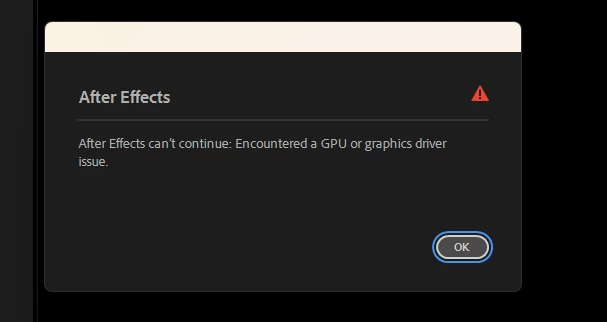
After Effects can't continue : Encountered a GPU Or Graphics Driver issue

  • July 18, 2025
  • 22 replies
  • 1434 views


While working, the screen suddenly goes black and then this error appears... I'm using a 2060 Super. I updated the driver, but the problem still happens. How can I fix this problem?
    22 replies

    Participating Frequently
    October 17, 2025

    One more thing: In the display settings, disable Hardware Accelerate Composition, Layer, and Footage Panels, and in Import, disable Hardware Accelerated Decoding.

    Participating Frequently
    October 17, 2025

    After Effects can't continue: Encountered a GPU or graphics driver issue (I FIXED IT)

    UPD: Basically, all you need to do is: 1. Remove the drivers using DDU. 2. Roll back the Studio driver to version 537.58 (Windows 11 in the link, download it for your Windows version). 3. Uninstall AE. I uninstalled it using Revo Uninstaller without scanning. 4. Remove everything related to AE and Creative Cloud using the Everything program. In the search bar, type: After Effects / Creative Cloud > Ctrl + A > Del. 5. Be careful here. Remove GPUCache, but only the one related to Adobe, AE, and everything else related to AE. 6. Download any version you need. I downloaded 2025, preferably to an SSD. THAT'S IT, YOU'LL NEVER CRASH AGAIN, NO MATTER HOW MUCH YOU ALT-TAB.


    gtx 1650

    ryzen 7 5700x

    16 gb

    David.Arbor
    Community Manager
    Community Manager
    August 19, 2025

    Hi @Anik_Sarkar9020,


    We managed to reproduce this error in-house and it's possible the cause is overtaxing your GPU memory.


    Could you share a few more details? 

    1. Are you using 3D models in the Advanced 3D renderer? 
    2. If you are using A3D, can you please share a screenshot of your Renderer Settings? (This can be found in the same dropdown menu as the Classic, Advanced 3D, and Cinema 4D renderer options).
    3. Are you using large 3D models?
    4. Are you using Environment Light shadows?
    5. Are you able to share this project with me privately?
    6. Did you try temporarily switching over to Software Only mode? We're trying to narrow down the cause here and if the issue is overloading your GPU memory, then switching to Software Only will take some of the strain off your GPU. Advanced 3D requires a GPU, but it's possible that other things in your scene can switch over to CPU.


    Thanks,
    - David, After Effects Engineering Team

    David.Arbor
    Community Manager
    Community Manager
    August 15, 2025

    I understand others are having issues, but GPU issues can present themselves in many ways and can be caused by many different things. 
    One of our developers looked at your log and can see that the driver itself is encountering a ton of errors. Two things to try:

    1. Switch from Mercury GPU rendering to Software only (this is just a troubeshooting method and ideally, you want to be using Mercury GPU).
    2. Roll back to a previous GPU driver. Annoyingly, GPU drivers often cause so many problems, so it's not uncommon that rolling back is necessary. It doesn't mean there's not a problem in AE, but your log is showing a ton of CUDA errors, which points to the driver.

      Thanks,

    - David, After Effects Engineering Team

    Participating Frequently
    August 15, 2025

    1. Yes, my monitor is connected directly to my GPU , no remote connection or anything unusual.
    2. No, I’ve never modified the GPUSniffer.exe file in my After Effects installation folder.
    3. This problem isn’t just happening to me , it’s also happening to many others who are working with 16 and 20 series GPUs.

    David.Arbor
    Community Manager
    Community Manager
    August 15, 2025

    Two questions: 

    1. Is your monitor connected directly to your GPU or are you perhaps doing something "unique." Maybe remoting into another machine or doing something other than directly connecting the monitor to your GPU?
    2. Have you ever modified a file called the GPUSniffer.exe in your After Effects application folder?


    Thanks,
    - David, After Effects Engineering Team

    Participating Frequently
    August 15, 2025

    @David.Arbor Okay… thanks… Until this problem is fixed, I can’t work in After Effects… Please fix this issue quickly… If you find any solution, let me know.

    David.Arbor
    Community Manager
    Community Manager
    August 15, 2025

    Got it, thanks! I removed the link in case there was any private info in the logs, but I have them and will share them with my colleagues. Logs don't always contain the problem, but hopefully these have something useful.


    Thanks,
    - David, After Effects Engineering Team

    Participating Frequently
    August 15, 2025

    @David.Arbor [link removed by mod for privacy].

    David.Arbor
    Community Manager
    Community Manager
    August 15, 2025

    Thanks for the extra detail @Anik_Sarkar9020. I'll take this info back to the team and see if it gives us any new information. We haven't been able to repro this issue in-house, but maybe there's some new detail that will give us clues. I appreciate your continued respones, since we don't always get those when trying to troubleshoot with users.


    One thing that might give us some more clues are logs. Would you be able to do the following and then send me the log?

    • Open the Help menu
    • Select "Enable Logging" and close AE when prompted.
    • Relaunch AE and reproduce the issue.
      • e.g. take as few steps as possible to cause the error, then quit AE.
    • Go to "C:\Users\[username]\AppData\Roaming\Adobe\After Effects\25.3\logs"
    • Upload and share a link to the "After Effects Log.txt" file in the "logs" folder


    To keep the logs as clean as possible, make sure you don't do anything except reproduce the issue.


    Note, we just released 25.4, so if you updated, then the log path above will be in the 25.4 folder.


    Thanks,
    - David, After Effects Engineering Team