

Participating Frequently
Jun 22, 2023 11:41 AM UTC
Released

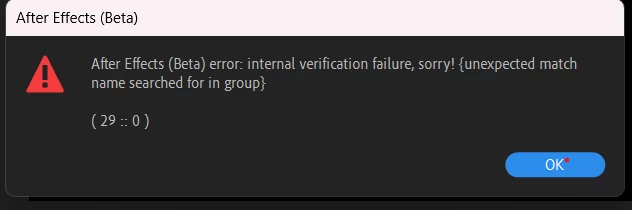
v23.6,0.29 no longer be able to open 3d objects.

After updates to v23.6,0.29,  AE beta is no longer be able to open 3d objects. The 3d object layer turns black screen.
 

This topic is closed to new replies. Start a new post to keep the conversation going.

15 replies

TimKurkoski
Community Manager
Community Manager
Aug 1, 2023 5:51 PM UTC

Thanks for the update, @beerthinker.


We're now tracking the reports of this issue on this forum thread:

https://community.adobe.com/t5/after-effects-beta-bugs/can-t-import-3d-objects/idi-p/13978107


We've got a fix for this problem in progress and hope to have it released in a day or two.

Translate
Participating Frequently
Aug 1, 2023 8:44 AM UTC

Ok,I updated to v24 and I made file from scratch and I imported simple cube. Still the problem occured.

Translate
Participant
Jul 31, 2023 9:34 PM UTC

Just adding to this... I'm having the same issue with the latest version. I'm just reverting to the previous Beta to test there.

Translate
TimKurkoski
Community Manager
Community Manager
Jul 31, 2023 8:41 PM UTC

Hi @jmoore.mp4,


Are you unable to import any 3D model into After Effects Beta? Or only specific models?


Can you share the project and models that are giving you problems? Please DM me a link to the files.


A reminder that new features in After Effects Beta are under active development. Changes in features and rendering quality can and do change in new builds. I recommend you seek established workflows in non-beta software if you are trying to meet a deadline.

Translate
TimKurkoski
Community Manager
Community Manager
Jul 31, 2023 8:35 PM UTC

Hi @beerthinker,


Are you unable to import any 3D model into After Effects Beta? Or only specific models?


Can you share the project and models that are giving you problems? Please DM me a link to the files.

Translate
Participant
Jul 29, 2023 2:10 PM UTC

I am also having this issue and a bit stressed about it because I have a deadline next week that I NEED this project file to be functioning for.

Unsuccessful attempts to fix this:

- Clear all caches including the new 3D cache.
- Collect Dependencies
- Replace affected 3D models within AE with new 3D models
- Replace the affected 3D models indirectly by renaming them in File Explorer
- Swapping 3D render engine to C4D and back to M3D
- Removing all adjustment layers
- Precomping 3D layers

Translate
Participating Frequently
Jul 29, 2023 9:36 AM UTC

Hello @TimKurkoski after this update v24.0.0.11, I can no longer be able to open my files with 3d objects in it. I tried to make a new composition from scratch but there was also a problem rading 3d objects.  

Thanks 


Translate
Participant
Jun 27, 2023 7:41 PM UTC

There no longer are error messages. The problem occurs with new and old projects. 

I sent you a download link for a 3D model. 

Translate
TimKurkoski
Community Manager
Community Manager
Jun 27, 2023 6:54 PM UTC

@Gregory24122458usz1, sorry to hear that.


Are you still experiencing the error message?


Is the problem only with existing projects, or is it in a new project as well?


Can you share the 3D model with me? Please send me a DM with the link to download.

Translate
Participant
Jun 27, 2023 5:39 PM UTC

I just updated to 23.6 build 34 and the problem persists - 3D models do not appear. 

Translate
