Erik Bloodaxe
Legend
June 10, 2025

"Find" using date criteria

  • June 10, 2025
  • 4 replies
  • 272 views

Windows 11 24H2

Bridge 15.0.4.534


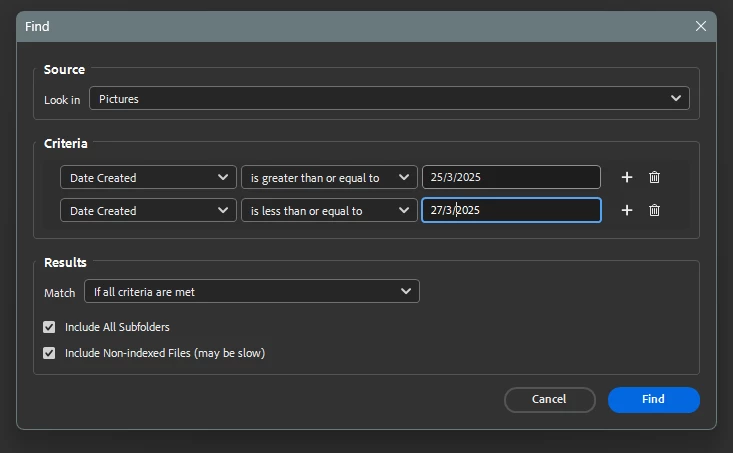
Using "Find" or CTrl+F and entering correctly formatted dates as criteria works only on the first instance of executing the search.

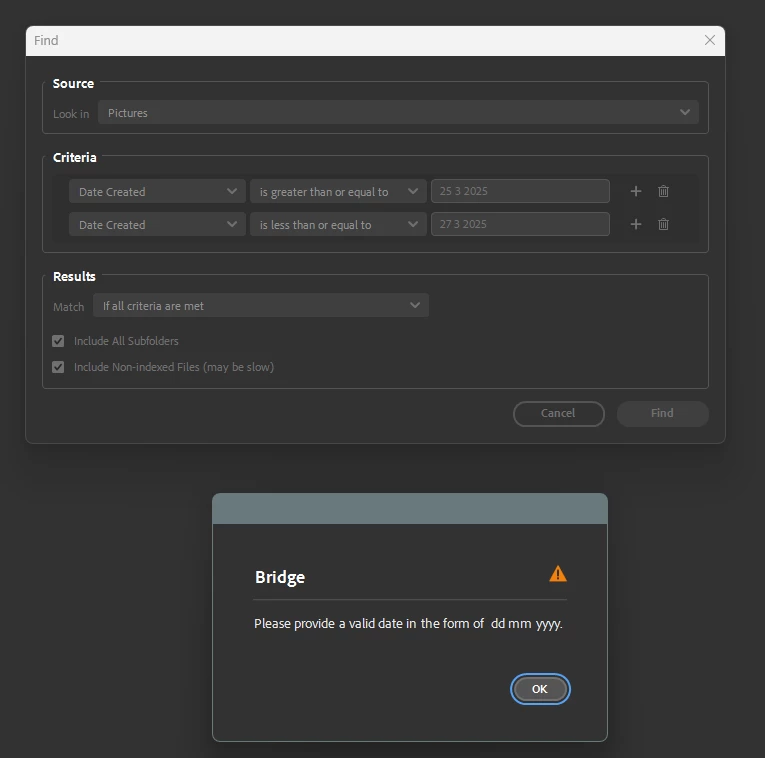
If the search is repeated, the dates have the "/" separators stripped and an error is generated.
 

4 replies

Erik Bloodaxe
Legend
June 12, 2025

Thank you. Your suggested workaround does fix the error generation issue but precludes the use of my preferred short date format, d mmm yyyy,  assigned in Windows 11 Date & Time settings.

Adobe Employee
June 12, 2025

Hi @Erik Bloodaxe 

Thank you for your feedback.

We have been able to reproduce the issue when using the format English (British Indian Ocean Territory) with the short date format set to d MMM yyyy.
We’ve added it to our engineering issue pipeline.

As a workaround, you can change the short date format from d MMM yyyy to dd/MM/yyyy to resolve the issue.


Thanks,
Bridge Team

Erik Bloodaxe
Legend
June 11, 2025

My included screen shots are equivalent to a recording. The first image shows the first use of Find which works correctly, the second image shows the second use which fails with error message shown.

Could this have any relation to my using British date format rather than US? i.e. dd/mm/yyyy as opposed to mm/dd/yyyy.

Screen recording forwarded as advised.

Adobe Employee
June 11, 2025

Hi @Erik Bloodaxe ,

Thank you for your feedback.

We are unable to reproduce the issue on our end.
Please share the screen recording of the issue at sharewithbr@adobe.com and mention this thread. Your assistance is greatly appreciated!


Thanks,
Bridge Team