

Inspiring
August 23, 2025

Review Links on CC

  • August 23, 2025
  • 15 replies
  • 286 views

My Creatice cloud for desktop is not showing REVIEW LINKS on my files folder (or in any place).


15 replies

kglad
Community Expert
Community Expert
August 24, 2025

i only see review links on the web.

Inspiring
August 24, 2025

ok, i know how to share for review works. 
What ive been asking since my first post is if the Desktop App shows the REVIEW LINKS (because it should)
as it does on the web (as you can see the attached image,


kglad
Community Expert
Community Expert
August 24, 2025
Inspiring
August 24, 2025

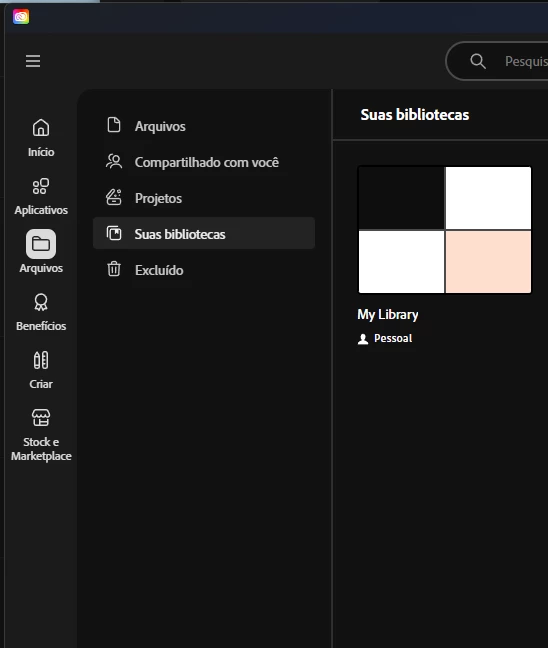
hurray, the libraries are back.

The only thing is missing is, REVIEW LINKS. Are you sure they show up on the app?


kglad
Community Expert
Community Expert
August 24, 2025

if you followed instructions, you uninstalled all adobe apps before uninstalling the cc desktop app and you did all that before using the cleaner.


did you do something else?

Inspiring
August 24, 2025

i did the Repain and uninstall Creative cloud and cleanup and used the Creative Cloud Cleaner Tool as well. then installed CC again and ... it showed a fresh start but same issues. 

Now i think its just better to unistall everything Adobe related. and reboot and start over again. maybe that will help, or not

kglad
Community Expert
Community Expert
August 24, 2025

what did you do?

Inspiring
August 24, 2025

meh, now i cant sync my libraries (not that i use it at all) but clearly its too much of a hastle just to get the option of REVIEW LINKS.

The only thing that seems not be working is that , and now the libraies as well. cant even open it on PS 😞

when i click UPDATE on CC, it takes me to this page :


commerce.adobe.com


that shows this 


kglad
Community Expert
Community Expert
August 24, 2025

repair per https://helpx.adobe.com/download-install/kb/creative-cloud-install-stuck.html


if that fails and you have windows, open your control panel > add/remove programs > cc desktop app > repair

if that fails, uninstall using the correct uninstaller from https://helpx.adobe.com/creative-cloud/help/uninstall-creative-cloud-desktop-app.html#sa_src=web-messaging and then reinstall using*


if that fails, do a clean cc install carefully following each applicable step:

uninstall every cc app including preferences per https://helpx.adobe.com/creative-cloud/help/uninstall-remove-app.html

then uninstall the cc desktop app, again using the correct uninstaller per https://helpx.adobe.com/creative-cloud/help/uninstall-creative-cloud-desktop-app.html#sa_src=web-messaging

clean your computer of cc files per http://www.adobe.com/support/contact/cscleanertool.html

check for, and if available, update your os

if windows is your os, repair all ms visual c++ versions that can be repaired (use google if you don't know how to do this)

if windows is your os update your ms visual c++, if it can be updated (use google if you don't know how to do this)

restart your computer (don't skip this)

reinstall the cc desktop app using the "alternative download links" at the bottom of the page at https://helpx.adobe.com/download-install/kb/creative-cloud-desktop-app-download.html

use the desktop app to install your cc programs/trials>

if that fails, you probably have a corrupt user account. google your os and how to create a new one.

Inspiring
August 24, 2025

nothing seem to happen.


and i do believe i should be seeing what the attached image is showing.
