


Participant
August 14, 2026

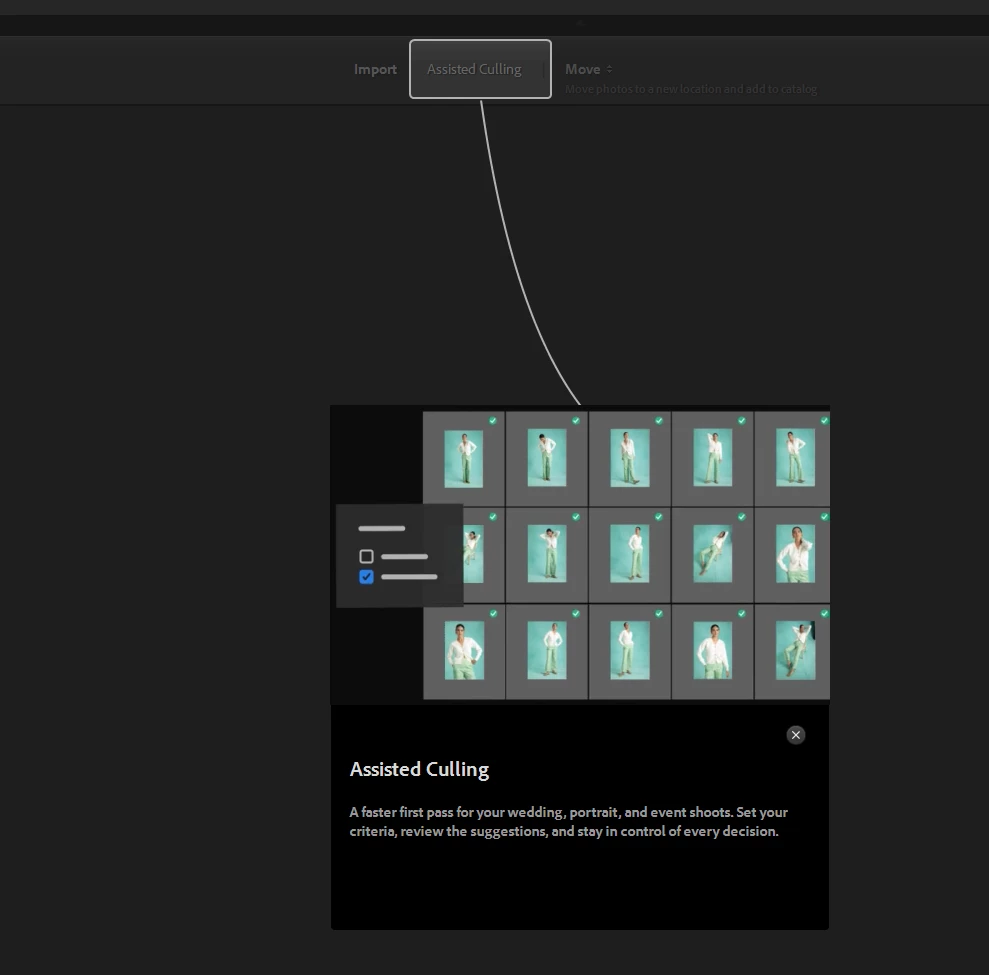
P: Assisted Culling popup locks application

  • August 14, 2026
  • 35 replies
  • 115 views

When I try to import picture files, I get a popup for assisted culling that locks the application. I need to go to task manager to shut down the application.  
 

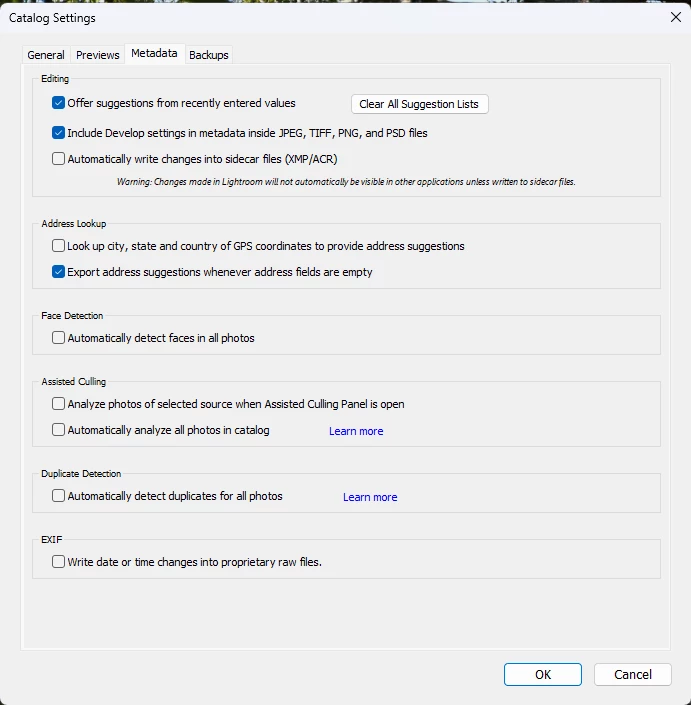
I turned off assisted culling under catalog settings, but this does not correct the issue.
 

Is anybody else experiencing this issue.


I cannot import new files!


    Pinned Reply By Sameer K

    Hey, all! Thank you for bringing this to our attention, and including the details. We’ve noticed the pattern. To priortise, and investigate further, we need you to submit crash reports using the email you used to log in to the Community. If you encounter a crash dialog, please follow the steps outlined here: https://helpx.adobe.com/photoshop/kb/submit-crash-reports.html 
     

    Also, leave a comment, or just like this note to confirm if this behavior only started after updating Lightroom Classic to v15.5. 


    (Mentions for direct notifications: ​@Srwoolc, ​@Eager_ease5E0A, ​@ronny_9487, ​@howardc41561686, ​@RosiPro, ​@KAbadie, ​@simonelago, ​@yairg79344582, ​@creative_coconut8018


    Best, 
    Sameer K

    35 replies

    Participating Frequently
    August 18, 2026

    @Sameer K  - I get no error message or crash notification.  Lr simply vanishes.  

    I’ve seen some posts where others can turn off Assisted Culling after a restart.  I could not.   I could only keep restarting Lr until Assisted Culling finished.  I could switch to the folder I had set before starting Assisted Culling and that was it.   I had no ability to do anything else in Lr between crashes.

    As for the behavior starting before v15.5 - This was literally the first time I’d used Assisted Culling.  Needless to say, my impression is not good! 😀

    My PC is up to date with MS updates as well.   

    If there is a way I can find crash logs or any other info you can use, please let me know how to get to it!  

    Participant
    August 17, 2026

    # Lightroom Classic 15.5 crashes with Assisted Culling enabled — 0xc0000374 heap corruption


    ## Summary


    Lightroom Classic 15.5 repeatedly crashes while working with a very large catalog when Assisted Culling is active.


    After several controlled tests, Assisted Culling appears to be the trigger. Lightroom has now run overnight without a crash with **GPU acceleration enabled and Duplicate Detection enabled, but Assisted Culling disabled**.


    ## System


    * **Lightroom Classic:** 15.5, build 202607291506-b8869fa7

    * **Camera Raw:** 18.5

    * **Operating system:** Windows 11

    * **GPU:** NVIDIA GeForce RTX 4080 SUPER, 16 GB

    * **NVIDIA driver:** 32.0.16.1088

    * **System RAM:** approximately 64 GB

    * **Catalog location:** local NVMe/SSD drive

    * **Photo originals:** primarily stored on network-attached storage (NAS)

    * **Displays:** 3


    ## Crash information


    Windows Event Viewer repeatedly reports:


    * **Faulting application:** Lightroom.exe

    * **Lightroom version:** 15.5.0.8

    * **Faulting module:** ntdll.dll

    * **Exception code:** `0xc0000374`

    * **Event ID:** 1000


    The Lightroom console log records:


    `AICulling:start`


    shortly before the failure.


    ## Testing performed


    ### Initial behavior


    With Assisted Culling active, Lightroom repeatedly crashed while I was working with the catalog.


    The catalog itself could open successfully. In some cases Lightroom ran for a short period before crashing.


    ### GPU test


    I completely disabled Lightroom's GPU acceleration and restarted Windows.


    Lightroom still crashed with the same `0xc0000374` error.


    This suggests the problem is not dependent on Lightroom GPU acceleration.


    ### Assisted Culling / Duplicate Detection test


    I then disabled both:


    * Assisted Culling

    * Automatic Duplicate Detection


    Lightroom became stable.


    I then performed a more specific isolation test:


    * **GPU acceleration: ON**

    * **Duplicate Detection: ON**

    * **Assisted Culling: OFF**


    With this configuration, Lightroom ran **all night without any crashes** while Duplicate Detection continued working.


    This is a major change from the repeated crashes experienced when Assisted Culling was active.


    ## Expected result


    Assisted Culling should analyze photographs in the background without causing Lightroom Classic to terminate.


    ## Actual result


    When Assisted Culling is active, Lightroom repeatedly terminates with Windows exception:


    `0xc0000374`


    Windows reports the crash through `ntdll.dll`.


    Disabling Assisted Culling appears to prevent the crashes.


    ## Workaround


    Disable Assisted Culling under:


    **Catalog Settings → Metadata → Assisted Culling**


    I can continue using Lightroom normally with:


    * GPU acceleration enabled

    * Duplicate Detection enabled

    * Assisted Culling disabled


    ## Additional information


    This is an unusually large Lightroom catalog. The catalog database itself is on a fast local drive, while most original photographs are stored on NAS storage.


    The catalog opens successfully, so the failure does not appear to occur during initial catalog opening.


    I can provide:


    * Lightroom `lrc_console.log`

    * Windows Event Viewer screenshots

    * Windows Error Reporting information

    * Lightroom System Info


    The console log captured `AICulling:start` during the affected session.


    Because Lightroom remains stable with GPU acceleration and Duplicate Detection enabled as long as Assisted Culling remains disabled, Assisted Culling appears to be the strongest common factor in the crashes.

    Participant
    August 17, 2026

    @Sameer K - answering your question directly: no, this did not start with 15.5.

    On my machine (Windows 11, LrC 15.5, GTX 1650, 32 GB RAM) the first heap-corruption
    crash was 4 July 2026 on 15.4.1 - five weeks before 15.5 shipped. The install dates
    below come from Adobe's own installer log, Install.log:

      Installed     Version    Days in use    0xc0000374 crashes
      ----------    -------    -----------    ------------------
      2026-03-19    15.2.1          30                 0
      2026-04-18    15.3            53                 0
      2026-06-10    15.3.1          10                 0
      2026-06-20    15.4             3                 0
      2026-06-23    15.4.1          45                 4
      2026-08-07    15.5             8                 8

    96 crash-free days across four consecutive versions, then 15.4.1. Version 15.5 made it
    roughly 11x worse - three crashes within five hours of installing it - but it did not
    introduce the problem.

    If the investigation is scoped to 15.5 only, I believe the regression will be missed.
    I would suggest looking at what changed in the Assisted Culling / WML path between
    15.4 and 15.4.1.

    One clarification on symptom: mine is a hard crash rather than the import popup lock
    described in the original post - exception 0xc0000374 (STATUS_HEAP_CORRUPTION) in
    ntdll.dll, landing 5 and 30 seconds after AICulling:start on two separate occasions,
    with no AICulling:complete. Full details, timeline and logs are in my post earlier in
    this thread. Disabling automatic culling analysis does not prevent it; the second crash
    occurred under manual Auto Analysis with AICulling_enableAutoCullingAnalysis = false.

    On crash reports: I have now added my Community e-mail address to the Adobe Crash
    Reporter. My previous 12 crashes were submitted anonymously - the Email Id field was
    blank - so they will not be linked to this account. If it helps you locate them, the
    crash reporter GUID on this machine is:

      fced2b08-11bd-487e-aff3-77043b35c688

    Happy to reproduce on demand and submit a fresh report with contact details attached.

    Community Expert
    August 17, 2026

    Moderators, ​@Sameer K,  ​@Rikk Flohr_Photography, please merge with the existing post:

    P: Assisted Culling popup locks application | Adobe DME


    My System: Intel i7-8700K - 64GB RAM - NVidia Geforce RTX 3060 - Windows 11 Pro 25H2 -- LR-Classic 15 - Photoshop 27 - Nik Collection 9 - PureRAW 6 - Topaz Photo AI
    Known Participant
    August 17, 2026

    LrC 15.5,  Windows 11
    AMD Ryzen 7 3700X, 32GB Ram, RTX 2060 GPU (6GB)

    I have all auto analysing turned off and LrC runs fine. I am able to do everything.

    But, if I decide to start any analysing (i.e. trigger the culling process), it runs for a few seconds then I get a Windows dialog telling me that Lightroom has crashed.
    I have tried turning off all GPU options and the problem persists.

    I have attached a very long crash log - if anyone can review it.
    Here is the tail of that log ...


    2026-08-16T21:32:50.280795+01:00 |       Collection.cpp:1339  |    error | auto Collection::setPersonalizationRequestTimeout::<>::operator ()(void)  | Failed edge request on error | 
    The thread 'session-13-intra-op-4' (10012) has exited with code 0 (0x0).
    The thread 'session-13-intra-op-1' (31008) has exited with code 0 (0x0).
    The thread 'session-13-intra-op-0' (21092) has exited with code 0 (0x0).
    The thread 'session-13-intra-op-2' (4124) has exited with code 0 (0x0).
    The thread 'session-13-intra-op-3' (16924) has exited with code 0 (0x0).
    The thread 'session-13-intra-op-5' (7740) has exited with code 0 (0x0).
    The thread 'session-13-intra-op-6' (27232) has exited with code 0 (0x0).
    The thread 20788 has exited with code 0 (0x0).
    2026-08-16T21:32:50+01:00: *** Warning: no ML mask found ***
    Exception thrown at 0x00007FF9816B187A in Lightroom.exe: Microsoft C++ exception: dng_exception at memory location 0x000000005A77ADA0.
    Exception thrown at 0x00007FF9816B187A in Lightroom.exe: Microsoft C++ exception: cv::Exception at memory location 0x0000000059A7D630.
    Exception thrown at 0x00007FF9816B187A in Lightroom.exe: Microsoft C++ exception: cv::Exception at memory location 0x00000000617ED630.
    Critical error detected c0000374
    A breakpoint instruction (__debugbreak() statement or a similar call) was executed in Lightroom.exe.

    Exception thrown at 0x00007FF983F12165 (ntdll.dll) in Lightroom.exe: 0xC0000374: A heap has been corrupted (parameters: 0x00007FF983FCC0E0).
    Unhandled exception at 0x00007FF983F12165 (ntdll.dll) in Lightroom.exe: 0xC0000374: A heap has been corrupted (parameters: 0x00007FF983FCC0E0).

    The program '[12940] Lightroom.exe' has exited with code 0 (0x0).


    Known Participant
    August 17, 2026

    Looking at Reliability Monitor and Event Viewer, my crash started happening shortly after a .Net update from 8.0.xx to 9.0.xx (part of a Windows Update)
    Event  viewer entries have  been captured with …
    ntdll.dll versions …
    10.0.26100.8875
    10.0.26100.8737
    10.0.26100.8972


    I don’t know if this helps.

    Participant
    August 17, 2026

    I never received a crash report dialog during any of my crashes - if I had, you’d have multiple reports already.

    Sameer K
    Community Manager
    Community Manager
    August 17, 2026

    Hey, all! Thank you for bringing this to our attention, and including the details. We’ve noticed the pattern. To priortise, and investigate further, we need you to submit crash reports using the email you used to log in to the Community. If you encounter a crash dialog, please follow the steps outlined here: https://helpx.adobe.com/photoshop/kb/submit-crash-reports.html 
     

    Also, leave a comment, or just like this note to confirm if this behavior only started after updating Lightroom Classic to v15.5. 


    (Mentions for direct notifications: ​@Srwoolc, ​@Eager_ease5E0A, ​@ronny_9487, ​@howardc41561686, ​@RosiPro, ​@KAbadie, ​@simonelago, ​@yairg79344582, ​@creative_coconut8018


    Best, 
    Sameer K

    Participant
    August 17, 2026

    Hi! 

    The latest version of LRC has just changed the nature of the crash for me. Before the update, the programme would freeze, not close down and it would take about 10 minutes for me to be able to close the programme using Task Manager (this would happen after around 400 culls). Since the update, this does not happen, the programme just shuts down without warning after a much smaller number of culls (usually between 6 and 20). I have only had the crash report popup on 2 occasions, and I filled out both popup forms and sent through. Most of the time, the popup doesn't happen.

    Community Expert
    August 17, 2026

    Moderators, ​@Rikk Flohr_Photography, please merge with the existing post:

    P: Assisted Culling popup locks application | Adobe DME


    My System: Intel i7-8700K - 64GB RAM - NVidia Geforce RTX 3060 - Windows 11 Pro 25H2 -- LR-Classic 15 - Photoshop 27 - Nik Collection 9 - PureRAW 6 - Topaz Photo AI
    Community Expert
    August 17, 2026

    Moderators, ​@Rikk Flohr_Photography, please merge with the existing post:

    P: Assisted Culling popup locks application | Adobe DME


    My System: Intel i7-8700K - 64GB RAM - NVidia Geforce RTX 3060 - Windows 11 Pro 25H2 -- LR-Classic 15 - Photoshop 27 - Nik Collection 9 - PureRAW 6 - Topaz Photo AI
    Participant
    August 16, 2026

    I recently enabled Assisted Culling Analysis after upgrading to 15.5, and I’m noticing silent crashes. Disabling the analysis process seems to prevent crashes. The analysis is actually making progress, as I have tens of thousands of photos, and I see the number ticking down. Sometimes LRC only lasts a couple minutes, sometimes it lasts longer (going on 10 minutes as I write). I also noticed that my GPU spins up just a little (not 100%) in cases where a crash ultimately comes (though it also spins up other times without issue). I would guess that this behavior might be consistent with a specific media item triggering the crash.

    Nvidia 4090 on Windows 11.