


Participant
August 14, 2026

P: Assisted Culling popup locks application

  • August 14, 2026
  • 14 replies
  • 275 views

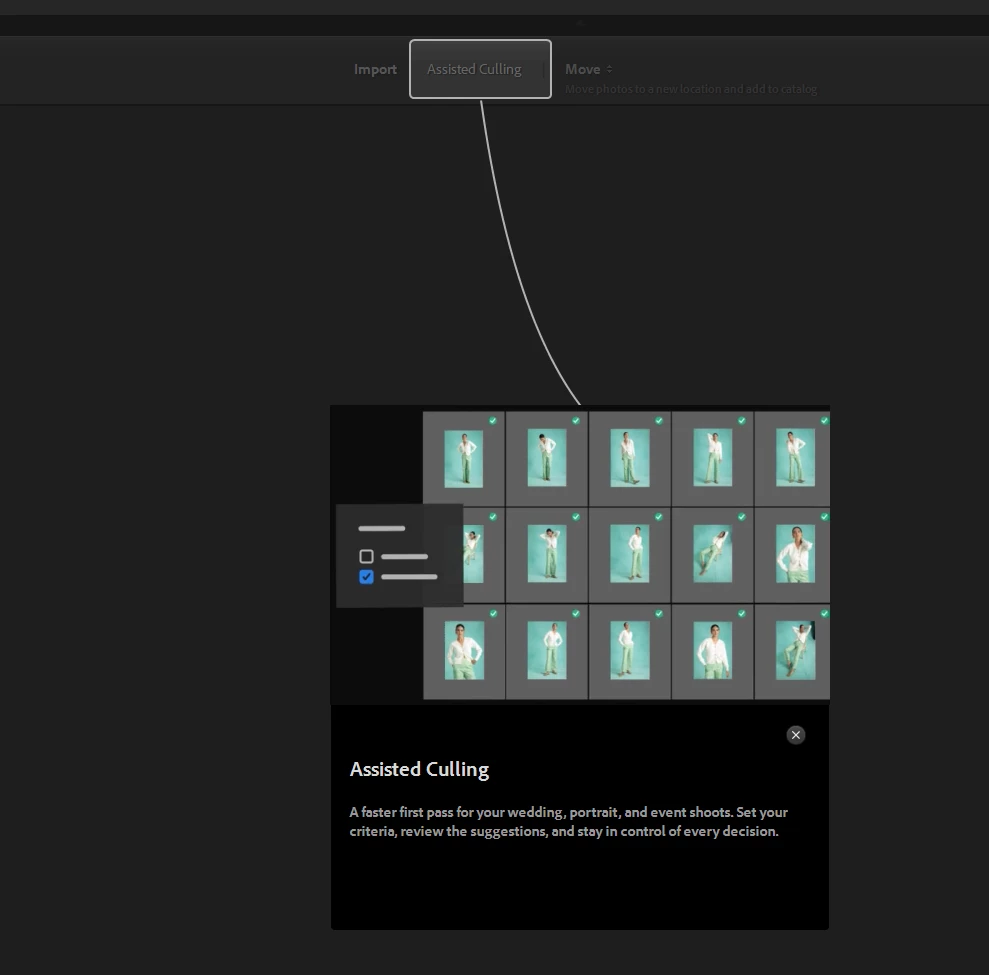
When I try to import picture files, I get a popup for assisted culling that locks the application. I need to go to task manager to shut down the application.  
 

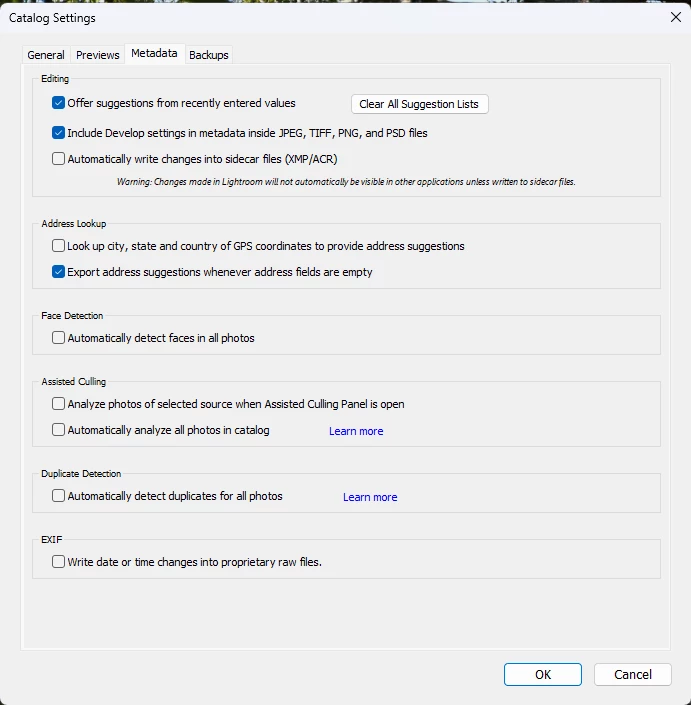
I turned off assisted culling under catalog settings, but this does not correct the issue.
 

Is anybody else experiencing this issue.


I cannot import new files!


    Pinned Reply By Sameer K

    Hey, all! Thank you for bringing this to our attention, and including the details. The team is working on this. 

    If you’re working on Lightroom Classic v15.5 and see crash, or app hang even after start Assisted Culling, please head here: 


    Best, 
    Sameer K

    14 replies

    Sameer K
    Community Manager
    Community Manager
    August 17, 2026

    Hey, all! Thank you for bringing this to our attention, and including the details. The team is working on this. 

    If you’re working on Lightroom Classic v15.5 and see crash, or app hang even after start Assisted Culling, please head here: 


    Best, 
    Sameer K

    Participating Frequently
    August 17, 2026

    Hi! 

    The latest version of LRC has just changed the nature of the crash for me. Before the update, the programme would freeze, not close down and it would take about 10 minutes for me to be able to close the programme using Task Manager (this would happen after around 400 culls). Since the update, this does not happen, the programme just shuts down without warning after a much smaller number of culls (usually between 6 and 20). I have only had the crash report popup on 2 occasions, and I filled out both popup forms and sent through. Most of the time, the popup doesn't happen.

    Community Expert
    August 17, 2026

    Moderators, ​@Rikk Flohr_Photography, please merge with the existing post:

    P: Assisted Culling popup locks application | Adobe DME


    My System: Intel i7-8700K - 64GB RAM - NVidia Geforce RTX 3060 - Windows 11 Pro 25H2 -- LR-Classic 15 - Photoshop 27 - Nik Collection 9 - PureRAW 6 - Topaz Photo AI
    Community Expert
    August 17, 2026

    Moderators, ​@Rikk Flohr_Photography, please merge with the existing post:

    P: Assisted Culling popup locks application | Adobe DME


    My System: Intel i7-8700K - 64GB RAM - NVidia Geforce RTX 3060 - Windows 11 Pro 25H2 -- LR-Classic 15 - Photoshop 27 - Nik Collection 9 - PureRAW 6 - Topaz Photo AI
    johnrellis
    Legend
    August 14, 2026

    Please do the LR menu command Help > System Info, click the Copy button in the upper right corner, and paste into your reply here, so we can see exactly which versions of hardware and software LR thinks you're running and important LR options that are set.

    Community Expert
    August 13, 2026

    If you don’t do it, try to reset the preferences of Lightroom Classic:  How to reset Lightroom Classic preferences (adobe.com)

    It's recommended to backup your preferences before you reset the preferences to the default settings: https://helpx.adobe.com/lightroom-classic/kb/preference-file-and-other-file-locations.html


    If this doesn't help, check if your system is up-to-date. Do you have installed all recent updates and patches for the operating system and the device drivers, especially the graphic driver? Please make also sure that you have installed the Studio version and not the Game Ready version of your NVidia driver.

    If this already doesn’t help I would try to reinstall Lightroom.


    My System: Intel i7-8700K - 64GB RAM - NVidia Geforce RTX 3060 - Windows 11 Pro 25H2 -- LR-Classic 15 - Photoshop 27 - Nik Collection 9 - PureRAW 6 - Topaz Photo AI
    Participating Frequently
    August 14, 2026

    Hi,


    I had already done these things with the exception of checking my NVidia driver, which was set to studio. I tried the optimising tool in the Nvidia dashboard, but again, no change. I have uninstalled and reinstalled already. At this point, all it is doing is starting the cull, and about 10 images in it completely shuts down LRC. In the last batch i tried to cull, there was only 95 images, not a big batch at all.

    Community Expert
    August 13, 2026

    Moderators, ​@Rikk Flohr_Photography, please merge with the existing post:

    It’s presumably the same problem.


    My System: Intel i7-8700K - 64GB RAM - NVidia Geforce RTX 3060 - Windows 11 Pro 25H2 -- LR-Classic 15 - Photoshop 27 - Nik Collection 9 - PureRAW 6 - Topaz Photo AI
    Community Expert
    August 13, 2026

    @howardc41561686  Simply writing "I have the same problem" isn't very helpful.

    As I wrote in my former answer in this thread I ask for more and detailed informations.

    Do you get an error message or an crash report? If yes, please post the message word-by-word or send the crash report to Adobe.

    Which steps you’ve done to solve the issue? 

    Please provide a copy of your 'System Info'. This can be get from the Lightroom menu item Help > System Info. There's a copy button in the System Info dialog. Press this button and paste the info into your next forum post.


    First try to reset the preferences of Lightroom Classic:  How to reset Lightroom Classic preferences (adobe.com)

    It's recommended to backup your preferences before you reset the preferences to the default settings: https://helpx.adobe.com/lightroom-classic/kb/preference-file-and-other-file-locations.html

    .

    My System: Intel i7-8700K - 64GB RAM - NVidia Geforce RTX 3060 - Windows 11 Pro 25H2 -- LR-Classic 15 - Photoshop 27 - Nik Collection 9 - PureRAW 6 - Topaz Photo AI
    Community Expert
    August 10, 2026

    @Eager_ease5E0A wrote: ...and less than a minute into the process it crashes LRC


    Do you get an error message? If yes, please post the message word-by-word.


    @Eager_ease5E0A wrote: ...I have uninstalled and re-installed LRC,


    Do you’ve done a clean reinstallation by using the Adobe Cleaner Tool?


    Unfortunately you haven't given us any information about your system. Therefore, all proposed solutions are a little bit like a look into the crystal ball

    Please provide a copy of your 'System Info'. This can be get from the Lightroom menu item Help > System Info. There's a copy button in the System Info dialog. Press this button and paste the info into your next forum post.


    @Eager_ease5E0A wrote: For this to happen in the middle of the busy season is unforgiveable. Adobe should be working around the clock to fix this issue, but I’m seeing nothing, not even a message to say they are working on it. Fuming doesn't cover how I'm feeling right now.

    I’m understand that you’re angry. But I’ve never heard and read about such an issue. It isn’t sure that’s a bug, it can also be an issue with the local configuration or compatibility issues or whatever.

    As I mentioned above we need more infos about your system.


    My System: Intel i7-8700K - 64GB RAM - NVidia Geforce RTX 3060 - Windows 11 Pro 25H2 -- LR-Classic 15 - Photoshop 27 - Nik Collection 9 - PureRAW 6 - Topaz Photo AI
    Participating Frequently
    August 10, 2026

    I would like to point out that I have the latest version installed and this issue has not been resolved. The only difference is that instead of freezing lightroom and then closing it after 10 minutes, it just shuts it down completely after less than a minute...still not culling. Middle of the busy season, this needs to be priority 1.

    Participating Frequently
    August 10, 2026

    When opening LRC, I enter Library, select the folder where my photos are and click assisted cull from the bar at the top. It starts the cull, and less than a minute into the process it crashes LRC. I have tried to import and then cull, same thing happens. I have reset all preferences, it changes nothing. I have uninstalled and re-installed LRC, no difference.


    For this to happen in the middle of the busy season is unforgiveable. Adobe should be working around the clock to fix this issue, but I’m seeing nothing, not even a message to say they are working on it. Fuming doesn't cover how I'm feeling right now.