Inspiring
July 4, 2017

P: Camera Raw, Lightroom Classic: Internal math error on export
  • July 4, 2017
  • 62 replies
  • 7370 views

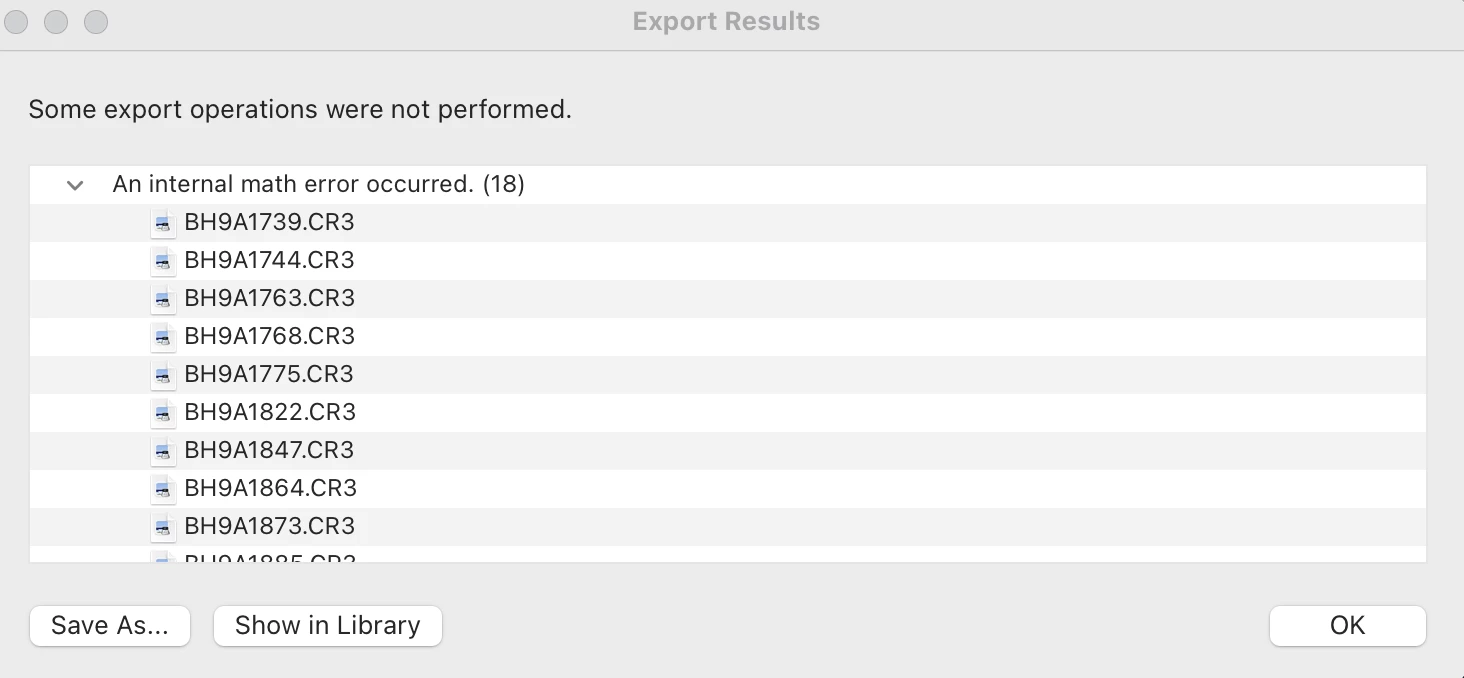
After exporting this error report populates and states that an internal math error has occurred for 18 of the images. I'm not sure how to fix this. Can someone help me out? 

This topic has been closed for replies.

62 replies

Inspiring
June 11, 2021
Inspiring
June 11, 2021

I am having this same issue! I am exporting over 800 photos for a wedding, and maddeningly, the 12 best bridal photos are the ones that are reporting the math error! I have tried clearing multiple caches, I have tried updating Lightroom, restarting that and my computer multiple times, I have tried to delete the photos and reupload them to Lightroom and re-edit them, and then I get the same error message on export. Also if I try to zoom in to these photos at 100%, the exposure goes darker. When I click and drag while zoomed in, the photo goes to my edited exposure, then as soon as I let go of the click it goes dark again. And when I zoom back out to 50% or 0%, the photo stays at normal edited exposure. Also, when I am zoomed in to 100% or more, the brush doesn't work.

I edited these 12 photos the exact same way I edited the rest of the 800+ photos. I always use a preset and tweak on top of that.

My info:

Macbook Pro 2015

Big Sur 11.3

Lightroom Classic 10.3

Canon R6, R Adapter, Canon 24-70mm 2.4L II

This has been so frustrating -- I can't deliver the photos when the bride needs them because I can't export them! Please fix this! The same thing happened last week with a family session and I couldn't export 4 photos for the same reason. 

johnrellis
Legend
June 6, 2021

Google translation: "Has anyone had feedback on this error?"

This bug report is marked "In progress" at the top, which means that Adobe is actively working on it.

Inspiring
June 6, 2021

Alguém já teve retorno sobre esse erro?

Inspiring
June 4, 2021

I've been experiencing the same issue, and it's random, which makes it really difficult to figure out. However, the issue/error message does seem to occur when syncing settings or using copy/paste in the Develop module. I uninstalled and reinstalled every recent version of Lightroom Classic, created a new catalog, exported and renamed the files, and imported new files and nothing seems to change or fix the issue – it only (and continues to) glitches and corrupts the files in the develop module. I can export as DNG or JPEG but none of the changes are recorded. 

I don't have a screenshot of it, but I've also received the "math error" and this error when I've attempted to edit the files in PS - 
Please help! I have so many clients waiting on images! 
Inspiring
June 4, 2021

Same issue, it's so bizarre and so completely frustrating! I've literally tried everything imaginable for the past two days and thought I was going crazy until finding this thread... thank you all for sharing, and Adobe please fix this bug! 

Participant
June 2, 2021

Hallo zusammen,


seit einigen Tagen ist es mir nicht mehr möglich bearbeitete Bilder zu exportieren.

Angehängte Meldungen erscheinen.

Neustart hat nicht geholfen. Was kann ich tun?


Vielen Dank vorab.

Alexandra

johnrellis
Legend
June 2, 2021

Google translation: "Edited images cannot be exported. For a few days I have not been able to export edited images. Attached messages appear. Rebooting did not help. What can I do?"


Google translation of first screenshot: "Some exports were not performed. An internal calculation error has occurred.".  Second screenshot: "There was a problem reading this photo in lightroom. You cannot make any changes to the photo."


The export error in the first screenshot has been reported by a number of people; the English version is "An internal math error occurred."  Adobe has acknowledged the bug:

https://feedback.photoshop.com/conversations/lightroom-classic/lightroom-classic-internal-math-error-on-export/6065d311414f1176ed90cbef 


No workaround has been posted for it, unfortunately.  You could try rolling back to an earlier version of LR, e.g. 10.1.1 or 10.0.


The error in the second screenshot, "There was a problem reading this photo in Lightroom", may be unrelated to the first.  The photo could be corrupted on disk, or it could have bad file permissions.  Upload it to Dropbox or similar and post the sharing link here.  We can see if the photo is corrupted or the problem is something else.

Inspiring
June 1, 2021

Have you found a correction to this issue?

Inspiring
May 27, 2021

Same Issue!! Adobe please fix this bug. I have never had this issue before. What the heck! I was working on 900 photos for a client and this showed up. Same thing would happen when I would copy and paste settings or presets. 

Rikk Flohr_Photography
Community Manager
May 27, 2021

I am sorry to hear about your issue @paying4sheet. 

I have a few questions for you.

  • Were all 600 images corrupted or a smaller number? How many?
  • Is it only on Export as JPEG that you see the issue? Export as Tiff?  
  • You mention export as DNG and creating a new catalog. Do those images not import into and work from your regular catalog?

No one at Adobe has yet been able to reproduce this issue. We need example files and step by step instructions to try and recreate this issue so the devs can fix it. 

Can anyone here provide an image that fails and the steps used to create the error?

Rikk Flohr: Adobe Photography Org