Participant
April 3, 2018

P: Develop presets not sorting correctly

  • April 3, 2018
  • 123 replies
  • 2273 views

They used to be sorted alphabetically. In version 7.3 the order is random

This topic has been closed for replies.

123 replies

Todd Shaner
Legend
May 12, 2018
Sounds good I'll give it try and report back.
johnrellis
Legend
May 12, 2018
The new preset format in .xmp files has a SortName field that is used for sorting the presets.  Camera Raw consistently sets SortName, but some operations in LR set SotName, some leave it empty (freshman programming). The Fix Ordering button of Fix Presets sets the field  to a version of the Name field, so that all the presets sort consistently.

FIx Presets will replace numbers embedded in the name with zero-padded numbers, to achieve the proper numeric sorting that was present in LR 7.2 and earlier and is still used in the Collections and Folders panels.  For example, collections with leading numbers in their names will sort "1 C", "3 C", "20 C".  Given a preset name "23 - 5 Orange", Fix Presets will give it the SortName "000023 - 000005 Orange", to achieve the proper sorting.  (Internally, LR has a sort function that does this hybrid numeric sorting, but the programmer forgot to use it in the new Presets panel.)

If/when a future release of LR fixes the issue, presets that have been corrected by Fix Prests will continue to work and sort properly.  (The internal LR numeric sorting treats a leading "000023" in the name the same as "23".)
Todd Shaner
Legend
May 12, 2018
John, thanks for creating this plugin. My User Develop presets are a mess so I'd like to give it a try. Exactly what does it do and how will this affect future LR updates that correct the sort order?
johnrellis
Legend
May 12, 2018
I just released the free Fix Presets plugin that corrects the ordering bug with a click of a button. You may need to invoke the plugin whenever you rename presets, change their groups (folders), or import new ones from earlier versions of LR.

The plugin also provides workarounds for a number of other develop preset issues.
Inspiring
May 10, 2018
OK, I'll take your word for it. If that's the case it is certainly confusing and somewhat illogical. No wonder the sorting of 'Presets' has raised so many questions lately.

Thanks for your comments on my questions.
JohanElzenga
Community Expert
Community Expert
May 10, 2018
Presets sort by an internal field. So whether or not the Adobe presets sort alphabetically is (probably) by design. But your own custom presets should sort correctly now.
-- Johan W. Elzenga
Inspiring
May 10, 2018
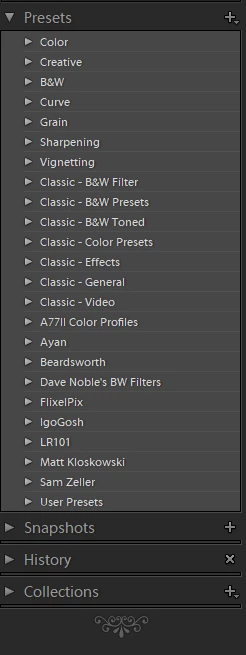
Well, looking inside this is what I see:


Doesn't look like it's alphabetical to me
JohanElzenga
Community Expert
Community Expert
May 10, 2018
Yes, consider them as grouped:
1: Adobe general presets
2: Adobe effects presets
3: Adobe Classic presets
4: Custom presets
Inside each group everything sorts as expected. When you specify some presets as 'favorite', you will see that the Favorites group comes all the way at the top.
-- Johan W. Elzenga
Inspiring
May 10, 2018
I have updated to LR 7.3.1 running on a Win 7 Professional 64bit OS based machine. My 'Presets' are stock--I have made no changes. They are displayed as follows:


Is this what the panel is supposed to look like? I doesn't appear to be alphabetically sorted to me.
Participating Frequently
May 5, 2018
I'm noticing that presets I rename no longer work.  They appear to work-hovering over them shows what the preset SHOULD do, but clicking on the preset (and un-hovering) shows that the preset did nothing...

WHAT IS HAPPENING???