Participant
April 3, 2018

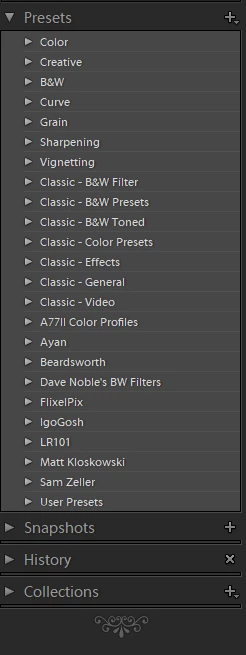
P: Develop presets not sorting correctly

  • April 3, 2018
  • 123 replies
  • 2273 views

They used to be sorted alphabetically. In version 7.3 the order is random

This topic has been closed for replies.

123 replies

Participating Frequently
May 4, 2018
Ditto that.  Renaming presets irreversibly messes up any sort order again.  

And if you try to save a preset with a ":", it won't save (and it won't tell you it didn't save either).  Oddly, I can re-name a preset with a ":" and it will stick, except, of course it will show up at the bottom of the preset list again...

If anyone is going to fix the preset panel, while you're at it can you incorporate a drag and drop system so users can order their presets/folders the way we want without having to add leading zeros/numbers/letters?

And redesign the terrible spacing/indenting of the preset panel so we can see more of the preset name in the same-sized window. For the love of God even my tool tips for preset names get cut off (if they show up in the first place).  Space is valuable here, as preset names need to be somewhat descriptive.  We could see 5/8" more of a preset name in the same-sized panel without sacrificing anything if someone would redesign the panel so that:
1) The folder arrows were flush with the left side of the panel (why would they ever start in the middle of the panel anyway??)
2) The preset icons were eliminated (what is the purpose of them anyway??), and preset names start under folder names (1/4" away from left side of panel)
3)  Drag/drop sort order were implemented and we no longer have to add a 2-digit minimum number/letter combo to the folder and/or preset names.  
Known Participant
April 28, 2018
Also, not sure if this has been reported, but if you create a new preset in folder A, then move it in Lightroom to folder B (drag & drop), it stays in folder A when you check the file location in file explorer...
Known Participant
April 28, 2018
I guess this sums up how well the sorting of presets works 🙂
mickspawn
Inspiring
April 28, 2018
they are so retarded that they sort alphabetically but not numerically.. who are their engineers, surely any braindead person would realise sort order means ALL sort order not just Alphabetical.
gregseth
Known Participant
April 27, 2018
7.3.1 didn't change a thing: still improperly sorted, impossible to delete or rename.
Inspiring
April 27, 2018
Hello. Unfortunately also the new version of Lightroom remains unuseful.

My main challenges with 7.3.1 are:

- I can't see new presets both in Lightroom and in the destination folder when I create them

- I can't get in alphabetical order older presets renamed in 7.3.0, even

changing the name more than one time

- Only a part of presets are now in alphabetical order. This is a

relevant part but the change is not complete.

Known Participant
April 26, 2018
Nope.  I changed the end of a preset and it dropped it to the bottom of my list

02A. Brightness +.25
to
02A. Brightness +.33

That's all it took to screw the order.
Inspiring
April 26, 2018
7.31 is a big improvement, but they only fixed alphabetical and not numerical.

If you have presets with numbers, it sorts by the first digit, so:
Preset 1
Preset 10
Preset 11
Preset 12
Preset 2
Preset 3

etc.
JohanElzenga
Community Expert
Community Expert
April 26, 2018
If you remove the ~ at the front of your old presets that will indeed tell Lightroom to re-convert that preset to .xmp, so don't do that unless there is a compelling reason for it.
-- Johan W. Elzenga
Victoria Bampton LR Queen
Community Expert
Community Expert
April 26, 2018
It just means it was reconverted to fix some issues introduced in 7.3. https://helpx.adobe.com/lightroom/kb/not-all-presets-are-converted.html
Victoria - The Lightroom Queen