[View this post in your web browser. It contains formatting and images that don't appear in email.]
@hans_onepicture Whether the map display works or not could depend on the username (user) in the Windows account. My Windows username contains an umlaut ("ü").
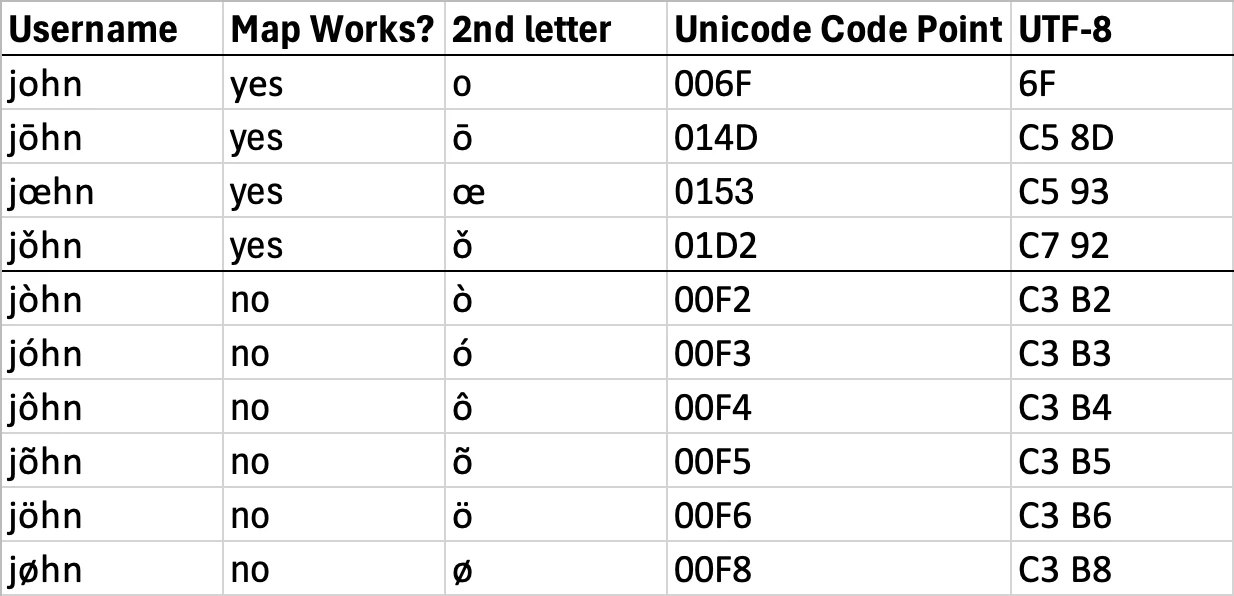
Excellent discovery! I tested 8 diacritical marks and 1 ligature in Windows account usernames, and some worked and some didn’t. This explains why the bug reports mostly came from the same European countries, with a few from South America and other countries.
So the workaround is to create a username without any diacritical marks.
Looking at the Unicode representations, all of the problem-causing diacritical marks have code points starting with U+00, while the non-problematic marks and ligatures don’t:
It’s pretty clear that some software component invoked by the Map module has a bug in its handling of Unicode strings. Given that similar bugs haven’t cropped up in other parts of LR, this strongly suggests the problem is somewhere in the third-party components such as the Google Maps JSON library. I think that library caches map data in hidden folders inside C:\Users\<username>\AppData, and the caching could be getting tripped up by the bug in the Unicode handling.
As of some months ago, Adobe hadn’t updated that component -- it was many years out-of-date. And the engineer who originally wrote that part of LR is likely long gone from the team.
Tested on LR 16.0 / Windows 11 running in the US region with US English.
Beim mir funktioniert das Kartenmodul in 14.3.1 immer noch nicht. Ich hatte heute einen Chat mit Adobe. Man riet mir, die Einstellungen zu löschen, aber das half nicht. Danach sollte ich den Grafikkartentreiber aktualisieren (Adrenalin-Software). Auch das half nicht. Ich habe außerdem testweise die Firewall (läuft bei mir über Norton360) kurzzeitig deaktiviert. Auch das hilft nicht. Ich starte immer im Kartenmodul. LR Classic läuft bei mir unter Windows 11 24H2 und ich habe einen AMD AMD Ryzen 7 3800X 8-Core Prozessor.
Leider verließ der Adobe-Mitarbeiter den Chat, als ich den Grafik-Treiber aktualisierte. Deshalb muss ich beim nächsten Chat wieder vor vorn beginnen.
merci pour votre contribution, comme à son habitude le support Adobe ne va pas jusqu'au bout ou n'est pas capable d'y aller !? Je ne sais comment il est organisé mais aucun suivi n'est fait sérieusement et il faut recommencer sans cesse en répétant tout ce qui a déjà été dit et dejà hyper connu de tous depuis longtemps ! Désolant, désopilant, affligeant !
I had the same issue after upgrading to 14.3. today. seems like no one helps. I randomly tried some things: switching from satellite to street map and disabled all external modules. Restart -> works
Je viens d'essayer la méthode préconisée par SG9865, que je remercie, en vain ! Seule l'apparition momentanée de la mappe monde en noir et blanc avec la notification : " la connection au serveur Adobe est impossible" est un changement notable par rapport au symptômes antérieurs. De nouveau la carte est inaccessible seul le fond gris est visible.
Il est tout de même inadmissible que le staff d'Adobe ne réagisse pas plus rapidement pour résoudre ce problème qui perdure pour nombre de personnes dépuis plusieurs mois aec la version 14.2 et continu avec la version 14.3, ce qui n'est pas le cas de l'encaissement de montant de notre abonnement qui, lui, fonctionne parfaitement !?
Earlier in this thread, @johnrellis said: "But when I restart LR from the Library module and then go to the Map module, in German and English I always get a functioning Map module." Please try that.
[This post contains formatting and embedded images that don't appear in email. View the post in your Web browser.]
I was able to demonstrate that grey maps occur when there is high network latency between your computer and Google's servers (e.g. with a satellite link). A workaround that works for me:
After the grey map appears, wait for at least 90 seconds (you may seen the grey background change slightly). Then click the center of the zoom slider at the bottom of the map module (don't try to use the + button):-
J'ai le même problème avec Lightroom Classic 14.2 : un écran gris affiché sur le module Carte, un message d'erreur "Impossible de se connecter au serveur Adobe" très fugace, et les contournement avec le module Bibliothèque ne fonctionne pas.
Bonjour, peut-on espérer avoir une solution proposée par Adobe pour résoudre définitivement ce problème d'affichage et d'accès au module carte dans Lightroom Classic 14.2 ? Cela fait maintenant 2 mois que cela dure et malgrè plusieurs demande aucune réponse n'est donnée !
Thank you for sharing which version of Lightroom Classic you're using! If you try zooming in or out of the map, does it suddenly start working? If not, try resizing the app and see if that helps.
[This post contains formatting and embedded images that don't appear in email. View the post in your Web browser.]
I've observed that when LR is running in German, and you restart LR while in the Map module, you're much more likely to trip over the years-old-bug where the Map module fails to display correctly. I see these symptoms in German but not in English.
But when I restart LR from the Library module and then go to the Map module, in German and English I always get a functioning Map module.
In my LR 14.2 / Mac OS 15.2, when I restart LR in German, I always see this error initially:
"Unable to connect to Adobe servers. The map module is not working."
After 2 - 30 seconds, sometimes the correct map is displayed anyway. But sometimes the main panel is blank:
And sometimes it shows this error:
"Oops! An error has occurred. Google Maps was not loaded correctly on this page. You can find technical details in the JavaScript console"
Das Kartenmodul in LRC funktioniert nach dem letzten Update auf Version 14.2 nicht mehr. Betriebssystem W11 - Prozessor AMD Ryzen 9 5900X 12-Core Processor, 3701 MHz, 12 Kern(e), 24 logische(r) Prozessor(en).. Auf meinem Laptop, gleiches Betriebssystem - Intel i5 - 8.Gen. funktioniert es ohne Probleme.
Ich hatte gehofft, das das Problem mit der neuen Version 14.3 gelöst wurde. Ist aber nicht so. Das Kartenmodul funktioniert bei mir seit dem Update 14.2 nicht mehr. Vielleicht sollte ich mich von Lightroom verabschieden. Denn das Kartenmodul ist das Feature, das Ligtroom von der Konkurrenz abhebt.
Ich verwende Win 10. Vor 11 Tagen habe ich mein LrC auf die neueste Version 14.2 geupdatet. Gestern Abend habe ich festgestellt, dass das Kartenmodul nur eine graue Fläche anzeigt, wobei beim Aufstart von LrC ganz kurz eine Weltkarte eingeblendet wird. In der Folge habe ich den Tipp aus der Fehlerbehebung, bekannte Probleme, d.h. zu den häufig auftretenden Problemen mit Lightroom Classic 14.x (rsp. 14.2), mehrmals durchgeführt, jedoch immer ohne Erfolg.
Nun meine Frage: Was mache ich falsch? Was müsste ich noch machen, dass ich die Karte im LrC wieder benutzen kann?
[Moved from ‘Bugs’ to ‘Discussions’ by moderator, according to forum rules.]
Today I switched my computer to Windows 11. Everything worked fine, but there is now no map in Lightroom 14.2. But I'm not sure if the error was already there in Windows 10. I've already reset Lightroom's defaults. But that didn't help.
[Moved from ‘Bugs’ to ‘Discussions’ by moderator, according to forum rules.]
Yes, I did all of that. Multiple times. I've already reset the defaults. Lightroom works fine, only the map is black, as if the connection to Google Maps is lost. However, Google Maps can be easily accessed in the browser.

 AdChoices