
Participating Frequently
August 19, 2021

P: Lightroom Classic: Applying develop preset to multiple images transfer all settings

  • August 19, 2021
  • 36 replies
  • 8581 views


I have a preset for sharpening. When I select multiple images and apply this develop preset there is a weird behaviour. The preset is applied but also all other images get develop settings from the active image in the selection.


This started happening in 10.4. I use this regularly and it never behaved like this.
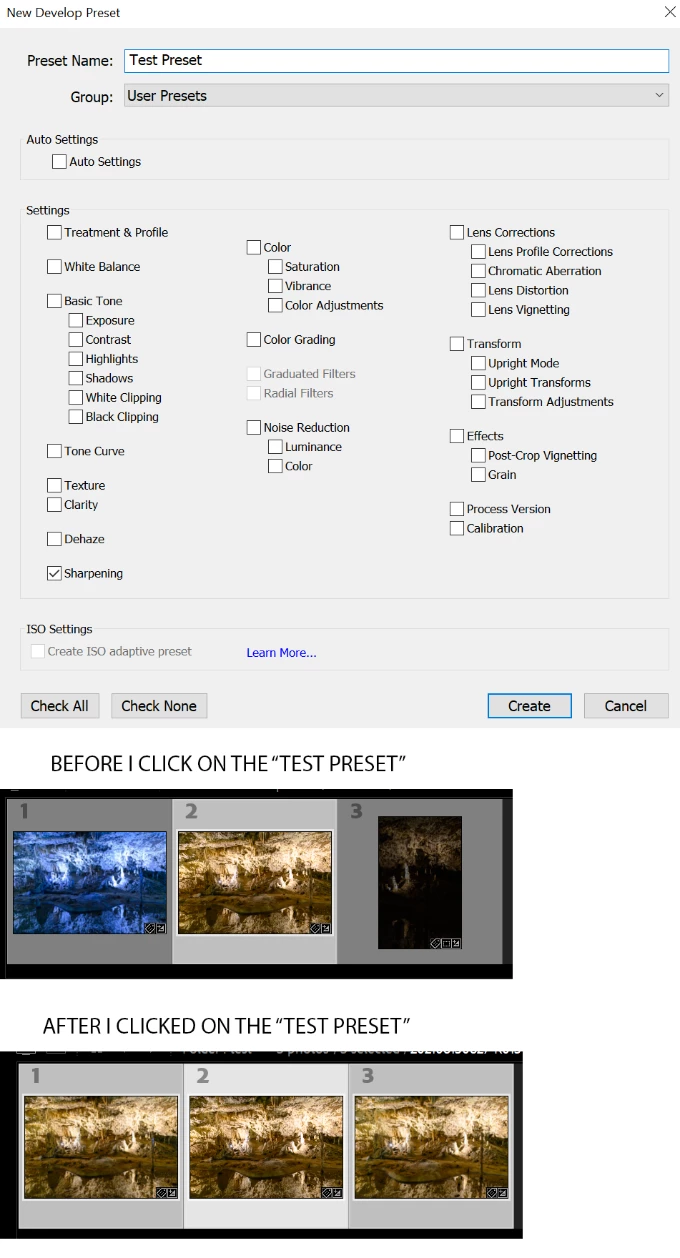


Lightroom Classic version: 10.4 [ 202108071231-af9219b9 ]
License: Creative Cloud
Language setting: en
Operating system: Windows 10 - Business Edition
Version: 10.0.19043
Application architecture: x64
System architecture: x64
Logical processor count: 12
Processor speed: 3,1GHz
SqLite Version: 3.34.0
Built-in memory: 49076,1 MB
Real memory available to Lightroom: 49076,1 MB
Real memory used by Lightroom: 4036,5 MB (8,2%)
Virtual memory used by Lightroom: 5463,4 MB
GDI objects count: 818
USER objects count: 2310
Process handles count: 3956
Memory cache size: 3950,8MB
Internal Camera Raw version: 13.4 [ 872 ]
Maximum thread count used by Camera Raw: 5
Camera Raw SIMD optimization: SSE2,AVX,AVX2
Camera Raw virtual memory: 924MB / 24538MB (3%)
Camera Raw real memory: 932MB / 49076MB (1%)
System DPI setting: 144 DPI (high DPI mode)
Desktop composition enabled: Yes
Displays: 1) 3840x2160
Input types: Multitouch: No, Integrated touch: No, Integrated pen: Yes, External touch: No, External pen: Yes, Keyboard: No

Graphics Processor Info: 
DirectX: Radeon RX 580 Series (27.20.22001.14011)

This topic has been closed for replies.

36 replies

Known Participant
August 25, 2021

I'm having an extremely frustrating bug in LR Classic 10.4 where, if I have auto sync enabled, and I make a change to the current photo, it syncs ALL of the settings to the other selected photos. In other words, if I adjust the white balance, it not only syncs WB to the other photso but also crop, exposure, etc. It's basically making auto sync unusable. I closed and restarted LR but it's still happening.

DdeGannes
Community Expert
Community Expert
August 25, 2021

Wow, this is weird and even crazy hope it gets sorted out ASAP. I will make a test on a small group of images.

Does this happen to everyone or is it random?

Only when using a preset?

On both Mac and Win OS?

Does it get sorted by a preferences reset?


Regards, Denis: iMac 27” mid-2015, macOS 11.7.10 Big Sur; 2TB SSD, 24 GB Ram, GPU 2 GB; LrC 12.5,; Lr 6.5, PS 24.7,; ACR 15.5,; (also Laptop Win 11, ver 24H2, LrC 15.0.1, PS 27.0; ) Camera Oly OM-D E-M1.
Rikk Flohr_Photography
Community Manager
Community Manager
August 19, 2021

I can confirm the behavior. Thank you for the repeatable steps. 

Rikk Flohr: Adobe Photography Org
Participating Frequently
August 19, 2021

@Rikk Installed LRc on another PC (LR was never there) so I suppose it's as clean as it gets. Behaves the same.

Steps (in develop):

1) create develop preset with one thing selected (sharpening only, for example)

2) find some images, at least two. Edit them so they are visibly different (so you can spot the change), i did one with blue white balance and one with visible crop

3) select all images 

4) ensure sync is set to "Auto Sync"

5) apply the preset

Expected behaviour would be the sharpening is set to all selected images.

Real behaviour (in LRc 10.4) is that all images will get ALL settings from the active image (the image visible in develop window)

Rikk Flohr_Photography
Community Manager
Community Manager
August 19, 2021

It would probably be prudent to reset your preference file to ensure we aren't dealing with a preferences corruption.

This procedure works for both Lightroom Classic and Lightroom Desktop.

If you are using Lightroom Desktop it can change the location of your local storage. Please review this setting after resetting preferences. 

Reset Procedure:

1. Close Lightroom.

2. Hold down [Alt/Opt]+[Shift] while restarting Lightroom.

3. Overwrite the Preferences when prompted by the dialog.

4. Close Lightroom.

5. Restart Lightroom.

If you still see the behavior after resetting preferences can you please record step-by-step instructions for reproducing the issue and post it here?

Thanks!

Rikk Flohr: Adobe Photography Org
Participating Frequently
August 19, 2021

@Jerry_Syder

Nope, I selected all images on purpose (as I want to do something with preset on all of them). 

Auto sync is always on for me. If I select multiple images I always want to do changes on all of them.

Problem is with presets and applying them on multiple images. They just copy all settings  from the active image (by active image i mean the one displayed) regardless of what is set in the preset.

As can be seen in the screenshot I included. Before applying preset, each image looks differently. When I apply the preset (with only sharpening set) all images looks same now. What happens is that all settings from the active photo is transfered to every selected photo.

Jerry Syder
Inspiring
August 19, 2021

I was going to suggest checking to see if 'Auto Sync' is switched on but that would mean that you've intentionally selected multiple images and subsequently switched on(maybe by accident) Auto Sync. What it seems like you're saying though, is that other photos are being selected without user input?