
Participant
October 7, 2015

P: Preview Thumbnails are Black

  • October 7, 2015
  • 42 replies
  • 1976 views

Hello
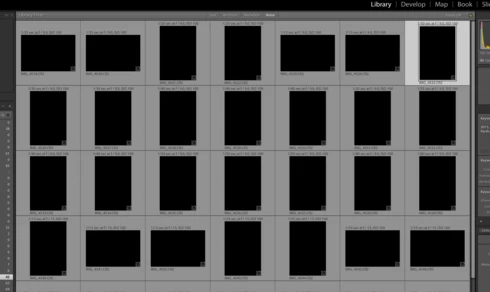
Just did my first import....but after import finish in Library all previews/thumbnails show BLACK, see imagine. I have ReSync'd even Exit out then come back and Previews not showing. All other folders are OK, just not the NEW import. Checked with Actual folder on MAC Finder and these ok. Any ideas?
This topic has been closed for replies.

42 replies

Participating Frequently
October 9, 2015
btw, the whole app seems to be runnung quicker including preview building which was a disaster too....
Participating Frequently
October 9, 2015
ok, so after spending 2 whole days - trying all your's and Laura's suggestions over and over, including a few of my own hacks - trying to get this right and eventually resorting to my Lr 5.7.1 in despair, I woke up this morning and lo and behold it seems to be working - with Auto tone unchecked -!!!!!!
please don't ask me what worked as I have no idea 😮
Victoria Bampton LR Queen
Community Expert
Community Expert
October 9, 2015
Pressing Reset doesn't work for you Sey? What happens if you switch to the Develop module, hold down the Shift key and press the Reset (Adobe) button. Does that work?
Victoria - The Lightroom Queen
Participating Frequently
October 8, 2015
Doesn't work for me!!! 😞 and caused the same problem on the rollback to Lr 2015.1.............so now I'm using my Lr 5.7.1 and if Adobe don't get their act together very soon, there are a number of viable concurrents out there......
Inspiring
October 8, 2015
Your instructions perfectly, thanks a lot for your help
Inspiring
October 8, 2015
Thanks a lot, Victoria, this helped and I can live with this workaround until the bugfix will be issued.
Inspiring
October 8, 2015


Since I have have updated to LR CC 2015.2 on my Win 7 computer, images are no longer displayed after importing. There has been no such issue before, from LR 1 to CC 2015.1.

It does make no difference whether the files are imported from SD card or from my HDD nor does the issue depend on the camera model: Every image is displayed simply as a black square, everywhere, be it in the library, grid or loupe, or in the develp module. And regardless of the selected development preset, the exposure slider is always set to -5, all other tone sliders are at 0, even if no development preset is selected during import.

Meanwhile, I have found out that pressing the reset button helps, images can be edited normally after this superfuous action. I wonder whether I am the only one who encounters this very annoying bug.
Victoria Bampton LR Queen
Community Expert
Community Expert
October 7, 2015
Follow my instructions above - it's solved the issue for every case I've seen so far.
Victoria - The Lightroom Queen
Inspiring
October 7, 2015
Hello,
have the same problem in Windows 10 and LR 2015.2!
When I use a different admin user it works.
The Adobe support tells me that he can help any further!
Super Support!
Victoria Bampton LR Queen
Community Expert
Community Expert
October 7, 2015
Thanks for posting it anyway. I've heard a few reports of this and haven't seen a bug posted here, so it's useful for reference.
Victoria - The Lightroom Queen