



johnrellis
Legend
January 17, 2022

P: SDK: LrView.bind (key) fails when "key" contains a period

  • January 17, 2022
  • 12 replies
  • 2205 views

LrView.bind (key) creates a non-working binding when "key" contains a period. To reproduce, install this plugin:

https://www.dropbox.com/s/fhx9521z9re47ro/bind-bug.lrdevplugin.2022.01.16.zip?dl=0 


and then do File > Plug-in Extras > Bind Bug. That will produce this window:
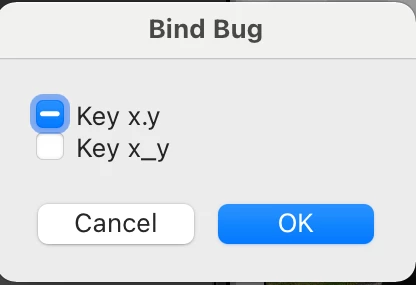
 

The first checkbox should be unchecked (white), not in the mixed state (hyphen).  Tested on LR 11.1 / Mac OS 11.6.2.


Just one more SDK bug to work around.


Here's the script for the Bind Bug command:


local LrBinding = import "LrBinding"
local LrDialogs = import "LrDialogs"
local LrFunctionContext = import "LrFunctionContext"
local LrView = import "LrView"

local bind = LrView.bind
local f = LrView.osFactory()

local key1 = "x.y"
local key2 = "x_y"

LrFunctionContext.callWithContext ("main", function (context)
    local prop = LrBinding.makePropertyTable (context)
    prop [key1], prop [key2] = false, false
    assert (prop [key1] == false)
    assert (prop [key2] == false)
    LrDialogs.presentModalDialog {title = "Bind Bug", 
        contents = f:column {bind_to_object = prop,
            f:checkbox {title = "Key " .. key1, value = bind (key1)},
            f:checkbox {title = "Key " .. key2, value = bind (key2)}}}
    end)


12 replies

johnrellis
Legend
September 29, 2025

I submitted a new bug report with all the incorrect or missing documentation I could find about "bind_to_object" and "key":

https://community.adobe.com/t5/lightroom-classic-bugs/sdk-documentation-for-quot-bind-to-object-quot-and-quot-key-quot-properties-incorrect/idi-p/15525982

Legend
September 29, 2025

From the SDK itself:


LrView.bind( binding )This namespace function declares a binding to a data value in a property table.

First supported in version 1.3 of the Lightroom SDK.

Parameters

1. binding (string or table) The data property. The name of a key in the default bound table, or, to specify a single property, a table with these entries:

  • key (string) A key name for the observed property.
  • bind_to_object (string) Optional. The name of an observable table containing this key, which overrides the current bound table.


bind_to_object type is a string! Wasted hours and hours because of this poor documentation.


Adobe really needs to take responsiblity for this and fix all the errors in their documentation.


johnrellis
Legend
September 29, 2025

"This where the SDK and the Programmers Guide is so misleading and confusing."


Agreed. Though the original bug report was marked as "fixed", the API Reference was never updated.  And the Guide has all sorts of little errors like this.

Legend
September 29, 2025

@johnrellis 


This where the SDK and the Programmers Guide is so misleading and confusing. Page 98 of the Programmers Guide:


"You can override the bound table for a specific binding by passing the LrView.bind() function a table
containing both the key and the table it comes from:


visible = LrView.bind { key = "mySetting", bind_to_object = "myTable" }


This allows you to bind different properties in one view object to keys in different tables.


The bind_to_object is being assigned a string! It also needs to be very clear that the object being bound is an observable table created with LrBinding.makePropertyTable, not just an ordinary lua table.


At last, an answer that actually makes sense and as a bonus, it works too.


Thanks for all your help and knowledge John. Most appreciated. Now I can move on with my plug-in development.


Regards, Tony

johnrellis
Legend
September 29, 2025

This script is setting the "bind_to_object" property of the various controls to strings rather than property tables:

bind_to_object = 'p.group' 
bind_to_object = 'p'

 When I change those to:

bind_to_object = p.group
bind_to_object = p

your first script appears to work as intended.

Legend
September 29, 2025

@johnrellis 


If I change the script to this


local LrFunctionContext = import 'LrFunctionContext'
local LrDialogs = import 'LrDialogs'
local LrBinding = import 'LrBinding'
local LrView = import 'LrView'


local function onChangeHandler( p, key, value )
  LrDialogs.showBezel( string.format ( 'Control having key %s is set to %s', key, value ), 1 )
end


LrFunctionContext.callWithContext( 'Control Bindings Test', function( context )
  local p = LrBinding.makePropertyTable( context )

  p.group = LrBinding.makePropertyTable( context )
  p.group['option1'], p.group['option2'], p['option3'] = true, false, true

  p.group:addObserver( 'option1', onChangeHandler )
  p.group:addObserver( 'option2', onChangeHandler )
  p:addObserver( 'option3', onChangeHandler )

  local bind = LrView.bind
  local f = LrView.osFactory()

  LrDialogs.presentModalDialog( {
    title = "Control Binding Test",
    cancelVerb = "< exclude >",
    contents = f:view {
      -- set default global binding
      bind_to_object = p,

      f:column {
        spacing = f:control_spacing(),

        f:row {
          f:column {
            spacing = f:control_spacing(),
            bind_to_object = p.group,

            f:checkbox {
              title = "Option 1",
--              value = bind { key = 'option1', bind_to_object = 'p.group' },
              value = bind 'option1',
--              enabled = bind { key = 'option2', bind_to_object = 'p.group' },
              enabled = bind 'option2',
            },

            f:checkbox {
              title = "Option 2: Uncheck to disable Options 1 && 3 (doesn't work)",
--              value = bind { key = 'option2', bind_to_object = 'p.group' },
              value = bind 'option2',
              enabled = bind { key = 'option3', bind_to_object = 'p' },
            },
          },
        },

        f:row {
          f:checkbox {
            title = "Option 3: Uncheck to disable Option 2 (doesn't work)",
            value = bind 'option3',
            enabled = bind { key = 'option2', bind_to_object = 'p.group' },
          },
        },
      },
    },
  } )
end )


then all Options get initialised correctly; unchecking Option 2 disables Option 1, but not Option 3; unchecking Option 3 still doesn't disable Option 2; all Options trigger the observer handler.


So, bindings still don't work as expected.

Legend
September 29, 2025

@johnrellis 


"value = bind(  'a', 'p.group' )"


My mistake (misreading of the SDK)


Still, using the table argument LrView.bind { key = 'item', bind_to_object = 'props' } doesn't seem to work in this example script.


local LrFunctionContext = import 'LrFunctionContext'
local LrDialogs = import 'LrDialogs'
local LrBinding = import 'LrBinding'
local LrView = import 'LrView'


local function onChangeHandler( p, key, value )
  LrDialogs.showBezel( string.format ( 'Control having key %s is set to %s', key, value ), 1 )
end


LrFunctionContext.callWithContext( 'Control Bindings Test', function( context )
  local p = LrBinding.makePropertyTable( context )

  p.group = LrBinding.makePropertyTable( context )
  p.group['option1'], p.group['option2'], p['option3'] = true, false, true

  p.group:addObserver( 'option1', onChangeHandler )
  p.group:addObserver( 'option2', onChangeHandler )
  p:addObserver( 'option3', onChangeHandler )

  local bind = LrView.bind
  local f = LrView.osFactory()

  LrDialogs.presentModalDialog( {
    title = "Control Binding Test",
    cancelVerb = "< exclude >",
    contents = f:view {
      -- set default global binding
      bind_to_object = p,

      f:column {
        spacing = f:control_spacing(),

        f:row {
          f:column {
            spacing = f:control_spacing(),

            f:checkbox {
              title = "Option 1",
              value = bind { key = 'option1', bind_to_object = 'p.group' },
              enabled = bind { key = 'option2', bind_to_object = 'p.group' },
            },

            f:checkbox {
              title = "Option 2: Uncheck to disable Options 1 && 3 (doesn't work)",
              value = bind { key = 'option2', bind_to_object = 'p.group' },
              enabled = bind { key = 'option3', bind_to_object = 'p' },
            },
          },
        },

        f:row {
          f:checkbox {
            title = "Option 3: Uncheck to disable Option 2 (doesn't work)",
            value = bind 'option3',
            enabled = bind { key = 'option2', bind_to_object = 'p.group' },
          },
        },
      },
    },
  } )
end )


On running the script:

Options 1 and 2 don't get their values initialised properly, but Option 3 does

Unchecking Option 2 should disable Options 1 & 3, but it doesn't

Unchecking Option 3 should disable Option 2, but it doesn't

Changing the state of any of the checkboxes should trigger the observer function, but only Option 3 works


johnrellis
Legend
September 28, 2025

"value = bind(  'a', 'p.group' )"


I don't see a two-argument form for LrView.bind() documented in the AP Reference or the SDK Guide, and it doesn't work in my testing either. However, I did observe that these other three methods did work for referencing a second property table in an LrView control hierarchy:


- bind {key = "key", bind_to_object = prop2}


- bind "prop2.key"


- Setting the property "bind_to_object = prop2" in a nested part of the control hierarchy.


This script illustrates all three methods:

local LrBinding = import "LrBinding"
local LrDialogs = import "LrDialogs"
local LrFunctionContext = import "LrFunctionContext"
local LrView = import "LrView"

local bind = LrView.bind
local f = LrView.osFactory()

LrFunctionContext.callWithContext ("main", function (context)
    local prop1 = LrBinding.makePropertyTable (context)
    prop1.prop2 = LrBinding.makePropertyTable (context)
    prop1.value, prop1.prop2.value = "prop1 value", "prop2 value"

    LrDialogs.presentModalDialog {title = "Bind", 
        contents = f:column {bind_to_object = prop1,
            spacing = f:control_spacing (),
            f:static_text {title = bind "value"},
            f:static_text {title = bind "prop2.value"},
            f:static_text {title = bind "value", 
                bind_to_object = prop1.prop2},
            f:column {bind_to_object = prop1.prop2,
                f:static_text {title = bind "value"}},
            f:static_text {title = bind {key = "value", 
                bind_to_object = prop1.prop2}}}}
    end)
Legend
September 24, 2025

The SDK documentation is quite poor containing many errors and possibly omissions too.


It would make sense to me for the Checkbox control to have a handler for a clicked or changed event, similar to the Action associated with the Button control.


Does anyone know how a plugin can 'know' when a Checkbox's state is changed?


johnrellis
Legend
September 25, 2025

You can use an observer function for the data binding of the checkbox, e.g.:


local prop = LrBinding.makePropertyTable (context)
prop:addObserver ("checkbox", function () ... end)
...
f:checkbox {title = "My checkbox", value = bind "checkbox"}


johnrellis
Legend
June 18, 2022

This was only partially fixed. The behavior is "as designed", but it was (and still is) undocumented in the API Reference for LrView.bind().


The Lightroom Classic Programmers Guide has been updated on page 98 with this sentence:


"The keys in the table are treated as “.” (dot/period) separated hierarchical key-value pairs, e.g. a key such as x.y would bind with the key y in the table bound to key x."


The API Reference documentation for LrView.bind() should be similarly updated:


"key (string) A key name for the observed property. If the key is of the form x.y, it references to the key y in the table bound to key x."


Here's a modified bind-bug.lua for the plugin above that illustrates the behavior:


local LrBinding = import "LrBinding"
local LrDialogs = import "LrDialogs"
local LrFunctionContext = import "LrFunctionContext"
local LrView = import "LrView"

local bind = LrView.bind
local f = LrView.osFactory()

LrFunctionContext.callWithContext ("main", function (context)
    local prop = LrBinding.makePropertyTable (context)
    prop ["x.y"], prop.y, prop.z = false, false, {a = false}
    LrDialogs.presentModalDialog {title = "Bind Bug", 
        contents = f:column {bind_to_object = prop,
            f:checkbox {title = "Key x.y", value = bind "x.y"},
            f:checkbox {title = "Key y", value = bind "y"},
            f:checkbox {title = "Key z.a", value = bind "z.a"}}}
    assert (prop.z.a == true)
    assert (prop.y == true)
    assert (prop.x == true)
    end)