johnrellis
Legend
December 10, 2014

P: Still inconsistent capture date/time for photos and videos

  • December 10, 2014
  • 165 replies
  • 5533 views

Update 5/17/2018: Though LR 7.1 made improvements, LR 7.3.1 still has two closely related problems with a single underlying cause:

- With photos and videos missing metadata capture date/times (e.g. scans), there is still an inconsistency between the times shown under the thumbnails in grid view and in the Metadata panel and the hidden, internal times used for sorting in grid view.

- Changing IPTC Date Created in the Metadata panel, either by editing the field or using Metadata > Copy/Paste Metadata, similarly causes inconsistent values to be shown and sorting and searching to work inconsistently.  It also causes date metadata to be written back to the files that doesn't conform with the Metadata Working Group's standard.

The underlying cause is architectural: LR doesn't have a single internal catalog field representing "capture time".  Rather, it maintains capture time in several different fields, and the various parts of LR update those fields inconsistently.

See here for precise recipes to replicate these bugs:

https://feedback.photoshop.com/photoshop_family/topics/lightroom-still-inconsistent-capture-date-tim...

https://feedback.photoshop.com/photoshop_family/topics/lightroom-still-inconsistent-capture-date-tim...

See here for a workaround: 

https://feedback.photoshop.com/photoshop_family/topics/lightroom-still-inconsistent-capture-date-time-for-videos?topic-reply-list%5Bsettings%5D%5Bfilter_by%5D=all&topic-reply-list%5Bsettings%5D%5Breply_id%5D=15475521#reply_15475521.  

-------------

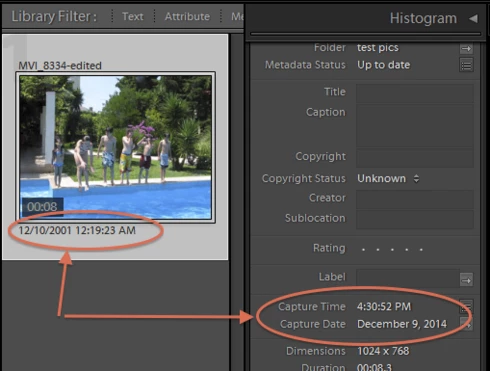
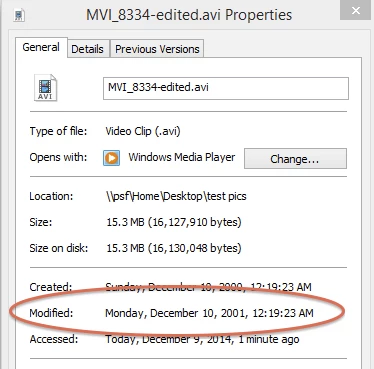
LR 5.7 still shows inconsistent capture date/times for videos. For a test .avi on Windows 8.1, the date in grid view appears to be the file system's last-modified time, while Capture Date/Time is set to the time of import.This problem was declared fixed in LR 5.5, and it appears to have been fixed for images, but not videos:http://feedback.photoshop.com/photoshop_family/topics/inconsistent_dates_for_files_missing_date_time...I'm opening a new topic, since the previous one has been marked "Solved".
This topic has been closed for replies.

165 replies

Inspiring
January 12, 2017
Ahhhhh .  LightroomCC Library, like Imac "Photos" lets me change the Metadata's four digit year when I type the numbers quickly.  If you hunt and peck the numbers slowly you get really bad results in both programs.
alanterra
Inspiring
January 11, 2017
Yes, if you pause when you are typing the digits, Lightroom resets the number. I wonder if there is a setting for people who have motor control problems.
Inspiring
January 11, 2017
Solution: AH, my Imac Photos has the same difficulty entering 4 digit year, so I got good Apple phone help:    Because I hunt and peck numbers above the letters on my Imac keypad I am slow.  Apple Sr Advisor for Photos suggested I type the year, say 1987 more quickly.  This has worked on 5 photos in Apple Photos.  The advisor thinks as the Photos program matures into its 2nd, third and later years, it will be able to tolerate slow typists more and more.  There is aways a paste option for when I'm really old.  I can't wait to see if LR likes fast typists just as much.  Thank to those on this site for their help 24/7
alanterra
Inspiring
January 11, 2017
HI Keith. Just to be clear, you are trying to edit the date using the menu command "Metadata:Edit Capture Time..." and then you have selected "Adjust to a specified date and time". Correct?

This may be a wild guess, but what are your settings for Date/Time on your Macintosh (in System Preferences app)? This is what mine look like and I cannot replicate your bug.

Inspiring
January 10, 2017
Lightroom version: CC 2015.8 [ 1099473 ]License: Creative Cloud
Operating system: Mac OS 10
Version: 10.12 [2]

My Imac program: Iphoto also can't accept a typed 4 digit year when I try, it only reliably accepts bumps of 1 year at a time, or hold down to spin year at medium speed.
johnrellis
Legend
January 10, 2017
Just to triple-check: Do Help > System Info -- does that show 2015.8?  (The CC update mechanism not infrequently fools people into thinking they've got the latest.)
Inspiring
January 10, 2017
Now have 2015.8 . Still have LR CC trouble AND just tried to adjust Apple Photo Metadata for the jpgs in Photos and guess what, my new Imac basically can't accept 4 digit year for updated metadata year, done under Photo, Image, Adjust date and time, all I photo seems to allow is bumping the year up or down with the arrows next to the time and date window, so its alot of bumps to go from 2017 to 1960 on each slide, OUCH.
johnrellis
Legend
January 8, 2017
You're running an old version (CC 2015.0).   Update to 2015.8 by doing Help > Updates.  If you have trouble with that, see here: http://blogs.adobe.com/lightroomjournal/2013/06/keeping-lightroom-up-to-date.html
Inspiring
January 8, 2017
Here's my Lightroom Help Info: Lightroom version:  CC 2015 [1014445]License: Creative Cloud
Operating system: Mac OS 10
Version: 10.12 [2]
Application architecture: x64 .     What does this mean??
Victoria Bampton LR Queen
Community Expert
Community Expert
January 8, 2017
Check you're actually running the latest version (2015.8) as this sounds a lot like a bug that was fixed months ago.
Victoria - The Lightroom Queen