johnrellis
Legend
December 10, 2014

P: Still inconsistent capture date/time for photos and videos

  • December 10, 2014
  • 165 replies
  • 5533 views

Update 5/17/2018: Though LR 7.1 made improvements, LR 7.3.1 still has two closely related problems with a single underlying cause:

- With photos and videos missing metadata capture date/times (e.g. scans), there is still an inconsistency between the times shown under the thumbnails in grid view and in the Metadata panel and the hidden, internal times used for sorting in grid view.

- Changing IPTC Date Created in the Metadata panel, either by editing the field or using Metadata > Copy/Paste Metadata, similarly causes inconsistent values to be shown and sorting and searching to work inconsistently.  It also causes date metadata to be written back to the files that doesn't conform with the Metadata Working Group's standard.

The underlying cause is architectural: LR doesn't have a single internal catalog field representing "capture time".  Rather, it maintains capture time in several different fields, and the various parts of LR update those fields inconsistently.

See here for precise recipes to replicate these bugs:

https://feedback.photoshop.com/photoshop_family/topics/lightroom-still-inconsistent-capture-date-tim...

https://feedback.photoshop.com/photoshop_family/topics/lightroom-still-inconsistent-capture-date-tim...

See here for a workaround: 

https://feedback.photoshop.com/photoshop_family/topics/lightroom-still-inconsistent-capture-date-time-for-videos?topic-reply-list%5Bsettings%5D%5Bfilter_by%5D=all&topic-reply-list%5Bsettings%5D%5Breply_id%5D=15475521#reply_15475521.  

-------------

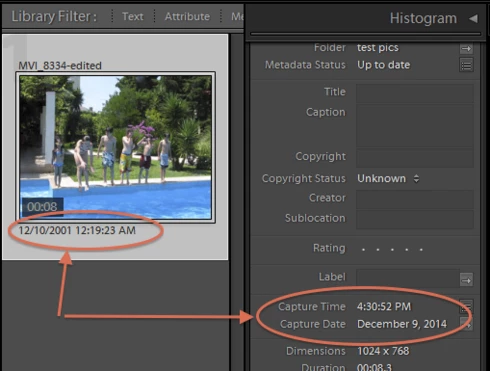
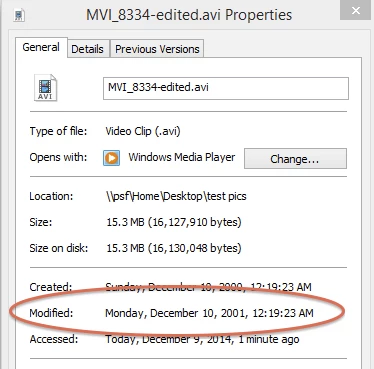
LR 5.7 still shows inconsistent capture date/times for videos. For a test .avi on Windows 8.1, the date in grid view appears to be the file system's last-modified time, while Capture Date/Time is set to the time of import.This problem was declared fixed in LR 5.5, and it appears to have been fixed for images, but not videos:http://feedback.photoshop.com/photoshop_family/topics/inconsistent_dates_for_files_missing_date_time...I'm opening a new topic, since the previous one has been marked "Solved".
This topic has been closed for replies.

165 replies

Inspiring
January 8, 2017
JAN 2017 Brand new subsciption LR on new Imac:  Have 100 Nikon Coolscanned tif slides in LR.  I just learned how to individually or group edit Metadata Capture time Date.  I change the month and year to match the indiv. slide I scanned a few days ago.  Bug: the year says 2017, I highlight it and try to type 1993 and it accepts 199 and then when I type the 3, the field changes to just 3 and looses almost 2000 years.  This happens on many photos, not all.  Sometimes a backspace or few will allow 3 digit year, sometimes nothing will allow a 4 digit year like 1993.  Jeez.  I will shut LR down all the way and restart Imac next.   Edit an hr. later: Just did that,  no better, tried entering year field before month field, that worked for 20 slides, now that doesn't work. Still can't enter 1993 or 2001 as capture year reliably. Jeez.
BassBone42
Participating Frequently
December 25, 2016
The bug is particularily annoying to me as Photoshop Elements hands dates more effectively so it proves that somewhere in Adobe they understand the problem but don't bother to do anything about it.

I have ended up using Elements where I need correct dates (reporting and sorting) and Lightroom where I am working with date insensitive photos or collections where I can use folders to help me locate things effectively.

Photos taken digitally seem to be more likely to be handled correctly in Lightroom, but heaven help those who want to date scans or photos with corrupt dates from earlier processing,

This is (as commented recently by others) not being handled professionally. 
Inspiring
December 24, 2016
I am frustrated having installed Lightroom in September 2016.  It has randomly messed up file "Capture Time" which is what LR uses to sort by.
In a run of photos taken by the same camera, it suddenly decided to use the date of installation of Lightroom .

It shows a capture time of 12/09/2016 16:25:10 
EXIF only has Digitized of  08/02/2005 12:29:33  - THIS IS THE ACTUAL TIME AND DATE THE PHOTO WAS TAKEN
Yet if I ask LR to change the Capture TIme to the Original File Creation Date, that is shown as 14/05/2005 23:07:46, which is ABSOLUTELY NOT correct.

So using the Lightroom File Creation Date would cause yet more problems.

The ONLY good thing about this is that I used a previous program (that sadly no longer works in Windows 10) to add the file creation date to the front of the file name.  So I can be sure that is right.

The IPTC File Creation Date is correct at 2005-02-08T12:29:33+0000

Lightroom is causing me a lot of problems, and this is just one that is totally unnecessary.

This forum / community help section is most strange. It seems to have no formatting options and no file insert options yet many people are managing to post screen shots.  Ah - a Firefox problem.

HANG ON JUST A SECOND>...

If I get LR to show "Default" metadata, the information presented shows me that the file "Capture Time" is entirely different from the file "Capture Time" shown in the information on the thumbnail.


Lightroom sorts by the Capture Time as shown on the thumbnail, not as shown in the default metadata.

In fact, the field that LR changes is "Date/Time Original" in the EXIF data.  SO it is calling a known field by a different name, and not using the actual IPTC field called Capture Time.  AAARRRGGGHHH.

So basically it is a mess.

The file before that has its Capture Time OK, exactly the same as its other Date/Time fields.


What I need to be able to do FOR MANY PHOTOS is change the so-called Capture Time to the correct "Digitised Time", but there seems to be no easy way of doing so.  CAN IT BE DONE?

Lightroom forces me to do each one manually, because if I bulk change them to a manually set time, they all get much the same time of day allocated, as Lightroom imported them all within a minute.
ItWasNotMe
Known Participant
August 24, 2016
So which of the dozen or so bugs in this thread have I said I have too?

If Adobe ever admit to/replicate/fix one of them (LOL) how does it set the status of the thread - e.g. if it says 'In Progress' (LOL even louder) does that mean they are all in progress or do I have to hope its the one I'm interested in, does 'Solved' mean all of them and so on...

As I said above, for any professional error reporting system, its one bug one report; only way you can unambiguously monitor whats going on.

Key word there was professional.
johnrellis
Legend
August 24, 2016
Adobe uses this forum to help gauge how many people are affected by a bug.  The more people who me-too and follow a topic, especially with meaningful details, the more likely Adobe will prioritize a solution.   This topic has 23 me-toos; but if the topic were split out into the individual bug reports of the different symptoms of the underlying defect, no single bug report would likely have more than half a dozen me-toos.  

The date of the original post is immaterial -- what matters are the dates of the recent posts and the number of me-toos.  Recent posts ensure the topic is bumped to the top of the feed and will make the posts just as likely to be read as starting a new topic.

Annoyingly, the forum software only displays the first post of a merged topic. However, you can still reach the follow-ups by clicking on "This reply was created from a merged topic originally titled Filter bar by date."   You can also repost replies in the merged topic, if warranted (which I occasionally do).
ItWasNotMe
Known Participant
August 23, 2016
And as I pointed out in previous thread that you trashed, the Edit Capture time and Save meta data sticking plasters don't fix the problem that Paste creates because the date it writes is invisible to both these operations

Still, given this is now successfully hidden on five year old thread, expectations of Adobe fixing this..... 
alanterra
Inspiring
August 23, 2016
Since this got merged, it appears that my proposed solution to my problem did not get merged as well. I find that if I Save Metadata and then Read Metadata, all the inconsistencies go away. This is easier to do than other proposed solutions in this thread.

I suspect it works because Lightroom has code to map its internal state onto the metadata, and then on reading the metadata, the internal fields become consistent. (Of course, the various Date metadata fields may not be what you want--but that is a different problem).

Stephen Leggett reported that this solution did not solve his problems, so YMMV. And, of course, this doesn't help with videos, the original subject of this thread, since you can't write metadata for videos in Lightroom.
johnrellis
Legend
August 23, 2016
See this previous post in this same topic: https://feedback.photoshop.com/photoshop_family/topics/lightroom-still-inconsistent-capture-date-tim... . 

The annoying but easy workaround is to always use Metadata > Edit Capture Time, rather than change the Date Created field.
alanterra
Inspiring
August 23, 2016


I can't tell if this is a new bug, or just a feature/bug/annoyance that I somehow overlooked.(Lightroom CC 2015.6)

I put an image that I downloaded today into Lightroom, and then set its Date Created to the correct date (Oct 21, 2007). However, if I try to use the Filter Bar to find it, it shows up as today's date, not the date taken. I would like to be able to use the Filter Bar to find other photos taken the same day.

Exiftool has this to report on the file:
File Modification Date/Time     : 2016:08:20 14:01:37-07:00
File Access Date/Time           : 2016:08:20 14:01:54-07:00
File Inode Change Date/Time     : 2016:08:20 14:01:37-07:00
Metadata Date                   : 2016:08:20 14:01:37-07:00
Date Created                    : 2007:10:21

The metadata panel for the image says:


But if I put it in a folder and then use the Filter Bar I see:
ItWasNotMe
Known Participant
August 2, 2016
More on non-video images.  I haven’t tried this on video but suspect its similar.

This time Copy and Paste date metadata.

Again, this refers to what is held in the catalog not; NOT any external xmp files that are created.

  1. So select an image with ‘good’ data; that is one from a camera supported by Lightroom
  2. Menu -> Copy Metadata -> Check filled > Copy (ensuring the ‘Date Created’ field has a value and is checked)
  3. Now select any image; whether its got exif data or not
  4. Menu -> Paste Metadata

What a mess you end up with...

The Paste:

  • Doesn’t create exif:DateTimeOriginal in the xmp column on AdobeAdditionalMetadata should that field not exist
  • Doesn’t update exif:DateTimeOriginal in the xmp column on AdobeAdditionalMetadata if it does exist
  • Doesn’t ever update captureTime on Adobe_images
  • Doesn’t ever update AgHarvestedExifMetadata, columns dateDay, dateMonth and dateYear
  • Does create/update photoshop:DateCreated in the xmp column on AdobeAdditionalMetadata

Consequently, there are now several different sets of capture time on the image.

No wonder there are inconsistencies.

Now, it appears that some of the code, such as display of Capture Time on the rightmost Metadata panel, uses:

  • exif:DateTimeOriginal if present in the xmp column on AdobeAdditionalMetadata,
  • failing that will use photoshop:DateCreated from the same source
  • failing that won't display anything
Result:
  • If exif:DateTimeOriginal existed for the image, its not updated and so it appears that the paste hasn’t worked as the new value gets placed in photoshop:DateCreated which is not used as its not the preferred field;
  • If exif:DateTimeOriginal did not exist the new value gets placed in photoshop:DateCreated and it appears that the paste worked (in some places at least)

Hacker solution:

  • If a copied field, have paste write/update exif:DateTimeOriginal in the xmp column on AdobeAdditionalMetadata

Professional solution:

1. If a copied field, have Paste update/write
  • captureTime on Adobe_images
  • AgHarvestedExifMetadata, columns dateDay, dateMonth and dateYear
  • exif:DateTimeOriginal in the xmp column on AdobeAdditionalMetadata
2. Provide a utility to bring the database fields back into sync.

Adobe solution:

  • Hmmmm...