johnrellis
Legend
December 10, 2014

P: Still inconsistent capture date/time for photos and videos

  • December 10, 2014
  • 165 replies
  • 5533 views

Update 5/17/2018: Though LR 7.1 made improvements, LR 7.3.1 still has two closely related problems with a single underlying cause:

- With photos and videos missing metadata capture date/times (e.g. scans), there is still an inconsistency between the times shown under the thumbnails in grid view and in the Metadata panel and the hidden, internal times used for sorting in grid view.

- Changing IPTC Date Created in the Metadata panel, either by editing the field or using Metadata > Copy/Paste Metadata, similarly causes inconsistent values to be shown and sorting and searching to work inconsistently.  It also causes date metadata to be written back to the files that doesn't conform with the Metadata Working Group's standard.

The underlying cause is architectural: LR doesn't have a single internal catalog field representing "capture time".  Rather, it maintains capture time in several different fields, and the various parts of LR update those fields inconsistently.

See here for precise recipes to replicate these bugs:

https://feedback.photoshop.com/photoshop_family/topics/lightroom-still-inconsistent-capture-date-tim...

https://feedback.photoshop.com/photoshop_family/topics/lightroom-still-inconsistent-capture-date-tim...

See here for a workaround: 

https://feedback.photoshop.com/photoshop_family/topics/lightroom-still-inconsistent-capture-date-time-for-videos?topic-reply-list%5Bsettings%5D%5Bfilter_by%5D=all&topic-reply-list%5Bsettings%5D%5Breply_id%5D=15475521#reply_15475521.  

-------------

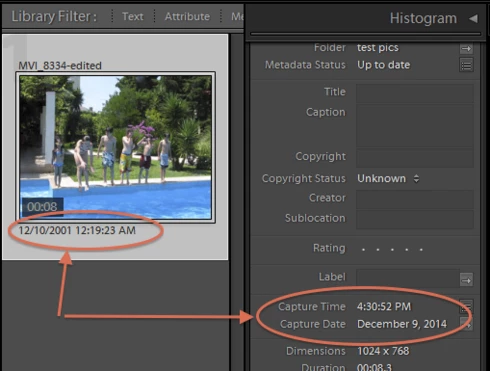
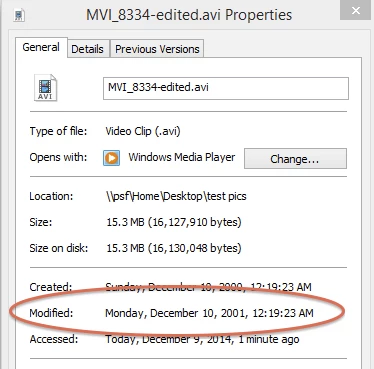
LR 5.7 still shows inconsistent capture date/times for videos. For a test .avi on Windows 8.1, the date in grid view appears to be the file system's last-modified time, while Capture Date/Time is set to the time of import.This problem was declared fixed in LR 5.5, and it appears to have been fixed for images, but not videos:http://feedback.photoshop.com/photoshop_family/topics/inconsistent_dates_for_files_missing_date_time...I'm opening a new topic, since the previous one has been marked "Solved".
This topic has been closed for replies.

165 replies

ItWasNotMe
Known Participant
August 2, 2016
For the sake of clarity, I should have said there is a value in the xmp column on AdobeAdditionalMetadata even if no xmp sidecar file has been written for that image.
ItWasNotMe
Known Participant
August 2, 2016
Here is what appears to the the root of the problems for non-video images. I suspect the same is true for video as well but haven't tried that.

There is an additional text string field ‘xmp’ on table ’AdobeAdditionalMetadata’

Often, but not always, this holds the value of capture time as ‘exif:DateTimeOriginal’.

It seems that the code prefers to use the value in the xmp field, largely ignoring captureTime on Adobe_images and AgHarvestedExifMetadata.

So what appears to happen on import of an images with ‘missing’ metadata is that the Import function:

  • Populates captureTime on Adobe_images
  • Populates AgHarvestedExifMetadata, fields dateDay, dateMonth and dateYear with corresponding values
  • Does not write exif:DateTimeOriginal into the xmp field on AdobeAdditionalMetadata

Now the effect of this varies according to the relevant piece of code. For example, what seems to happen if exif:DateTimeOriginal is absent:

  • Metadata panel to right of screen - shows nothing, not even the field labels
  • Date shown under image in grid view uses captureTime on Adobe_images
  • and so on

When you select an image, then Menu -> Metadata- >Edit Capture time and confirm, the result is that a line is written to the xmp field exif:DateTimeOriginal and (some) things start working again.

Hackers solution:

  • change the import function to write exif:DateTimeOriginal to the xmp field

Professional solution:

  • change the relevant code to use captureTime on Adobe_images

Adobe solution

  • Hmmm...
ItWasNotMe
Known Participant
August 1, 2016
Issue with imported, then pasted metadata sorting in wrong order (i.e. the bug in described in the reply to which this is a comment) is not fixed in LR 2015.6.1 running on OSX 10.11.6
ItWasNotMe
Known Participant
August 1, 2016
A. Architecture comments
“Architecturally, LR lacks a single internal notion of "capture time" that is used uniformly throughout the app”

It seems to me that there is now a "single internal motion"; I can't speak for earlier versions.

Its the "used uniformly" that continues to be the issue.

This is the schema for the table in the catalog for the Image:

TABLE Adobe_images (
    id_local INTEGER PRIMARY KEY,
    id_global UNIQUE NOT NULL,
    aspectRatioCache NOT NULL DEFAULT -1,
    bitDepth NOT NULL DEFAULT 0,
    captureTime,
    colorChannels NOT NULL DEFAULT 0,
    colorLabels NOT NULL DEFAULT '',
    colorMode NOT NULL DEFAULT -1,
    copyCreationTime NOT NULL DEFAULT -63113817600,
    copyName,
    copyReason,
    developSettingsIDCache,
    fileFormat NOT NULL DEFAULT 'unset',
    fileHeight,
    fileWidth,
    hasMissingSidecars INTEGER,
    masterImage INTEGER,
    orientation,
    originalCaptureTime,
    originalRootEntity INTEGER,
    panningDistanceH,
    panningDistanceV,
    pick NOT NULL DEFAULT 0,
    positionInFolder NOT NULL DEFAULT 'z',
    propertiesCache,
    pyramidIDCache,
    rating,
    rootFile INTEGER NOT NULL DEFAULT 0,
    sidecarStatus,
    touchCount NOT NULL DEFAULT 0,
    touchTime NOT NULL DEFAULT 0
);

Clearly has a column central to the image - captureTime and I only see one row in the table per image in the catalog.

Now, there are other date and time fields scattered about, such as originalCaptureTime in the same table and dateDay, dateMonth, and dateYear in AgHarvestedExifMetadata

So there are at least three classes of problem:
1. Not setting captureTime correctly in table Adobe_images
2. Not using captureTime when it should be used
3. Inconsistent use when captureTime is not set.

Correcting any problem in one of these classes doesn’t fix anything in that or the other classes, which to me, and I see others, emphasises why each problem should have its own thread.

B. Problem reporting best practice.

“Gathering all of these inconsistencies in a single topic will make it more likely that Adobe will notice and address the core issue rather than apply incomplete band-aids”

This seems to be a common idea across this site as I see it in several other problem threads.

Having managed a global IT support desk, I say this is misguided.

Best practice for problem/incident reporting includes the following:
1. A unique reference for each problem report
2. A single problem per report
3. Feedback from those reporting the problem on how the issue was managed (taking a sample is acceptable here)

Having experienced both processes in the past few months, I find it ironic that Western Digital, a (primarily) hardware supplier can achieve these for problems in the software it produces but Adobe can’t.
Known Participant
July 23, 2016
I have an idea. I wonder if we could import video into PSE and which should capture the right info and them import that into LR.
ItWasNotMe
Known Participant
July 23, 2016
Well, I  didn't really expect a response, however much fun it was writing the comments :))
ItWasNotMe
Known Participant
July 13, 2016
Thats as maybe, but last time I looked this was 2016.

Copy and paste as a computer concept originated sometime in the 1960's, so approximately 50 years ago.

Long enough I would have thought to master the idea.
ItWasNotMe
Known Participant
July 4, 2016
Well,  maybe some Adobe staff member would confirm that they actually looked at this page.

Above, I gave an example that takes less than three minutes to execute, involves no third party software and clearly demonstrates patently obvious bug

Sixth major release, yet 'copy and paste' doesn't work !!

When they have looked at it, maybe they would have the grace to respond:
a) Can't reproduce - in which case I'll put a screen capture together, or
b) Yes it is a bug and we will fix it by..., or
c) Yes its a bug and we will never fix it
ItWasNotMe
Known Participant
July 3, 2016
There is a much simpler route to showing there is a bug in LR

1. Choose a catalog with Automatically write changes into XMP set on
2. Close Lightroom
3. Create a raw image without an exif date (in my case .NEF file from Nikon Coolscan (referred to as ImageA below)
4. Using the OS, copy the file (referred to as ImageB)

So, you now have two identical files.

5. Start LR
6. Import both files in a single operation
7. On ImageA, Menu - Metadata; Edit Capture Time; Confirm (without changing anything)
8. Choose a completely different image (ImageC) with no known problems and which has a properly populated IPTC Image; Date Created field
9.  Select ImageC; Menu Copy Metadata (ensuring the field is checked)
10. Select ImageA; Menu Paste Metadata
11. Select ImageB; menu Paste Metadata

So, same metadata should be on each image? Sadly no.

On the default Metadata panel on the right:
ImageA shows - Original create date (i.e. date the file was created by scanner)
ImageB shows - Date from ImageC

No magic; no editing of files; just LR getting it wrong.
johnrellis
Legend
July 2, 2016

Changing IPTC Date Created, either through the Metadata panel or (as you discovered) by pasting from another photo, has long caused inconsistencies in LR's notion of capture time, at least for photos that originally had no capture-time fields.  I just merged in this bug report on the problem from LR 5.2: https://feedback.photoshop.com/photoshop_family/topics/lightroom-still-inconsistent-capture-date-time-for-videos?topic-reply-list%5Bsettings%5D%5Bfilter_by%5D=all&topic-reply-list%5Bsettings%5D%5Breply_id%5D=17007648#reply_17007648.   These inconsistencies can affect the dates shown under thumbnails, the dates shown in the Metadata panel, the dates used for sorting, and the dates used for renaming files.

Architecturally, LR lacks a single internal notion of "capture time" that is used uniformly throughout the app.  Rather LR uses a hodge-podge of inconsistent rules for interpreting the multiple industry-standard metadata fields that represent capture time.  The Metadata Working Group spec provides clear rules for doing this, but LR doesn't implement the rules correctly.  Adobe was a member of the MWG, and LR 3.4 was supposedly changed to follow the MWG spec: http://blogs.adobe.com/lightroomjournal/2011/04/lightroom-3-4-and-camera-raw-6-4-now-available.html. But it's become evident over the years that was botched.

In my opinion, Adobe has never made fixing this a priority because most of the inconsistencies arise from photos and vidoes that don't have capture dates (or, in the case of videos, don’t' have capture dates that LR knows how to read). Whereas LR was originally targeted towards handling photos from digital cameras, and nearly every digital camera writes EXIF:DateTimeOriginal to its files.  And LR knows how to read the capture time of the video formats used by most of the prosumer cameras, and they all put capture time in the standard QuickTime / MP4 location.

It's never been a priority for LR to support people using LR as a general-purpose digital asset manager, e.g. for cataloging scans.  And though LR claims to support video, support for video metadata has always been incomplete (years ago, one developer acknowledged that was an issue of priorities).