johnrellis
Legend
December 10, 2014

P: Still inconsistent capture date/time for photos and videos

  • December 10, 2014
  • 165 replies
  • 5533 views

Update 5/17/2018: Though LR 7.1 made improvements, LR 7.3.1 still has two closely related problems with a single underlying cause:

- With photos and videos missing metadata capture date/times (e.g. scans), there is still an inconsistency between the times shown under the thumbnails in grid view and in the Metadata panel and the hidden, internal times used for sorting in grid view.

- Changing IPTC Date Created in the Metadata panel, either by editing the field or using Metadata > Copy/Paste Metadata, similarly causes inconsistent values to be shown and sorting and searching to work inconsistently.  It also causes date metadata to be written back to the files that doesn't conform with the Metadata Working Group's standard.

The underlying cause is architectural: LR doesn't have a single internal catalog field representing "capture time".  Rather, it maintains capture time in several different fields, and the various parts of LR update those fields inconsistently.

See here for precise recipes to replicate these bugs:

https://feedback.photoshop.com/photoshop_family/topics/lightroom-still-inconsistent-capture-date-tim...

https://feedback.photoshop.com/photoshop_family/topics/lightroom-still-inconsistent-capture-date-tim...

See here for a workaround: 

https://feedback.photoshop.com/photoshop_family/topics/lightroom-still-inconsistent-capture-date-time-for-videos?topic-reply-list%5Bsettings%5D%5Bfilter_by%5D=all&topic-reply-list%5Bsettings%5D%5Breply_id%5D=15475521#reply_15475521.  

-------------

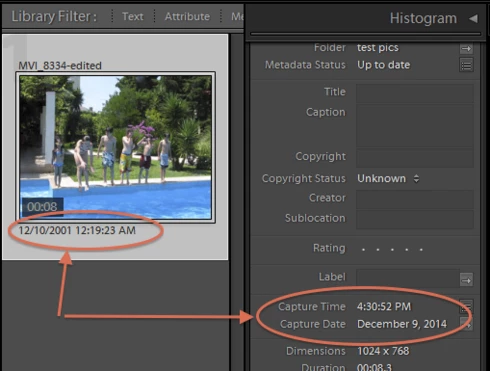
LR 5.7 still shows inconsistent capture date/times for videos. For a test .avi on Windows 8.1, the date in grid view appears to be the file system's last-modified time, while Capture Date/Time is set to the time of import.This problem was declared fixed in LR 5.5, and it appears to have been fixed for images, but not videos:http://feedback.photoshop.com/photoshop_family/topics/inconsistent_dates_for_files_missing_date_time...I'm opening a new topic, since the previous one has been marked "Solved".
This topic has been closed for replies.

165 replies

johnrellis
Legend
July 2, 2017
And regarding your goal of setting a batch of scanned photos to have the same exact capture time, you can't do it in LR.  Please add your me-too vote and detailed opinion of why you want this to this feature request: https://feedback.photoshop.com/photoshop_family/topics/edit_capture_time_issue_need_a_way_to_set_all...

See Alan Harper's response for how to use a plugin to do this.
johnrellis
Legend
July 2, 2017
Editing IPTC Date Created or pasting it from another photo causes LR to get very confused about what it thinks the photo's capture time is.  See this post in this same topic for more details:

https://feedback.photoshop.com/photoshop_family/topics/lightroom-still-inconsistent-capture-date-tim...

This is one symptom among many of the same underlying cause, which is that LR maintains the capture time of a photo in several different fields in the LR catalog.   Different parts of LR don't keep all the fields updated correctly, and some parts read one field, and some another.  It's an architectural mess.

The problem is most often encountered with imported photos missing EXIF:DateTimeOriginal, e.g. scans, and as the result of editing IPTC Date Created within the Metadata Panel.
alanterra
Inspiring
July 2, 2017
See my post https://feedback.photoshop.com/photoshop_family/topics/how-i-set-the-capture-time-of-a-bunch-of-phot... Let me know if it isn't clear or doesn't work for you.
Inspiring
July 2, 2017


I am trying to scan a large number of slides and import them into Lightroom. 
I need to change the capture time on all photos taken on a particular day from the scan date to the correct date. I tried doing this by:
Change Capture Time on one photo
Then with that photo selected in grid view: Library / Metadata / Copy Metadata then tick IPTC Image & Date Created
Then select all other photos taken on that day and: Metadata / Paste Metadata
This changed the Capture Time on all these photos, but Lightroom sorting in Grid View by Capture Time didn't use this new Capture Time, other than for the original photo changed, but still used the scan date.
If I go into Library / Metadata / Edit Capture Time and without changing the Capture Time click on the Change button the grid display sort by Capture Time picks up the correct Capture Time. This however would be very time consuming to do for thousands of slides.
Inspiring
February 27, 2017
LIghtroom capture date entry appears to actually match Apple Photos.  I called Apple and was handed to an expert that said I need to type the year rapidly, not hunt and peck.  If a really old slow typing person were entering, they should "paste in" the entries so the typing is rapid.  With rapid typing of the year I've successfully entered a manual capture year correctly each time for 200+ 35mm slides.
johnrellis
Legend
February 25, 2017
You've tripped over the bug described in this thread -- LR behaves inconsistently when it isn't able to read a capture date from a photo's or video's metadata.  See this post for a workaround: https://feedback.photoshop.com/photoshop_family/topics/lightroom-still-inconsistent-capture-date-tim...
Known Participant
February 25, 2017
I'm having a similar issue when sorting in collections including pictures and some sort of movies:

pictures typically have filled in different EXIF time information ensuring correct sorting:


(some) movies seem to have other EXIF time information. I don't know where the (correct!) timestamp above the picture comes from, but it is not listed in the EXIF panel onthe right and it is not considered for sorting:


This leads to the situation that in many times the pictures are listed first and the movies are listed in the end independent of their capture date.
johnrellis
Legend
February 24, 2017
Jim, I imported the files you posted into my LR CC 2015.8, and LR imported the capture times from both correctly.  They both have valid EXIF:DateTimeOriginal fields/

585.JPG:
[EXIF]          Date/Time Original              : 2003:06:15 12:53:56


592.JPG:
[EXIF]          Date/Time Original              : 2003:06:15 14:48:00


I see from the metadata that both pics had their metadata changed by LR 6.6.1 on 2016:09:12.   Do you have a sample pic that still imports incorrectly?

As you can see from this thread, LR has a long-standing bug and behaves inconsistently when it imports a pic that is missing capture date recorded in the metadata fields EXIF:DateTimeOriginal or XMP:DateCreated (sic, XMP:CreateDate is when the pic was digitized, not when it was captured).  That is almost certainly what is happening to you.  But we can confirm if you post a pic that still imports incorrectly.
Inspiring
February 24, 2017


Thank you to  John R. Ellis, Champion - I have been able to begin to fix the incorrect dates allocated by Lightroom.  But I am still of the opinion that Lightroom is not importing the information correctly when it is in the EXIF.

I found this thread because I am really frustrated with Lightroom, and could not find out how to fix the mess it seemed to have made of my jpgs.  These were taken with my own digital cameras.

I installed Lightroom as part of the CC Photography suite on 14 October 2016.   It has set a huge number of them to a "Capture Date/Time" of then.  Initially I thought it was setting them to that date of import, but it seems that is because it used the last time the file was changed, and most files had their "ModifyDate" amended on that date.

Looking at exactly the same photos in Windows explorer and other programs shows their correct time under "Date/Time Digitised". 

Until today, all I could tell was that Lightroom was doing it "wrong".  It has internally allocated its "Capture Date/Time" field but doesn't show it except in sorting.

Following the suggestion of using attributes to filter, I find that most of my files show under "unknown" in the Date column.  So why does Lightroom show a date in the "Capture Date/Time" that it uses for sorting? How can it say unknown yet have a "Date/Time Capture"?  Why is it "Unknown" when there are valid entries in the EXIF? This inconsistency has caused me to waste so much time.

I have now looked at the EXIF using ExiftoolGUI.  There is a field called "DateTimeOriginal" which is I am guessing what you mean in your comment above by  "original date/time" field. That has the correct information, as does the field "CreateDate".  So it should work.  Lightroom has just ignored those, and used the date of last modification to set the "Capture Date/Time" which it insists on using as the default field for sorting!  If Lightroom would allow sorting by the other fields, it would not be as important.


Thanks to this thread, I have now found the way of using ExifTool and ExifToolGUI to fix the date and time so that the incorrect data is corrected and files are sorted correctly by Lightroom.

There is now a field called "Date Time Original" in the EXIF section of Metadata in Lightroom, that was not there before:


So what happened? 

It appears that prior to Lightroom importing the files, some XMP data has been lost, or not created. Because there is SOME XMP data, Lightroom then ignores valid EXIF data.

I fixed the first mentioned files before doing screenshots, so for comparison, here is the Metadata as shown in Lightroom for two other files.  The first has been given an erroneous Capture Date/Time; the second is correct.


In ExifToolGUI, the missing fields are XMP:CreateDate and XMP:ModifyDate.  All of the EXIF fields are there and correct.  Yet Lightroom only allocates the correct date for sorting to the file below which for some reason has those XMP fields.


The two files are on dropbox in case looking at them will help confirm whether I have worked out the issue, or if there is something else that Lightroom is doing / not doing.  Do I need to report a continuing bug?

https://dl.dropboxusercontent.com/u/31011761/Lightroom/20030615CanonPowerShotA40105_0585.JPG

https://dl.dropboxusercontent.com/u/31011761/Lightroom/20030615CanonPowerShotA40105_0592...

Participating Frequently
February 15, 2017
Im not sure if my particular instance of this issue is already addressed earlier in this thread, but I will ad it anyways to be sure that it is represented.
I am running 2015.8 version of LR, on a OSX Sierra 10.12.3 
In the metadata panel, the option to chose date - "unknown" is not available, as you see below. Apparently Lightroom does not think that these images are without date. Lightroom seems to have a opinion about the date and time of these images, that it suggests when I go into "edit capture time..." with one of these images selected. But as you can see in the image bellow, the chosen image has no capture date and time information in the metadata panel to the right.


Thanks a lot to: johnrellis for answering my post about this, and directing me here.
Hope Adobe fixes this!