johnrellis
Legend
December 10, 2014

P: Still inconsistent capture date/time for photos and videos

  • December 10, 2014
  • 165 replies
  • 5533 views

Update 5/17/2018: Though LR 7.1 made improvements, LR 7.3.1 still has two closely related problems with a single underlying cause:

- With photos and videos missing metadata capture date/times (e.g. scans), there is still an inconsistency between the times shown under the thumbnails in grid view and in the Metadata panel and the hidden, internal times used for sorting in grid view.

- Changing IPTC Date Created in the Metadata panel, either by editing the field or using Metadata > Copy/Paste Metadata, similarly causes inconsistent values to be shown and sorting and searching to work inconsistently.  It also causes date metadata to be written back to the files that doesn't conform with the Metadata Working Group's standard.

The underlying cause is architectural: LR doesn't have a single internal catalog field representing "capture time".  Rather, it maintains capture time in several different fields, and the various parts of LR update those fields inconsistently.

See here for precise recipes to replicate these bugs:

https://feedback.photoshop.com/photoshop_family/topics/lightroom-still-inconsistent-capture-date-tim...

https://feedback.photoshop.com/photoshop_family/topics/lightroom-still-inconsistent-capture-date-tim...

See here for a workaround: 

https://feedback.photoshop.com/photoshop_family/topics/lightroom-still-inconsistent-capture-date-time-for-videos?topic-reply-list%5Bsettings%5D%5Bfilter_by%5D=all&topic-reply-list%5Bsettings%5D%5Breply_id%5D=15475521#reply_15475521.  

-------------

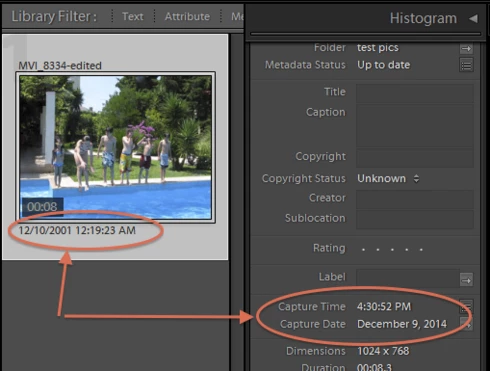
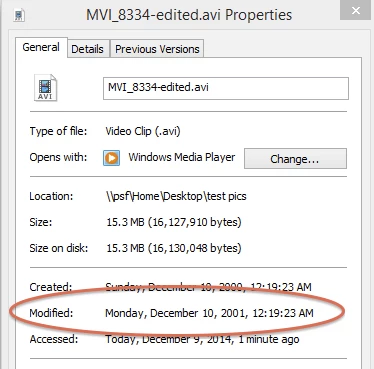
LR 5.7 still shows inconsistent capture date/times for videos. For a test .avi on Windows 8.1, the date in grid view appears to be the file system's last-modified time, while Capture Date/Time is set to the time of import.This problem was declared fixed in LR 5.5, and it appears to have been fixed for images, but not videos:http://feedback.photoshop.com/photoshop_family/topics/inconsistent_dates_for_files_missing_date_time...I'm opening a new topic, since the previous one has been marked "Solved".
This topic has been closed for replies.

165 replies

Inspiring
August 22, 2017
Actually one more question John. I did what you suggested and everything seemed to work well. While my files were being corrected for date and time I deleted a picture I did not want. I removed it from disk. Since all files were selected, that deleted all of my pictures and videos. They were in my Win 7 recycle bin and I was able to restore them to the correct folder in my HD. My last catalog backup was 6 weeks ago. Is there anything I can do to recover my edits or did I lose all the work I did this past month and a half?
Inspiring
August 22, 2017
Thank you again John. You're the best!
johnrellis
Legend
August 21, 2017
Select multiple videos or photos, choose "Adjust to a specified date and time" (the default), then click "Change All".
johnrellis
Legend
August 21, 2017
Here's a recipe for reproducing the bug with editing IPTC > Date Created in the Metadata panel or using Metadata > Copy/Paste Metadata to copy IPTC > Date Created. This was tested in both CC 2015.12 and LR 5.7.1, OS X 10.12.6 (i.e. this behavior has been present since at least LR 5.7.1):

1. Create a new catalog.

2. Download and unzip https://www.dropbox.com/s/6b0s00up2i7lm04/iptc-date-bug.2017.08.21.zip?dl=0

3. Import the three pics in the unzipped folder "iptc-date-bug".

4. Select All Photographs and do View > Sort > Capture Time and View > Sort > Ascending.

5. Observe that the pics sort in order test1.jpg, test2.jpg, test3.jpg:


6. Observe that for test1.jpg and test2.jpg, the date under the thumbnails match the capture date/time shown in Metadata > Default, Metadata > EXIF > Date Time Original, and Metadata > IPTC > Date Created.

7. Observe that for test3.jpg, there is no capture time shown in Metadata > Default, and Metadata > EXIF > Date Time Original and Metadata > IPTC > Date Created are blank.

8. Select test2.jpg, and in the Metadata > IPTC panel, change Date Created to 2014-08-21T14:04:51.  Do the same for test3.jpg.

9. Observe that the various dates shown for test2.jpg and test3.jpg are inconsistent:

test2.jpg:
Thumbnail: 8/21/16 (wrong)
Metadata > Default > Capture Date: 8/21/16 (wrong)
Metadata > EXIF > Date Time Original: 8/21/16 (wrong)
Metadata > IPTC > Date Create: 8/21/2014 (correct)

test3.jpg:
Thumbnail: 8/21/14 (correct)
Metadata > Default > Capture Date: 8/21/16 (wrong)
Metadata > EXIF > Date Time Original: (wrong)
Metadata > IPTC > Date Create: 8/21/2014 (correct)

The Metadata Working Group's "Guidelines for Handling Image Metadata Version 2.0", which Adobe employees have previously stated controls LR's metadata behavior, requires that all three date/time fields match after one of the fields is changed.

10. Observe that the pics are no longer correctly sorted by the dates shown under their thumbnails:


11. Select all three pics and do Metadata > Save Metadata To File.

12. In a command shell, execute this command:

exiftool -a -G -exif:datetimeoriginal -xmp:datecreated -iptc:datecreated test2.jpg test3.jpg

Observe this incorrect output:
======== test2.jpg
[EXIF]          Date/Time Original              : 2016:08:21 14:04:51
[XMP]           Date Created                    : 2014:08:21 14:04:51
[IPTC]          Date Created                    : 2014:08:21
======== test3.jpg
[XMP]           Date Created                    : 2014:08:21 14:04:51
[IPTC]          Date Created                    : 2014:08:21
Note that in test2.jpg, EXIF:DateTimeOriginal doesn't match XMP:DateCreated and IPTC:DateCreated. Also note that in test3.jpg, there is no EXIF:DateTimeOriginal.

However, the "Guidelines for Handling Image Metadata Version 2.0" requires that in each file, all three fields should exist and contain the same value.

This post, among others, discusses the underlying architectural problem in LR: https://feedback.photoshop.com/photoshop_family/topics/lightroom-still-inconsistent-capture-date-tim...

LR should maintain internally a single field representing "capture time", and it should use the Metadata Working Group's rules for mapping that field to and from the EXIF, XMP, and IPTC date fields in the file and to and from the Edit Capture Time command and the Metadata panel > IPTC > Date Created field.
johnrellis
Legend
August 21, 2017
This was tested on LR CC 2015.12 / OS X 10.12.6.
johnrellis
Legend
August 21, 2017
Here's a recipe for reproducing the bug with photos that are missing EXIF:DateTimeOriginal:

1. Create a new catalog.

2. Download and unzip https://dl.dropboxusercontent.com/u/21811200/capture-time-bug.2017.08.21.zip

3. Import the three pics in the unzipped folder "capture-time-bug".

4. Select All Photographs and do View > Sort > Capture Time and View > Sort > Ascending.

5. Observe the following inconsistent ordering of pics:


Inconsistency A: The pics are not ordered by the capture date/time shown under the thumbnails.  

Inconsistency B: The date/time shown under the test2.jpg thumbnail doesn't match the capture date/time shown for that file in the Metadata panel.

Inconsistency C: The Metadata > Default tagset shows a capture date/time (see the screenshot above), while the EXIF tagset shows no Date Time Original and the IPTC tagset shows no Date Created:


(The Metadata Working Group spec calls for EXIF:DateTimeOriginal and IPTC:Date/TimeCreated to match.)

The proximate cause of these symptoms is that test2.jpg has EXIF:ModifyDate but no EXIF:DateTimeOriginal.  This often occurs when importing scans and other images not produced by digital cameras.

This post, among others, discusses the underlying architectural problem in LR: https://feedback.photoshop.com/photoshop_family/topics/lightroom-still-inconsistent-capture-date-tim...
Inspiring
August 19, 2017
Hi John. Would you please take a minute to explain the three steps above in a little more detail? 
1. Select all the videos. In LR, correct?  
2. Metadata > Edit Capture Time- I see: Adjust to a specific time and date, Shift by a set number of hours and Change to a file's creation date (does is not the correct creation date) - Which of these options do I select?
3. OK 
Thanks in advance. 
LR6/Win7
johnrellis
Legend
August 2, 2017
johnrellis
Legend
August 2, 2017
In the original topic, Alan Harper wrote:

"This is a long-time issue in Lightroom. The only one of the dates you can edit in the metadata panel is not the one that Lightroom uses to sort by. Some of these metadata fields are supposed to be kept in sync, and by editing one of them, you break that rule too.

"My advice is to use the Metadata : Edit Capture Time command if it fills your needs. In this way, Lightroom has the ability to keep everything copacetic. If you still feel the need to copy/paste the capture time, then look at this post for a couple of ways to make it work."
Inspiring
August 2, 2017


When I copy/paste the metadata (with capture date/time selected) of one photo to another photo (which didn't have any date/time set), the metadata is copied correctly, but the sorting of photos (sort on capture date/time) is not reapplied.

Manually changing the ordering does not seem to work. When switching back to 'order by capture date/time' the photo is still not put in the right position.

When changing the capture date/time via Metadata > Edit Capture Time, the photo is correctly reordered.

My expectation is that after pasting metadata, containing a new capture date/time, the photo would be reordered correctly.

I'm using Lightroom 6.12.